Note: This question is part of a series of questions that use the same scenario. For your convenience, the scenario is repeated in each question. Each question presents a different goal and answer choices, but the text of the scenario is exactly the same in each question in this series.
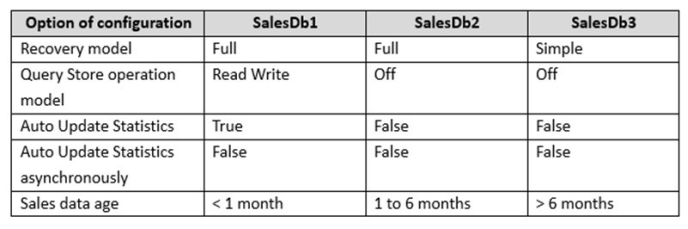
You maintain a Microsoft SQL Server instance that contains the following databases SalesDb1, SalesDb2, and SalesDb3. Each database has tables named Products and Sales. The following table shows the configuration of each database.
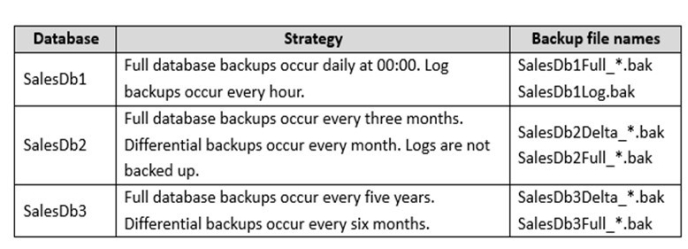
The backup strategies for each database are described in the following table.
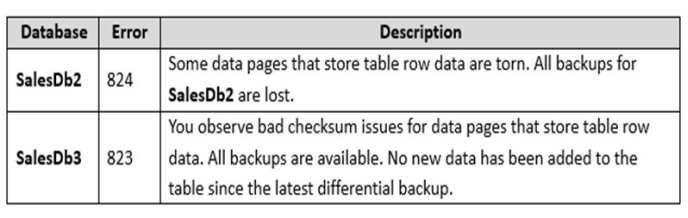
Each full or differential backup operation writes into a new file and uses a different sequence number. You observe the following database corruption issues.
SalesDb3 reports a number of database corruption issues related to error 823 and 824 when reading data pages. You must display the following information about the corrupted pages:
database name
impacted file id
impacted file physical name impacted page id
event type that identifies the error type error count
Users report performance issues when they run queries against SalesDb2. You plan to monitor query statistics and execution plans for SalesDb2 by using Query Store. The monitoring strategy must meet the following requirements:
Perform automatic data cleanup when query store disk usage reaches 500 megabyte (MB).
Capture queries based on resource consumption. Use a stale query threshold value of 60 days.
The query optimizer generates suboptimal execution plans for a number of queries on the Sales table in SalesDb2. You will create a maintenance plan that updates statistics for the table. The plan should only update statistics that were automatically created and have not been updated for 30 days. The update should be based on all data in the table.
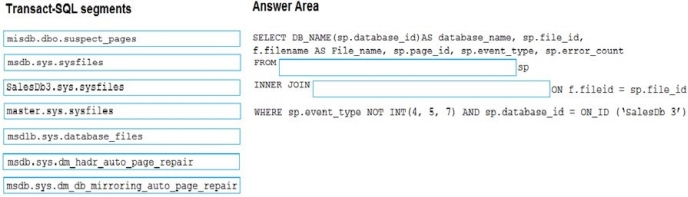
You need to view the information about the corrupted pages on SalesDb3.
How should you complete the Transact-SQL statement? To answer, drag the appropriate Transact-SQL segments to the correct locations. Each Transact-SQL segment may be used once, more than once, or not at all. You may need to drag the split bar between panes or scroll to view content.
Select and Place:
Answer is in the explanation below.
Reference / correct answer:
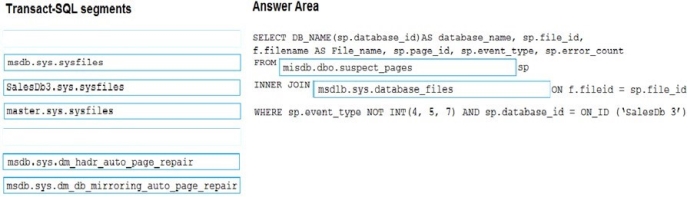
Box 1: msdb.dbo.suspect_pages
suspect_pages contains one row per page that failed with a minor 823 error or an 824 error. Pages are listed in this table because they are suspected of being bad, but they might actually be fine. When a suspect page is repaired, its status is updated in the event_type column.
The suspect_pages table resides in the msdb database. SalesDb3 has pages with checksum errors.
Box 2: msdb.sys.database_files
We want to identify these pages and which database they are in, this is easy enough to do when we join out to sys.databases and sys.master_files, as seen here:
SELECT d.name AS databaseName, mf.name AS logicalFileName, mf.physical_name AS physicalFileName, sp.page_id, case sp.event_type
when 1 then N'823 or 824 error' when 2 then N'Bad Checksum' when 3 then N'Torn Page' when 4 then N'Restored' when 5 then N'Repaired' when 7 then N'Deallocated' end AS eventType, sp.error_count, sp.last_update_date
from msdb.dbo.suspect_pages as sp
join sys.databases as d ON sp.database_id = d.database_id join sys.master_files as mf on sp.[file_id] = mf.[file_id] and d.database_id = mf.database_id;
The result of this query will give you a high level view of where you have potential corruption in your databases, from here it is important to use tools such as DBCC CHECKDB and your backups to recover from in line with your RPO and RTO.
A company has an on-premises Microsoft SQL Server environment and Microsoft Azure SQL Database instances. The environment hosts several customer databases.
You configure instances for a specific customer as an Always On Availability Group. The primary replica is located on-premises and the secondary replica is in Azure.
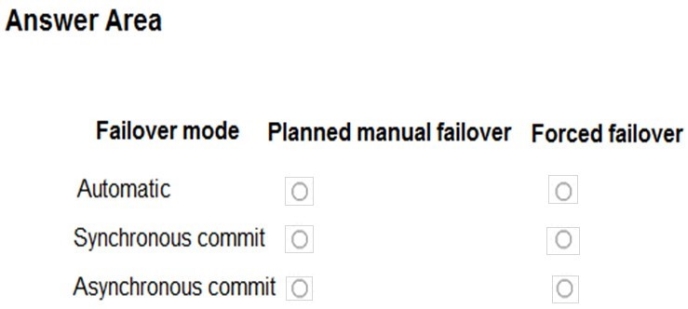
You need to configure the availability group for planned manual failovers and forced failovers.
In the table below, identify the failover mode that you must use for each failover type.
NOTE: Make only one selection in each column.
Hot Area:
Answer is in the explanation below.
Reference / correct answer:
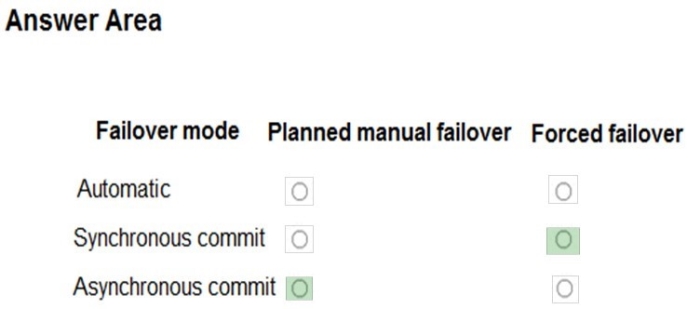
Column 1: Asynchronous-commit
Asynchronous-commit replicas support only the manual failover mode.
Column 2: Synchronous-commit
Synchronous-commit replicas support two settings—automatic or manual. The "automatic" setting supports both automatic failover and manual failover.
Three forms of failover exist: automatic failover (without data loss), planned manual failover (without data loss), and forced manual failover (with possible data loss), typically called forced failover.
 database name
 Perform automatic data cleanup when query store disk usage reaches 500 megabyte (MB).