70-741 Networking with Windows Server 2016

Loading demo links...

Showing 13–15 of 15 questions

Question 13

Note: This question is part of a series of questions that present the same scenario. Each question in the series contains a unique solution that might meet the stated goals. Some question sets might have more than one correct solution, while others might not have a correct solution.

After you answer a question in this section, you will NOT be able to return to it. As a result, these questions will not appear in the review screen.

Your network contains an Active Directory domain named adatum.com. The domain contains two DHCP servers named Server1 and Server2.

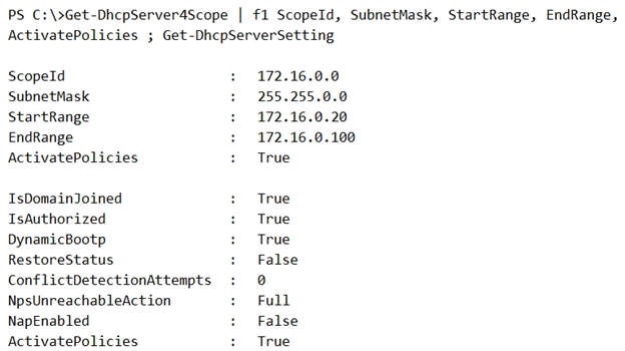
Server1 has the following IP configuration.
Server2 has the following IP configuration.
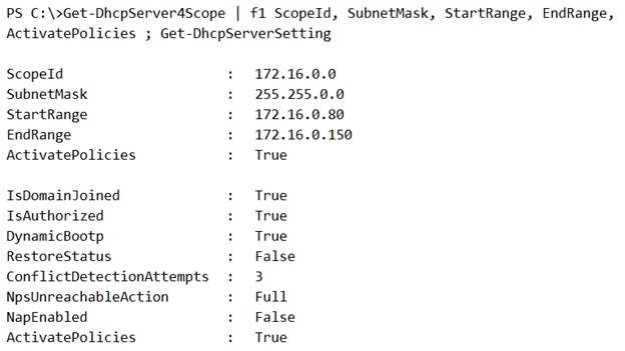
Some users report that sometimes they cannot access the network because of conflicting IP addresses.

You need to configure DHCP to avoid leasing addresses that are in use already.

Solution: On Server2, you modify the StartRange IP address of the scope.

Does this meet the goal?

Select an option, then click Submit answer.

  • Yes

  • No

Question 14

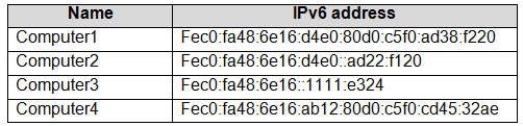
You have the computers shown in the following table.

Which computers are on the same IPv6 subnet as Computer1?

Select an option, then click Submit answer.

  • Computer2 and Computer3 only

  • Computer2 and Computer4 only

  • Computer2 only

  • Computer2, Computer3, and Computer4

Question 15

Note: This question is part of a series of questions that use the same or similar answer choices. An answer choice may be correct for more than one question in the series. Each question is independent of the other questions in this series. Information and details provided in a question apply only to that question.

You have a DHCP server named Server1 that has an IPv4 scope named Scope1.

Users report that when they turn on their client computers, it takes a long time to access the network.

You validate that it takes a long time for the computers to receive an IP address from Server1.

You monitor the network traffic and discover that Server1 issues five ping commands on the network before leasing an IP address.

You need to reduce the amount of time it takes for the computers to receive an IP address.

What should you do?

Select an option, then click Submit answer.

  • From the properties of IPv4, modify the Conflict detection attempts setting.

  • From the properties of Scope1, configure Name Protection.

  • From the properties of IPv4, configure the bindings.

  • From IPv4, create a new filter.

  • From the properties of Scope1, create an exclusion range.

  • From IPv4, run the DHCP Policy Configuration Wizard.

  • From Control Panel, modify the properties of Ethernet.

  • From Scope1, create a reservation.