70-741 Networking with Windows Server 2016

Loading demo links...

Showing 10–12 of 15 questions

Question 10

Note: This question is part of a series of questions that present the same scenario. Each question in the series contains a unique solution that might meet the stated goals. Some question sets might have more than one correct solution, while others might not have a correct solution.

After you answer a question in this sections, you will NOT be able to return to it. As a result, these questions will not appear in the review screen.

You are a network administrator for a company named Contoso, Ltd. The network is configured as shown in the exhibit. (Click the Exhibit tab.)
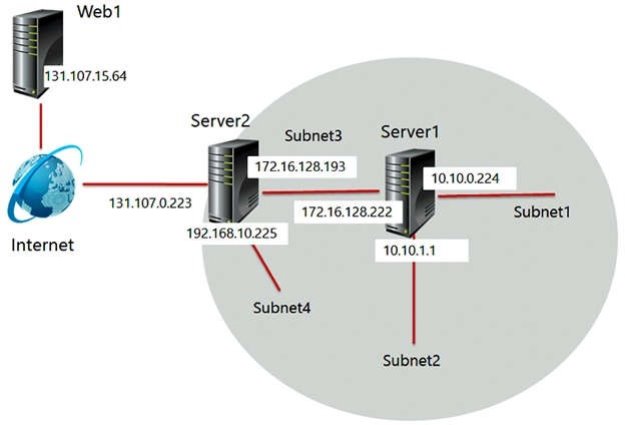
You install the Remote Access server role on Server2. Server2 has the following configured:

Network address translation (NAT) The DHCP Server server role

The Security Policy of Contoso states that only TCP ports 80 and 443 are allowed from the Internet to Server2.

You identify the following requirements:

Add 28 devices to Subnet2 for a temporary project.

Configure Server2 to accept VPN connections from the Internet.

Ensure that devices on Subnet2 obtain TCP/IP settings from DHCP on Server2.

You deploy a computer named ComputerA to Subnet1. ComputerA has an IP address of 10.10.0.129 and a subnet mask of 255.255.255.0.

You plan to use ComputerA to access the resources on Web1.

Which IP address should you use as the default gateway on ComputerA?

Select an option, then click Submit answer.

  • 10.10.1.1

  • 10.10.0.224

  • 131.107.0.223

  • 172.16.128.193

Question 11

Note: This question is part of a series of questions that present the same scenario. Each question in the series contains a unique solution that might meet the stated goals. Some question sets might have more than one correct solution, while others might not have a correct solution.

After you answer a question in this section, you will NOT be able to return to it. As a result, these questions will not appear in the review screen.

Your network contains an Active Directory domain named contoso.com. The domain contains a DNS server named Server1. All client computers run Windows 10.

On Server1, you have the following zone configuration.

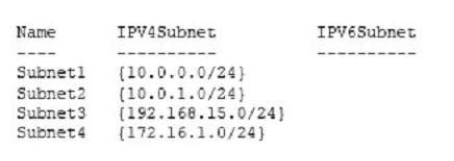
You have the following subnets defined on Server1.

You need to prevent Server1 from resolving queries from DNS clients located on Subnet4. Server1 must resolve queries from all other DNS clients.

Solution: From the Security setting of each zone on Server1, you modify the permissions.

Does this meet the goal?

Select an option, then click Submit answer.

  • Yes

  • No

Question 12

Note: This question is part of a series of questions that present the same scenario. Each question in the series contains a unique solution that might meet the stated goals. Some question sets might have more than one correct solution, while others might not have a correct solution.

After you answer a question in this section, you will NOT be able to return to it. As a result, these questions will not appear in the review screen.

You have a Hyper-V host named Server1. The network adapters on Server1 have single root I/O virtualization (SR-IOV) enabled.

Server1 hosts a virtual machine named VM1 that runs Windows Server 2016.

You need to identify whether SR-IOV is used by VM1.

Solution: You sign in to VM1. You open Device Manager and view the properties of the network adapters.

Does this meet the goal?

Select an option, then click Submit answer.

  • Yes

  • No