70-411 Administering Windows Server 2012

Loading demo links...

Showing 4–6 of 15 questions

Question 4 (Volume B)

HOTSPOT

Your network contains an Active Directory domain named contoso.com. The domain contains 30 user accounts that are used for network administration. The user accounts are members of a domain global group named Group1.

You identify the security requirements for the 30 user accounts as shown in the following table.
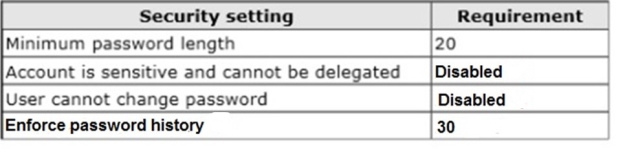
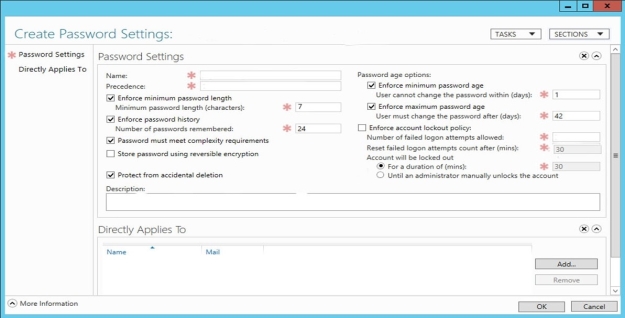
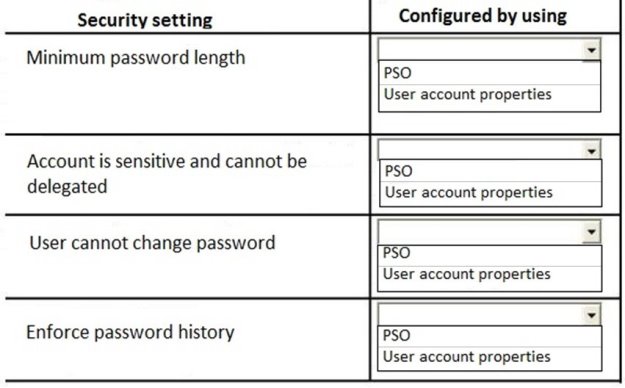
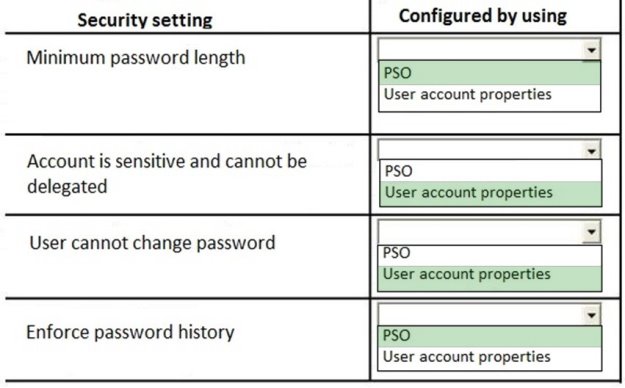
You need to identify which settings must be implemented by using a Password Settings object (PSO) and which settings must be implemented by modifying the properties of the user accounts.

What should you identify? To answer, configure the appropriate settings in the dialog box in the answer area.

Hot Area:
Answer is in the explanation below.
Question 5 (Volume A)

You manage a server that runs Windows Server 2012 R2. The server has the Windows Deployment Services server role installed.

You have a desktop computer that has the following configuration:

Computer name: Computer1

Operating system: Windows 8

MAC address: 20-CF-30-65-D0-87

GUID: 979708BF-C04B-4525-9FE0-C4150BB6C618

You need to configure a pre-staged device for Computer1 in the Windows Deployment Services console.

Which two values should you assign to the device ID? (Each correct answer presents a complete solution. Choose two.)

Select all that apply, then click Submit answer.

  • 20CF3065D08700000000000000000000

  • 979708BFC04B45259FE0C4150BB6C618

  • 979708BF-C04B-452S-9FE0-C4150BB6C618

  • 0000000000000000000020CF306SD087

  • 00000000-0000-0000-0000-C41S0BB6C618

Question 6 (Volume A)

Your network contains an Active Directory domain named contoso.com. All client computers run Windows 8.1.

The network contains a shared folder named FinancialData that contains five files.

You need to ensure that the FinancialData folder and its contents are copied to all of the client computers.

Which two Group Policy preferences should you configure? (Each correct answer presents part of the solution. Choose two.)

Select all that apply, then click Submit answer.

  • Shortcuts

  • Network Shares

  • Environment

  • Folders

  • Files