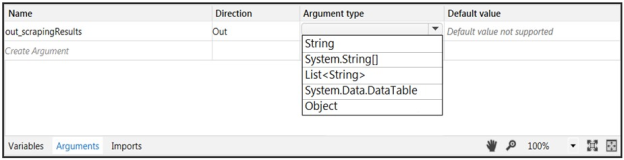
A developer needs to create an Out argument to pass the results of a Data Scraping activity to another workflow. The activity scrapes text from a structured list on a website.
From the drop-down list shown in the exhibit, select the Argument Type that should be used.
Answer is in the explanation below.
Ask AI for More Explanation
— your own AI account, opens inside the app
Reference / correct answer:
Question 2
In this exercise, you will create a UiPath automation that performs the steps below.
To achieve this, you will use the REFrameWork as the starting template and follow the UiPath development best
practices.
Here are the steps performed by the Robot:
1. Log in to https://www.acme-test.com.
2. On the landing page, Dashboard, click on the Work items menu item. Scrape the data in all the pages of the table, page by page, ensuring error handling and recovery.
3. For each page:
- Filter the records where Status is 'Open';
- Filter the records where Description is 'Calculate Client Security Hash';
- Filter the records where WIID is less than 600000;
- Append the resulting datatable into an Excel worksheet, you shouldn't worry about the headers and format of the output file.
Constraints to follow in the development, using the REFrameWork:
1. TransactionItem datatype should be a String. The process should recover and retry in case of errors in
navigation between WorkItems page. One transaction is the action of scraping one web page.By navigating to the
next page, the next transaction will execute. (Same as ACME Process 4 Dispatcher from the UiPath Academy).
2. Create a separate workflow file for the Login to ACME. File input arguments: URL ; Username ; Password .
3. Create a separate workflow file for closing ACME.
3. Add the ACME_URL and ACME_Credential to the Config file.
4. Populate InitAllApplications.xaml from the Framework folder with Invoking the Login to ACME and navigation to the Work Items.
5. Populate CloseAllApplications.xaml from the Framework folder with Invoking the Close ACME.
6. Populate KillAllProcesses.xaml from the Framework folder with killing the process used.
7. Populate the Process.xaml file with the following actions: Web scraping, Filtering and Appending to Excel.
Important Note: Don't use external file references outside of the project folder (including Orchestrator Assets).
Place all the used files within the project folder, zip that folder and upload it to the UiPath Certification Platform.
Zip ALL the used workflow files AND the output Excel file. Then upload the .zip file to the UiPath Certification Platform.
ALL THE BEST!
Answer is in the explanation below.
Ask AI for More Explanation
— your own AI account, opens inside the app
Reference / correct answer:
Sendusyourfeedbackonthis.
Question 3
How can a process be executed on three different robots?
Options are :
Select all that apply, then click Submit answer.
○
By scheduling the process and adjusting the settings in the Execution Target tab accordingly
○
By creating a job and selecting all three robots
○
By deploying the process in the environment of the robots, which run it automatically
○
It is not possible to allocate a process to three different robots
Ask AI for More Explanation
— your own AI account, opens inside the app
Reference / correct answer:
By scheduling the process and adjusting the settings in the Execution Target tab accordingly
By creating a job and selecting all three robots
Question 4
In the UiPath Robotic Enterprise Framework template, in the Main workflow, the State Machine includes the following states:
Options are :
Select all that apply, then click Submit answer.
○
Init state
○
Set Transaction State
○
Get transaction data state
○
End Process State
○
Process Transaction State
Ask AI for More Explanation
— your own AI account, opens inside the app
Reference / correct answer:
Init state
Get transaction data state
End Process State
Process Transaction State
Question 5
In UiPath Robotic Enterprise Framework, what are the transitions of the Init state?
Options are :
Select all that apply, then click Submit answer.
○
In the case of Success, the transition is to the Process Transaction state.
○
In the case of System Error, the transition is to the End Process state.
○
In the case of Success, the transition is to the Get Transaction Data state.
○
In the case of System Error, the transition is to the Init state.
Ask AI for More Explanation
— your own AI account, opens inside the app
Reference / correct answer:
In the case of System Error, the transition is to the End Process state.
In the case of Success, the transition is to the Get Transaction Data state.
Question 6
In the UiPath Robotic Enterprise Framework template, what should be the outcome of the Process Transaction state of the Main workflow when the application loops back to the Get Transaction Item state?
Options are :
Select all that apply, then click Submit answer.
○
Application exception
○
Business rule exception
○
Success
Ask AI for More Explanation
— your own AI account, opens inside the app
Reference / correct answer:
Business rule exception
Success
Question 7
Which of the following statements is true regarding Lists and Arrays?
Options are :
Select all that apply, then click Submit answer.
○
You can add any number of elements to an array.
○
You can iterate through a List using a For Each loop activity.
○
List items can be added using an Add to Collection activity.
○
Array and List elements can be accessed by index.
Ask AI for More Explanation
— your own AI account, opens inside the app
Reference / correct answer:
You can iterate through a List using a For Each loop activity.
List items can be added using an Add to Collection activity.
Question 8
Where should credentials be stored? Select all the options that apply.
Options are :
Select all that apply, then click Submit answer.
○
In Windows Credential Store.
○
In Orchestrator, as assets.
○
Directly inside the workflows, as variables.
Ask AI for More Explanation
— your own AI account, opens inside the app
Reference / correct answer:
In Windows Credential Store.
Directly inside the workflows, as variables.
Question 9
What type of Output variable do all Get Mail activities return? (POP3, IMAP, Outlook, Exchange)
Options are :
Select an option, then click Submit answer.
○
List
○
List
○
MailMessage
Ask AI for More Explanation
— your own AI account, opens inside the app
Reference / correct answer:
List
Question 10
Which emails are deleted if you use Get IMAP Mail Messages with the DeleteMessages property set to true?
Options are :
Select an option, then click Submit answer.
○
Only the emails that were marked as previously read.
○
There is no DeleteMessages property for the Get IMAP Mail Message activity. This option is available only for Get Exchange Mail Message.
○
The ones in the list that is retrieved by the Get IMAP Mail Messages activity.
Ask AI for More Explanation
— your own AI account, opens inside the app
Reference / correct answer:
The ones in the list that is retrieved by the Get IMAP Mail Messages activity.
Question 11
A developer is using UiExplorer to modify selectors. The "Highlight" button is present in UiExplorer. What is its functionality and when does this button appear?
Select an option, then click Submit answer.
○
Highlights the selected element from the Visual Tree in real time. The highlight stays on for 3 seconds.
○
Brings the target element in the foreground. The button is enabled only if the selector is valid.
○
Highlights the selected element from the Visual Tree in real time. The highlight stays on until it's switched off.
○
Brings the target element in the foreground. The button is enabled only if the selector is invalid.
Ask AI for More Explanation
— your own AI account, opens inside the app
Reference / correct answer:
Brings the target element in the foreground. The button is enabled only if the selector is valid.
Explanation
The general Highlight button in UiExplorer brings the target element in the foreground. The highlight stays on until it's switched off. The button is enabled only if the selector is valid.
Highlight button in Visual Tree panel highlights the selected element from the Visual Tree in real time. The highlight stays on until it's switched off.
Exam Topic: Describe how Tags and Attributes, Dynamic Selectors, Anchor Base, etc. are used in UI Explorer to create a robust selector in the Default, Active Accessibility, or UI Automation frameworks
Question 12
Review the following exhibit:
What is the result of clicking the "Run in PiP" button?
Select an option, then click Submit answer.
○
The attended process starts in an isolated Windows session. The user is prompted with a window to enter credentials on every run.
○
The attended process starts on a remote machine. The user is prompted with a window to enter credentials.
○
The attended process starts in an isolated Windows session. The user is logged in with the credentials entered from the main session.
○
The attended process starts in the same Windows session. The user is logged in automatically with their credentials.
Ask AI for More Explanation
— your own AI account, opens inside the app
Reference / correct answer:
The attended process starts in an isolated Windows session. The user is logged in with the credentials entered from the main session.
Question 13
You want to build a Dispatcher process to populate an Orchestrator Queue for parallel processing on multiple robots. Which activity should you use to add a queue item for each work item?
Options are :
Select an option, then click Submit answer.
○
Add Queue Item
○
Add Transaction Item
○
Get Transaction Item
Ask AI for More Explanation
— your own AI account, opens inside the app
Reference / correct answer:
Add Transaction Item
Question 14
In the UiPath Robotic Enterprise Framework template, to enable the retry mechanism without using Queues, what should the value of MaxRetryNumber be set to?
Options are :
Select an option, then click Submit answer.
○
0
○
Any value greater than 0
○
Any value greater than 2
Ask AI for More Explanation
— your own AI account, opens inside the app
Reference / correct answer:
Any value greater than 0
Question 15
A developer automates a project for Finance Team. As the first step, robot needs to capture ticket numbers from a Sharepoint site and then search them in SalesForce application. However, on Sharepoint all ticket numbers contain 7 characters and start with zeros e.g. 0000728, 0011430, 0003219. While in SalesForce, zeros in front are removed e.g. 728, 11430, 3219.
How can robot overcome this inconsistency?
Select an option, then click Submit answer.
○
newTicketNumber = oldTicketNumber.Substring(3)
○
newTicketNumber = oldTicketNumber.Trim("0"c)
○
newTicketNumber = oldTicketNumber.TrimStart("0"c)
○
newTicketNumber = oldTicketNumber.Replace("0","")
Ask AI for More Explanation
— your own AI account, opens inside the app
Reference / correct answer:
newTicketNumber = oldTicketNumber.TrimStart("0"c)
Explanation
TrimStart method would remove all zeroes only at the start of the ticket number (correct).
Trim method would remove zeroes at the start and at the end of the ticket number (incorrect).
Replace("0") would remove zeroes from the whole string, even in the middle (incorrect).
Substring(3) would work only for ticket numbers with 3 zeroes at the start (incorrect).
Microsoft Documentation
UiPath Forum
Exam Topic: Identify how methods, activities, and the RegEx Builder are used for string manipulation and regular expressions
About the UiPath-ARDv1 Free Practice Test
Thinking of taking the UiPath Advanced RPA Developer v1.0 Exam (UiARD) (UiPath-ARDv1) exam? This free UiPath practice test is the place to start. The 15 questions come free from the full 351-question Study4Pass practice set — a quick, honest check of where you stand. The free sample includes 7 single-answer, 6 multiple-answer, 1 interactive and 1 hands-on lab questions — the same mix of formats you will meet in the full set. The set follows the real exam’s spread of topics: Automation Concepts, UiPath Architecture, UiPath Development and UiPath Administration. UiPath-ARDv1 (UiPath Advanced RPA Developer) is a certification exam designed to assess the knowledge and skills of experienced RPA developers.
The target audience of the UiPath UiPath-ARDv1 Exam is professionals who are looking to demonstrate their knowledge and skills in the UiPath Automation platform. The Prerequisite for UiPath UiPath-ARDv1 Exam is to have basic knowledge of the UiPath platform, including the UiPath Studio, Orchestrator, and the UiPath Robot.
Free on this page: 15 practice questions with answers and explanations
Full practice set: 351 questions
Work through the questions one at a time and read every explanation, even for the ones you get right — the reasoning behind an answer is what the real exam tests. If one area keeps costing you marks, you have found exactly what to revise before exam day.
Think of the result as a map, not a verdict. The questions you miss point straight at the topics that need work, and the explanations tell you why the correct option wins. Candidates who loop through that cycle — practise, review the reasoning, re-test — walk into the real exam having already seen their weak spots and fixed them.
Inside the full UiPath-ARDv1 practice set:
All 351 questions with answers and explanations
Timed Exam Simulation that mirrors the real exam pressure
Topic Training to drill one domain at a time
Ask AI for More Explanation on every question
Flag questions and review them before you finish
How to use this UiPath-ARDv1 free practice test
There is no clock and no account needed. Answer each question, check the result, and read the explanation before moving on. For anything that still feels unclear, Ask AI is built into this AI-Enabled practice test — it explains the concept behind the question so the next one like it gets easier. When the free sample feels comfortable, the full set of 351 questions adds timed Exam Simulation, topic-by-topic training, and flagged-question review — the closest thing to exam day you can get before the real thing.
What to study for each UiPath-ARDv1 domain
Automation Concepts — This section covers the basics of automation and the various tools and techniques used to create automated processes.
UiPath Architecture — This section covers the fundamentals of UiPath architecture and how it works.
UiPath Development — This section covers the development of automated processes using UiPath.
UiPath Administration — This section covers the administration of UiPath.
UiPath Security — This section covers the security
UiPath-ARDv1 practice test — quick questions
Is this UiPath-ARDv1 practice test free?
Yes. Every question on this page — all 15 of them — is free to use, and you never need to create an account to try them.
How many questions are in the full UiPath-ARDv1 set?
The full Study4Pass set for UiPath-ARDv1 has 351 practice questions. This page gives you 15 of them free so you can judge the quality and difficulty first.
Does the free test show the answers?
Yes. Check any question to reveal the correct answer and its explanation, and use Ask AI whenever you want the underlying concept explained step by step.
Is this the real UiPath-ARDv1 exam?
No — these are practice questions built to match the UiPath-ARDv1 domains and difficulty level, so you can prepare for the real exam with confidence.