There were two systems: system1, main system on which most of the configuration take place system2, some configuration here
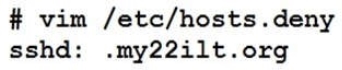
SSH configuration.
Configure SSH access on your virtual hosts as follows.
Clients within my22ilt.org should NOT have access to ssh on your systems
Answer is in the explanation below.
Ask AI for More Explanation
— your own AI account, opens inside the app
Reference / correct answer:
Please see explanation
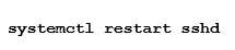
Save and Exit (:wq) Then run this:
Optional:
Question 2(Topic 2)
SIMULATION
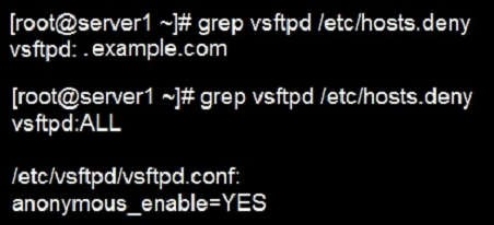
According to the following requirements, deploy your ftp login rule:
Users in example.com domain must be able to login to your ftp server as an anonymous user.
But users outside the example.com domain are unable to login to your server
Answer is in the explanation below.
Ask AI for More Explanation
— your own AI account, opens inside the app
Reference / correct answer:
Please see explanation
Question 3(Topic 3)
SIMULATION
There are Mail servers, Web Servers, DNS Servers and Log Server. Log Server is already configured. You should configure the mail server, web server and dns server to send the logs to log server.
Answer is in the explanation below.
Ask AI for More Explanation
— your own AI account, opens inside the app
Reference / correct answer:
Please see explanation
According to question, log server is already configured. We have to configure the mail, web and dns server for log redirection. In mail, web and dns server:
1. vi /etc/syslog.conf mail.* @logserveraddress 2. service syslog restart mail is the facility and * means the priority. It sends logs of mail services into log server.
Question 4(Topic 2)
SIMULATION
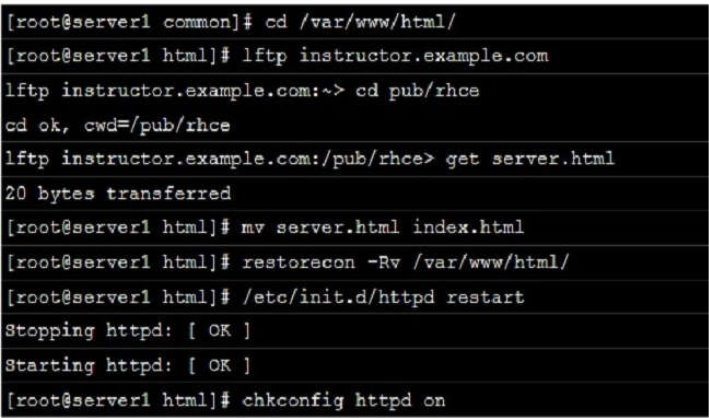
Arrange a web service address is: http://serverX.example.com, X is the number of your exam machine. Deploy it in accordance with the following requirements: Download ftp://instructor.example.com/pub/rhce/server.html
Cannot do any modification to file document server.html
Rename file document server.html as index.html
Copy the file document server.html to DocumentRoot
Answer is in the explanation below.
Ask AI for More Explanation
— your own AI account, opens inside the app
Reference / correct answer:
Please see explanation
Question 5(Topic 1)
SIMULATION
RHCE Test Configuration Instructions
Information for the two systems you will use in test is the following:
system1.group3.example.com: is one of the main sever. system2.group3.example.com: mainly used as a client.
Password for both of the two systems is atenorth
System’s IP is provided by DHCP, you can regard it as normal, or you can reset to Static IP in accordance with the following requirements:
Your system is a member of DNS domain group3.example.com. All systems in DNS domain group3.example.com are all in subnet 172.24.3.0/255.255.255.0, the same all systems in this subnet are also in group3.example.com, unless specialized, all network services required to be configured can be accessed by systems of domain group3.
host.group3.example.com provides a centralized authentication service domain
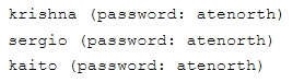
GROUP3.EXAMPLE.COM, both system1 and system2 have already been pre-configured to be the client for this domain, this domain provides the following user account:
Firewall is enabled by default, you can turn it off when deemed appropriate, other settings about firewall may be in separate requirements.
Your system will be restarted before scoring, so please ensure that all modifications and service configurations you made still can be operated after the restart without manual intervention, virtual machine instances of all examinations must be able to enter the correct multi-user level after restart without manual assistance, it will be scored zero if the test using virtual machine system cannot be restarted or be properly restarted.
Corresponding distribution packages for the testing using operating system Red Hat Enterprise Linux version can be found in the following link:
http://server1.group3.example.com/rhel
Part of the requirements include host security, ensure your host security limit does not prevent the request to allow the host and network, although you correctly configured the network service but would have to allow the host or network is blocked, this also does not score.
You will notice that some requirements which clearly do not allow services be accessed by service domain my133t.org, systems of this domain are in subnet 172.25.1.0/252.255.255.0, and systems of these subnets also belong to my 133t.org domain.
PS: Notice that some test questions may depend on other exam questions, for example, you might be asked to perform a series of restrictions on a user, but this user creation may be required in other questions. For convenient identification, each exam question has some radio buttons to help you identify which questions you have already completed or not completed. Certainly, you do not need to care these buttons if you don’t need them.
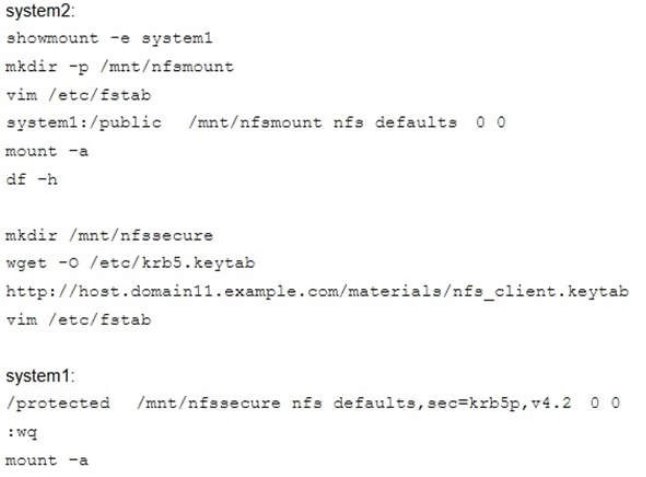
Mount a NFS Share
Mount a NFS Share to system1.domain11.example.com on the system2, as required:
1. Mount the /public to the directory /mnt/nfsmount
2. Mount the /protected to the directory /mnt/nfssecure, in a security way, key download from the following URL:
3. User deepak can create files in /mnt/nfssecure/project
4. These file systems automatically hang up when the system is started
Answer is in the explanation below.
Ask AI for More Explanation
— your own AI account, opens inside the app
Reference / correct answer:
Please see explanation
Question 6(Topic 3)
SIMULATION
Whoever creates the file on /data make automatically owner group should be the group owner of /data directory.
Answer is in the explanation below.
Ask AI for More Explanation
— your own AI account, opens inside the app
Reference / correct answer:
Please see explanation
When user creates the file/directory, user owner will be user itself and group owner will be the primary group of the user.
There is one Special Permission SGID, when you set the SGID bit on directory. When users create the file/directory automatically owner group will be same as a parent.
1. chmod g+s /data
2. Verify using: ls -ld /data You will get: drwxrws---
Question 7(Topic 1)
SIMULATION
RHCE Test Configuration Instructions
Information for the two systems you will use in test is the following:
system1.group3.example.com: is one of the main sever. system2.group3.example.com: mainly used as a client.
Password for both of the two systems is atenorth
System’s IP is provided by DHCP, you can regard it as normal, or you can reset to Static IP in accordance with the following requirements:
Your system is a member of DNS domain group3.example.com. All systems in DNS domain group3.example.com are all in subnet 172.24.3.0/255.255.255.0, the same all systems in this subnet are also in group3.example.com, unless specialized, all network services required to be configured can be accessed by systems of domain group3.
host.group3.example.com provides a centralized authentication service domain
GROUP3.EXAMPLE.COM, both system1 and system2 have already been pre-configured to be the client for this domain, this domain provides the following user account:
Firewall is enabled by default, you can turn it off when deemed appropriate, other settings about firewall may be in separate requirements.
Your system will be restarted before scoring, so please ensure that all modifications and service configurations you made still can be operated after the restart without manual intervention, virtual machine instances of all examinations must be able to enter the correct multi-user level after restart without manual assistance, it will be scored zero if the test using virtual machine system cannot be restarted or be properly restarted.
Corresponding distribution packages for the testing using operating system Red Hat Enterprise Linux version can be found in the following link:
http://server1.group3.example.com/rhel
Part of the requirements include host security, ensure your host security limit does not prevent the request to allow the host and network, although you correctly configured the network service but would have to allow the host or network is blocked, this also does not score.
You will notice that some requirements which clearly do not allow services be accessed by service domain my133t.org, systems of this domain are in subnet 172.25.1.0/252.255.255.0, and systems of these subnets also belong to my 133t.org domain.
PS: Notice that some test questions may depend on other exam questions, for example, you might be asked to perform a series of restrictions on a user, but this user creation may be required in other questions. For convenient identification, each exam question has some radio buttons to help you identify which questions you have already completed or not completed. Certainly, you do not need to care these buttons if you don’t need them.
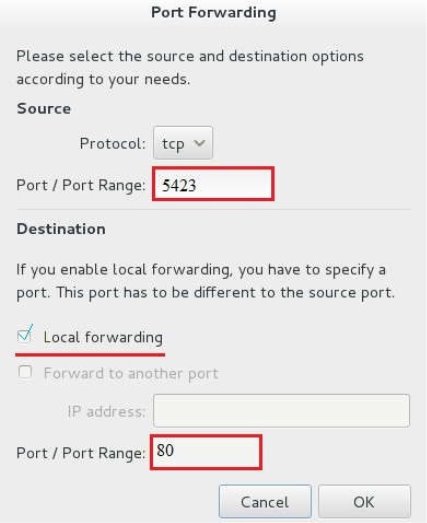
Configure port forwarding on the system1, as required:
1. The systems in the network 172.24.11.0/24, local port 5423 for accessing system1 will be forwarded to 80
(2) This setting must be permanent
Answer is in the explanation below.
Ask AI for More Explanation
— your own AI account, opens inside the app
Reference / correct answer:
Please see explanation
Use Graphical interface to configure
Use firewall-config to open the Graphical interface in CLI
Adjust the configuration: drop-down menu to permanent
Add a strategy to the public area of the “Port Forwarding”
systemctl restart firewalld.service // Reload the firewall strategy
Question 8(Topic 4)
SIMULATION
There were two systems:
system1, main system on which most of the configuration take place system2, some configuration here
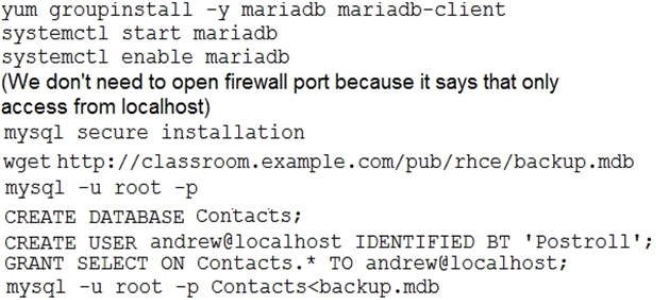
MariaDB
Restore a database on serverX from the backup file http://classroom.com/pub/rhce/backup.mdb The database name should be Contacts. It should be access only within the localhost
Set a password for root user as “Postroll”. Other than the root user, the user Andrew is able to read the query from the above mentioned database. The user should be authenticated with the password as “Postroll”.
Answer is in the explanation below.
Ask AI for More Explanation
— your own AI account, opens inside the app
Reference / correct answer:
Please see explanation
Question 9(Topic 4)
SIMULATION
There were two systems: system1, main system on which most of the configuration take place system2, some configuration here
Script1.
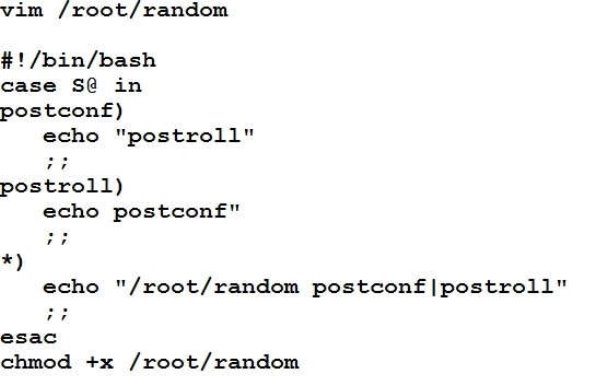
Create a script on serverX called /root/random with the following details
When run as /root/random postconf, should bring the output as “postroll” When run as /root/random postroll, should bring the output as “postconf”
When run with any other argument or without argument, should bring any other argument or without argument, should bring the stderr as “/root/random postconf|postroll”
Answer is in the explanation below.
Ask AI for More Explanation
— your own AI account, opens inside the app
Reference / correct answer:
Please see explanation
Question 10(Topic 4)
SIMULATION
There were two systems: system1, main system on which most of the configuration take place system2, some configuration here
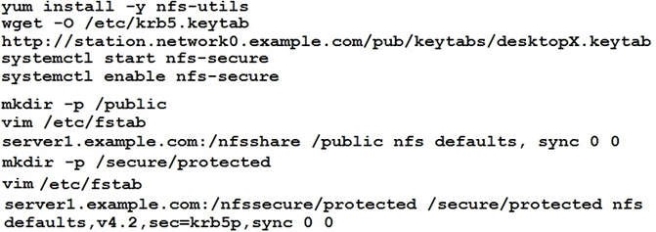
Configure NFS mount.
Mount /nfsshare directory on desktopX under /public directory persistently at system boot time.
Mount /nfssecure/protected with krb5p secured share on desktopX beneath /secure/protected provided with keytab http://station.network0.example.com/pub/keytabs/desktopX.keytab
The user harry is able to write files on /secure directory
Answer is in the explanation below.
Ask AI for More Explanation
— your own AI account, opens inside the app
Reference / correct answer:
Please see explanation
Verification from DesktopX:
About the EX300 Free Practice Test
This free practice test covers the Red Hat Certified Engineer – RHCE (v6+v7) (EX300) exam from RedHat. You will find 10 free questions, drawn from the full Study4Pass practice set of 88 questions for this exam. The free sample is made up of 10 hands-on lab questions, each with a full explanation. The questions follow the same topic balance as the real exam: System Architecture, Installation and Configuration, Command Line Interface and System Maintenance. Red Hat Certified Engineer (RHCE) EX300 exam is a performance-based exam that tests your knowledge, skills, and ability to perform system administration tasks on Red Hat Enterprise Linux 7 systems.
The Target Audience of the RedHat EX300 Exam is system administrators, system integrators, and other IT professionals who are responsible for the deployment, configuration, and maintenance of Red Hat Enterprise… The Prerequisite for RedHat EX300 Exam is that candidates must have taken and passed the RedHat EX200 Exam.
Certification: Red Hat Certified Engineer – RHCE (v6+v7) (EX300)
Vendor: RedHat
Free on this page: 10 practice questions with answers and explanations
Full practice set: 88 questions
Use the sample the way you would use the real thing: answer each question on your own first, then open the explanation and make sure you understand why the right answer is right. That habit — reasoning instead of memorizing — is what carries over to exam day. When a topic keeps tripping you up, that is your study plan telling you where to go next.
When you finish the sample, do not just count the score — read it. Every missed question names a topic, and the full set lets you train that topic on its own until it stops costing you marks. That loop of test, review and targeted practice is how this set is designed to be used, from the first free question to the last simulation.
Inside the full EX300 practice set:
All 88 questions with answers and explanations
Timed Exam Simulation that mirrors the real exam pressure
Topic Training to drill one domain at a time
Ask AI for More Explanation on every question
Flag questions and review them before you finish
How to use this EX300 free practice test
Pick an answer for each question and check it straight away — the correct answer and a full explanation appear under the question. There is no time limit and nothing to sign up for. When an explanation is not enough, use Ask AI: this is an AI-Enabled practice test, and Ask AI explains the concept behind the question in plain language. Ready for more? The full 88-question set adds a timed Exam Simulation mode, topic training for your weak areas, and a flagged-question review, so you can practise the way the real exam feels.
What to study for each EX300 domain
System Architecture — This section covers the basics of system architecture, including hardware, software, and networking components.
Installation and Configuration — This section covers the installation and configuration of Red Hat Enterprise Linux, including installation of packages and services, as well as the configuration of user accounts…
Command Line Interface — This section covers the use of the command line interface (CLI) for system administration tasks.
System Maintenance — This section covers the basics of system maintenance, including system monitoring, system backups, and system recovery.
EX300 practice test — quick questions
Is this EX300 practice test free?
Yes — the 10 questions on this page are completely free, with no signup and no payment details needed.
How many questions are in the full EX300 set?
88 questions. The 10 free questions above are a sample of that full set, in the same style and topic balance.
Does the free test show the answers?
Yes — every question shows the correct answer with an explanation, and Ask AI can explain the concept behind a question in plain words if you want to go deeper.
Is this the real EX300 exam?
No. This is a practice test: the questions are written to mirror the real EX300 exam’s topics and difficulty, not copied from it.
 system1, main system on which most of the configuration take place