Free MO-201 – Microsoft Excel Expert (Excel and Excel 2019) Practice Test Question

Free demo downloads

Loading demo links...

Showing 1–5 of 5 questions

Question 1 (Southridge Video)

SIMULATION

Instructions

nvironment

nterface and Controls

The exam panel provides access to the project task(s). Each project has an associated file in which you will perform the project tasks.
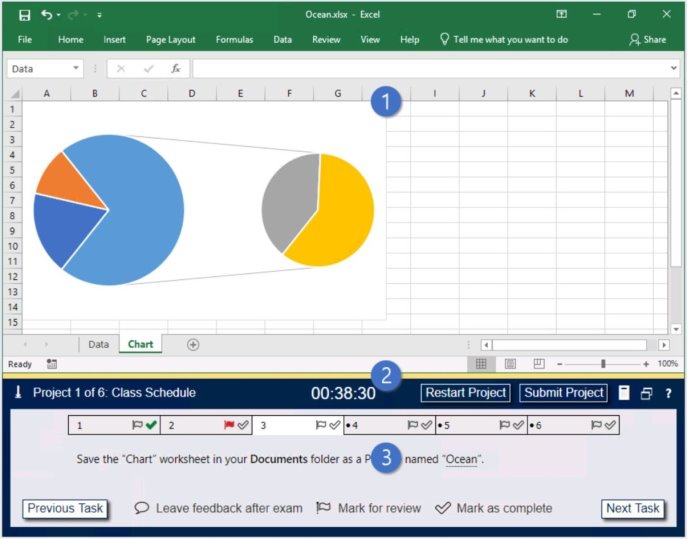
1. Project file

2. Split bar

3. Exam panel

You can modify the exam interface to fit your needs in the following ways:

To increase or decrease the exam panel font size, press Ctrl+Plus or Ctrl+Minus.

To change the height of the exam panel, drag the split bar between the project file and the exam panel.

To minimize the exam panel, click the Collapse Panel arrow in the upper-left corner of the exam panel. The minimized exam panel displays the Expand Panel button, the project number and name, the remaining time, and the Restart Project and Submit Project buttons. To move between tasks, you must expand the exam panel. To restore the interface to the default appearance, click the Restore button near the upper-right corner of the exam panel.
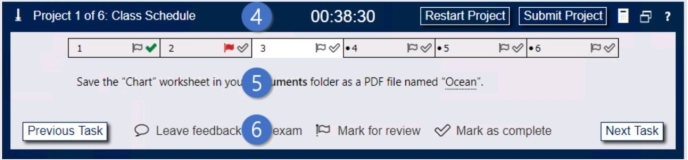
4. The Information bar at the top of the exam panel displays the current project and total number of projects, the remaining exam time, and the following commands: Collapse Panel. Minimizes the exam panel to provide more space for the project file.

Restart Project. Closes and reopens the current project file without saving your changes.

Submit Project. Saves your changes, submits the project file, and moves to the next project.

Calculator. A calculator is available in some exams. You are not required to use the calculator.

Restore. Restores the size and position of the project file and exam panel to the defaults. Help. Displays information about the exam interface.

5. The Content area displays the task tabs and the current task description.

6. The Navigation area at the bottom of the exam panel contains the following commands.

Previous Task/Next Task. Saves your response and moves to the previous or next task in the current project.

Leave feedback after exam. Flags the task to indicate that you want to leave feedback about it after the exam.

Mark for review. Flags the task to indicate that you want to return to it before you finish the exam. Mark as complete. Flags the task to indicate that you feel you have completed the task.

In projects that contain multiple tasks, you can switch between tasks by clicking the task tab, Next Task button, or Previous Task button.

End of the instructions.

On the “Plan Analysis” worksheet, modify the PivotTable to group the data by the values in the “Full Package Price” column. Group the values in steps of 100 beginning at 0 and ending at 200.

Exhibit 1 (exhibit):

Exhibit 2 (exhibit):

Exhibit 3 (exhibit):

Exhibit 4 (exhibit):

Exhibit 5 (exhibit):

Answer is in the explanation below.
Ask AI for More Explanation

— your own AI account, opens inside the app

About the MO-201 Free Practice Test

Prepare for the Microsoft Excel Expert (Excel and Excel 2019) (MO-201) exam with this free practice test from Study4Pass, built around the real Microsoft syllabus. You will find 5 free questions, drawn from the full Study4Pass practice set of 24 questions for this exam. The free sample is made up of 5 hands-on lab questions, each with a full explanation. The questions follow the same topic balance as the real exam: Southridge Video, Lucerne Publishing, VanArsdel Limited and National Parks. Microsoft MO-201 is the Microsoft Office Specialist (MOS) Expert certification exam for Microsoft Word.

The Microsoft MO-201 exam is designed for IT professionals who are looking to validate their knowledge and skills in designing and implementing Microsoft 365 services. The prerequisite for the Microsoft MO-201 exam is that you must have a basic understanding of Microsoft 365 workloads and how to configure and manage them.

  • Certification: Microsoft Excel Expert (Excel and Excel 2019) (MO-201)
  • Vendor: Microsoft
  • Free on this page: 5 practice questions with answers and explanations
  • Full practice set: 24 questions

Use the sample the way you would use the real thing: answer each question on your own first, then open the explanation and make sure you understand why the right answer is right. That habit — reasoning instead of memorizing — is what carries over to exam day. When a topic keeps tripping you up, that is your study plan telling you where to go next.

When you finish the sample, do not just count the score — read it. Every missed question names a topic, and the full set lets you train that topic on its own until it stops costing you marks. That loop of test, review and targeted practice is how this set is designed to be used, from the first free question to the last simulation.

Inside the full MO-201 practice set:

  • All 24 questions with answers and explanations
  • Timed Exam Simulation that mirrors the real exam pressure
  • Topic Training to drill one domain at a time
  • Ask AI for More Explanation on every question
  • Flag questions and review them before you finish

How to use this MO-201 free practice test

Pick an answer for each question and check it straight away — the correct answer and a full explanation appear under the question. There is no time limit and nothing to sign up for. When an explanation is not enough, use Ask AI: this is an AI-Enabled practice test, and Ask AI explains the concept behind the question in plain language. When the free sample feels comfortable, the full set of 24 questions adds timed Exam Simulation, topic-by-topic training, and flagged-question review — the closest thing to exam day you can get before the real thing.

What to study for each MO-201 topic

  • Southridge Video — about 21% of this practice set — Drill Southridge Video with the questions above, and revisit any explanation that surprises you — surprises are exactly what to fix before the exam.
  • Lucerne Publishing — about 21% of this practice set — Work through the Lucerne Publishing questions until the reasoning behind each answer is clear — guessing your way past this area will show up on exam day.
  • VanArsdel Limited — about 21% of this practice set — Use the practice questions to find your gaps in VanArsdel Limited first, then read the official Microsoft documentation for anything you missed.
  • National Parks — about 17% of this practice set — For National Parks, focus on understanding why each correct answer is right; the real exam rewards reasoning over recall.
  • Tailspin Toys — about 17% of this practice set — Drill Tailspin Toys with the questions above, and revisit any explanation that surprises you — surprises are exactly what to fix before the exam.
  • Ski Lessons — about 4% of this practice set — Work through the Ski Lessons questions until the reasoning behind each answer is clear — guessing your way past this area will show up on exam day.

MO-201 practice test — quick questions

Is this MO-201 practice test free?

Yes. Every question on this page — all 5 of them — is free to use, and you never need to create an account to try them.

How many questions are in the full MO-201 set?

The full Study4Pass set for MO-201 has 24 practice questions. This page gives you 5 of them free so you can judge the quality and difficulty first.

Does the free test show the answers?

Yes. Check any question to reveal the correct answer and its explanation, and use Ask AI whenever you want the underlying concept explained step by step.

Is this the real MO-201 exam?

No — these are practice questions built to match the MO-201 domains and difficulty level, so you can prepare for the real exam with confidence.

Practice Tests Related to MO-201