You have an Azure subscription that contains an Azure file share.
You have an on-premises server named Server1 that runs Windows Server 2016.
You plan to set up Azure File Sync between Server1 and the Azure file share.
You need to prepare the subscription for the planned Azure File Sync.
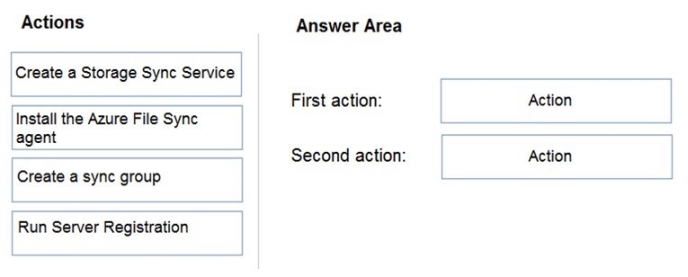
Which two actions should you perform in the Azure subscription? To answer, drag the appropriate actions to the correct targets. Each action may be used once, more than once, or not at all. You may need to drag the split bar between panes or scroll to view content.
NOTE: Each correct selection is worth one point.
Select and Place:
Answer is in the explanation below.
Ask AI for More Explanation
— your own AI account, opens inside the app
Reference / correct answer:
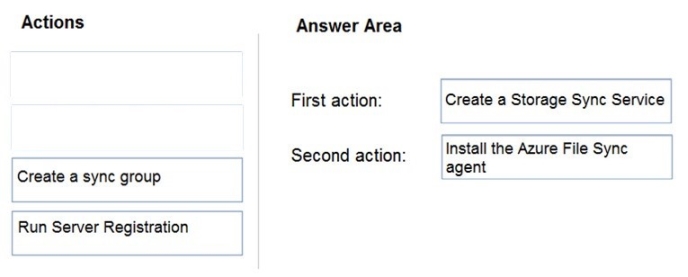
First action: Create a Storage Sync Service
The deployment of Azure File Sync starts with placing a Storage Sync Service resource into a resource group of your selected subscription.
Second action: Install the Azure File Sync agent
The Azure File Sync agent is a downloadable package that enables Windows Server to be synced with an Azure file share.
You have an Azure subscription that is used by four departments in your company. The subscription contains 10 resource groups. Each department uses resources in several resource groups.
You need to send a report to the finance department. The report must detail the costs for each department.
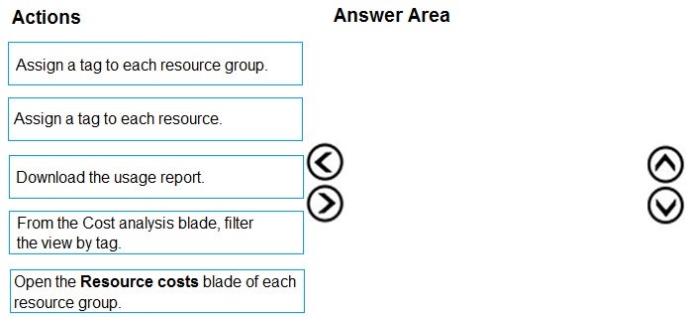
Which three actions should you perform in sequence? To answer, move the appropriate actions from the list of actions to the answer area and arrange them in the correct order.
Select and Place:
Answer is in the explanation below.
Ask AI for More Explanation
— your own AI account, opens inside the app
Reference / correct answer:
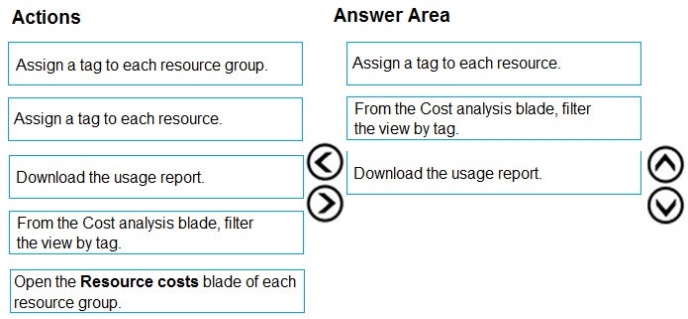
Box 1: Assign a tag to each resource.
You apply tags to your Azure resources giving metadata to logically organize them into a taxonomy. After you apply tags, you can retrieve all the resources in your subscription with that tag name and value. Each resource or resource group can have a maximum of 15 tag name/value pairs. Tags applied to the resource group are not inherited by the resources in that resource group.
Box 2: From the Cost analysis blade, filter the view by tag
After you get your services running, regularly check how much they're costing you. You can see the current spend and burn rate in Azure portal.
1. Visit the Subscriptions blade in Azure portal and select a subscription.
You should see the cost breakdown and burn rate in the popup blade.
2. Click Cost analysis in the list to the left to see the cost breakdown by resource. Wait 24 hours after you add a service for the data to populate.
3. You can filter by different properties like tags, resource group, and timespan. Click Apply to confirm the filters and Download if you want to export the view to a Comma-Separated Values (.csv) file.
You have the Azure virtual machines shown in the following table.
VNET1, VNET2, and VNET3 are peered.
VM4 has a DNS server that is authoritative for a zone named Contoso.com and contains the records shown in the following table.
VNET1 and VNET2 are linked to an Azure private DNS zone named Contoso.com that contains the records shown in the following table.
The virtual networks are configured to use the DNS servers shown in the following table.
For each of the following statements, select Yes if the statement is true. Otherwise, select No.
NOTE: Each correct selection is worth one point.
Answer is in the explanation below.
Ask AI for More Explanation
— your own AI account, opens inside the app
Reference / correct answer:
Question 5(New Update)
You need to configure Azure Backup to back up the file shares and virtual machines.
What is the minimum number of Recovery Services vaults and backup policies you should create? To answer, select the appropriate options in the
answer area.
NOTE: Each correct selection is worth one point.
Answer is in the explanation below.
Ask AI for More Explanation
— your own AI account, opens inside the app
Reference / correct answer:
checkanswerinimageexplanation.
Explanation.
See the answer as below.
Question 6(New Update)
You have an Azure App Service plan named ASP1.
CPU usage for ASP1 is shown in the following exhibit.
Answer is in the explanation below.
Ask AI for More Explanation
— your own AI account, opens inside the app
Reference / correct answer:
seetheanswerbelow.
Answer as :
Question 7(New Update)
You plan to move services from your on-premises network to Azure.
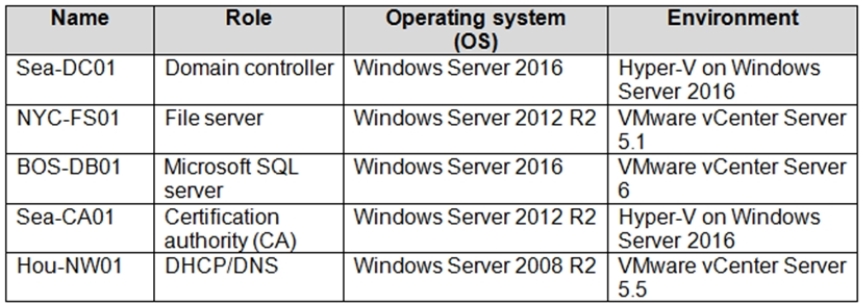
You identify several virtual machines that you believe can be hosted in Azure. The virtual machines are shown in the following table.
Which two virtual machines can you access by using Azure migrate? Each correct answer presents a complete solution.
NOTE: Each correct selection is worth one point.
Select all that apply, then click Submit answer.
○
Sea-CA0l
○
Hou-NW01
○
NYC-FS01
○
Sea-DC01
○
BOS-DB01
Ask AI for More Explanation
— your own AI account, opens inside the app
Reference / correct answer:
NYC-FS01
BOS-DB01
Azure Migrate supports discovery and assessment (and migration via Azure Migrate: Server Migration) for VMware VMs and Hyper-V VMs. In the table, the VMs running in VMware vCenter environments that are supported versions can be accessed/discovered by Azure Migrate.
- NYC-FS01 runs on VMware vCenter Server 5.1, which is supported for discovery/assessment.
- BOS-DB01 runs on VMware vCenter Server 6, which is supported for discovery/assessment.
Hou-NW01 is on VMware vCenter 5.5 (also supported), but its guest OS is Windows Server 2008 R2, which isn’t supported for Azure Migrate agentless dependency visualization and can be problematic for migration support expectations in exam context; the question asks for two, and the clearly correct pair based on the provided options is NYC-FS01 and BOS-DB01.
References (official): https://learn.microsoft.com/en-us/azure/migrate/migrate-support-matrix-vmware and https://learn.microsoft.com/en-us/azure/migrate/migrate-support-matrix-hyper-v.
Question 8(New Update)
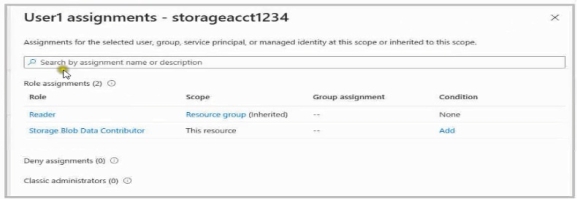
You have an Azure subscription that contains a storage account named storageacct1234 and two users named User1 and User2.
You assign User1 the roles shown in the following exhibit.
Which two actions can User1 perform? Each correct answer presents a complete solution. NOTE: Each correct selection is worth one point.
Select all that apply, then click Submit answer.
○
Modify the firewall of storageacct1234.
○
View blob data in storageacct1234.
○
View file shares in storageacct1234.
○
Upload blob data to storageacct1234.
○
Assign roles to User2 for storageacct1234.
Ask AI for More Explanation
— your own AI account, opens inside the app
Reference / correct answer:
View blob data in storageacct1234.
Upload blob data to storageacct1234.
User1 has two role assignments:
- **Reader (management plane)** inherited at the resource group scope. This allows viewing storage account settings and configuration but does not allow changing them.
- **Storage Blob Data Contributor (data plane)** scoped to the storage account. This allows read/write/delete operations on **blob data** (containers/blobs), including uploading and viewing blobs, but does not grant permissions to manage the storage account configuration or access Azure Files.
Therefore:
- **B is correct**: Storage Blob Data Contributor can read/view blob data.
- **D is correct**: Storage Blob Data Contributor can upload blob data.
Incorrect:
- **A** requires a management-plane role with write permissions (e.g., Storage Account Contributor/Contributor).
- **C** is Azure Files data and would require file data roles (e.g., Storage File Data SMB Share Reader/Contributor) and appropriate protocol access.
- **E** requires Microsoft.Authorization/roleAssignments/write (Owner or User Access Administrator), which Reader + Storage Blob Data Contributor does not provide.
References: https://learn.microsoft.com/en-us/azure/role-based-access-control/built-in-roles , https://learn.microsoft.com/en-us/azure/storage/blobs/authorize-access-azure-active-directory
Question 9(New Update)
Your VMware vSphere on-premises infrastructure hosts 600 virtual machines (VMs).
Your company is planning to move all of these VMs to Azure. You are asked to provide information about
the resources that will be needed in Azure to host all of the VMs.
All VMs hosted in your on-premise infrastructure are based on Windows Server 2012 R2 or newer and RedHat Enterprise Linux 7.0 or newer.
You conduct the initial migration assessment and get a message that some virtual machines are conditionally ready for Azure.
You need to find the cause of this message.
What are two reasons why are you might get this message on some VMs? (Choose two)
Each correct answer presents part of the solution.
Select all that apply, then click Submit answer.
○
The vCenter user does not have enough permissions on affected VMs.
○
The operating system is configured as Windows Server 2003 in vCenter Server.
○
The operating system is configured as Others in vCenter Server.
○
The VMs are configured with the BIOS boot type.
○
The VMs are configured with the UEFI boot type.
Ask AI for More Explanation
— your own AI account, opens inside the app
Reference / correct answer:
The operating system is configured as Windows Server 2003 in vCenter Server.
The VMs are configured with the UEFI boot type.
In Azure Migrate (VMware assessment), **Conditionally ready for Azure** can appear when a VM is technically supportable but has configuration issues/constraints that require changes before migration.
Two common causes are:
1) **Incorrect/unsupported OS identified in vCenter** (for example, set to Windows Server 2003). Even if the guest OS is actually newer, if vCenter reports an older/unsupported OS, the assessment can flag it as conditionally ready.
2) **UEFI boot configuration**. Some migration/replication paths and VM sizing/target constraints may require adjustments when a VM uses UEFI (for example, ensuring Azure Generation 2 support and meeting prerequisites), so Azure Migrate can mark such VMs as conditionally ready.
References (official):
- https://learn.microsoft.com/en-us/azure/migrate/concepts-assessment-calculation
- https://learn.microsoft.com/en-us/azure/migrate/migrate-support-matrix-vmware
Question 10(New Update)
You have a general purpose v1 storage account named storageaccount1 that has a private container named container1. You need to allow read access to the data inside container1, but only within a 14 day window. How do you accomplish this?
Select all that apply, then click Submit answer.
○
Create a stored access policy
○
Create a service SAS
○
Create a shared access signatures
○
Upgrade the storage account to general purpose v2
Ask AI for More Explanation
— your own AI account, opens inside the app
Reference / correct answer:
Create a service SAS
Create a shared access signatures
To allow time-bound read-only access to a private blob container, generate a Shared Access Signature (SAS) with read permission and an expiry time 14 days in the future. This can be done directly as a service SAS on the container (or blobs) and optionally be associated with a stored access policy on the container to centrally manage/rotate or revoke the SAS by changing the policy.
In other words, the required mechanism is a SAS; a stored access policy is optional but commonly used for better control.
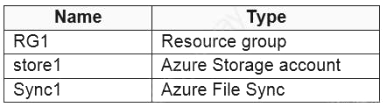
You have an Azure subscription that contains the resources in the following table.
Store1 contains a file share named data. Data contains 5,000 files.
You need to synchronize the files in the file share named data to an on-premises server named Server1.
Which three actions should you perform? Each correct answer presents part of the solution.
NOTE: Each correct selection is worth one point.
Select all that apply, then click Submit answer.
○
Create a container instance
○
Register Server1
○
Install the Azure File Sync agent on Server1
○
Download an automation script
○
Create a sync group
Ask AI for More Explanation
— your own AI account, opens inside the app
Reference / correct answer:
Register Server1
Install the Azure File Sync agent on Server1
Create a sync group
To sync an Azure file share to an on-premises Windows Server by using Azure File Sync, you must:
1) Install the Azure File Sync agent on the on-premises server (Server1).
2) Register Server1 with the Storage Sync Service (Sync1) to establish trust.
3) Create a sync group (and then add a cloud endpoint that points to the Azure file share, plus a server endpoint for the local path). In the provided choices, creating the sync group represents this required step.
Official reference: https://learn.microsoft.com/en-us/azure/storage/file-sync/file-sync-deployment-guide
Question 12(Mixed Questions)
You have an Azure subscription that contains a virtual network named VNet1. VNet1 contains four subnets named Gateway, Perimeter, NVA, and Production.
The NVA subnet contains two network virtual appliances (NVAs) that will perform network traffic inspection between the Perimeter subnet and the Production subnet.
You need to implement an Azure load balancer for the NVAs. The solution must meet the following requirements:
The NVAs must run in an active-active configuration that uses automatic failover.
The load balancer must load balance traffic to two services on the Production subnet. The services have different IP addresses.
Which three actions should you perform? Each correct answer presents part of the solution.
NOTE: Each correct selection is worth one point.
Select all that apply, then click Submit answer.
○
Deploy a basic load balancer
○
Deploy a standard load balancer
○
Add two load balancing rules that have HA Ports and Floating IP enabled
○
Add two load balancing rules that have HA Ports enabled and Floating IP disabled
○
Add a frontend IP configuration, a backend pool, and a health probe
○
Add a frontend IP configuration, two backend pools, and a health probe
Ask AI for More Explanation
— your own AI account, opens inside the app
Reference / correct answer:
Deploy a standard load balancer
Add two load balancing rules that have HA Ports and Floating IP enabled
Add a frontend IP configuration, two backend pools, and a health probe
To run NVAs in an active-active configuration with automatic failover, you should use a **Standard Load Balancer** (Basic Load Balancer doesn’t support the required HA scenarios like HA Ports).
Because you must load-balance traffic to **two different services with different IP addresses**, you typically expose **multiple frontends** and map them to the NVAs. Using **two backend pools** lets you target/associate different rules/frontends to the same pair of NVAs (common design for multi-VIP / multiple services scenarios).
For NsNVAs, you create **load-balancing rules using HA Ports**, which forwards all ports to the NVAs (often required for NVA inspection patterns). With HA Ports, enabling **Floating IP (direct server return)** is used in many NVA designs so the appliances can preserve/handle original flow behavior correctly.
References (official):
- https://learn.microsoft.com/en-us/azure/load-balancer/load-balancer-overview
- https://learn.microsoft.com/en-us/azure/load-balancer/load-balancer-ha-ports-overview
- https://learn.microsoft.com/en-us/azure/load-balancer/load-balancer-multivip-overview
Question 13(New Update)
You have an Azure subscription that contains two virtual machines named VM1 and VM2
You create an Azure load balancer.
You plan to create a load balancing rule that will load balance HTTPS traffic between VM1 and VM2.
Which two additional load balance resources should you create before you can create the load balancing rule? Each correct answer presents part of the solution
MOTL Each correct selection 5 worth one point.
Select all that apply, then click Submit answer.
○
a frontend IP address
○
a backend pool
○
a health probe
○
an inbound NAT rule
○
a virtual network
Ask AI for More Explanation
— your own AI account, opens inside the app
Reference / correct answer:
a backend pool
a health probe
To create an Azure Load Balancer load-balancing rule (for HTTPS), you must have:
A backend pool that contains the target VMs/NICs (VM1 and VM2) to receive the traffic.
A health probe to determine which backend instances are healthy and eligible to receive traffic.
(The frontend IP configuration is also required for a load balancing rule, but it is typically created as part of the load balancer itself. From the provided choices, the two additional resources required before defining the rule are the backend pool and the health probe.)
Note: The question is included in a number of questions that depicts the identical set-up. However, every question has a distinctive result. Establish if the solution satisfies the requirements.
Your company makes use of Multi-Factor Authentication for when users are not in the office. The Per Authentication option has been configured as the usage model.
After the acquisition of a smaller business and the addition of the new staff to Azure Active Directory (Azure AD) obtains a different company and adding the new employees to Azure Active Directory (Azure AD), you are informed that these employees should also make use of Multi-Factor Authentication.
To achieve this, the Per Enabled User setting must be set for the usage model.
Solution: You reconfigure the existing usage model via the Azure portal.
Does the solution meet the goal?
Select an option, then click Submit answer.
○
Yes
○
No
Ask AI for More Explanation
— your own AI account, opens inside the app
Reference / correct answer:
No
No. You can’t switch an existing Azure Multi-Factor Authentication (MFA) provider’s usage model (for example, from Per Authentication to Per Enabled User) by reconfiguring it in the Azure portal. To use a different model, you would need to create/configure MFA using the appropriate model (historically by creating a new MFA provider/service configuration) rather than changing the model on the existing one.
Note: The question is included in a number of questions that depicts the identical set-up. However, every question has a distinctive result. Establish if the solution satisfies the requirements.
Your company’s Azure solution makes use of Multi-Factor Authentication for when users are not in the office. The Per Authentication option has been configured as the usage model.
After the acquisition of a smaller business and the addition of the new staff to Azure Active Directory (Azure AD) obtains a different company and adding the new employees to Azure Active Directory (Azure AD), you are informed that these employees should also make use of Multi-Factor Authentication.
To achieve this, the Per Enabled User setting must be set for the usage model.
Solution: You reconfigure the existing usage model via the Azure CLI.
Does the solution meet the goal?
Select an option, then click Submit answer.
○
Yes
○
No
Ask AI for More Explanation
— your own AI account, opens inside the app
Reference / correct answer:
No
No. The MFA “usage model” (Per Authentication vs Per Enabled User) is tied to the MFA provider/licensing model and cannot be switched by “reconfiguring” it via Azure CLI. In Microsoft Entra ID (Azure AD), the recommended approach is to use Conditional Access (requires Entra ID P1/P2) or enable MFA per user; there is no Azure CLI operation to convert an existing MFA provider/usage model in-place.
You have an Azure subscription that contains the identifies shown in the following table.
User1, Principle, and Group1 are assigned the Monitoring Reader role.
An action an alert rule named Alert1 that uses AG1.
You need to identify who will receive an email notification when Alert1 is triggered.
Who should you identity?
Select an option, then click Submit answer.
○
User1, User2, Principle, and Principle2
○
User1 and Principle only
○
User1 only
○
User1 and User2 only
Ask AI for More Explanation
— your own AI account, opens inside the app
Reference / correct answer:
User1 only
Only identities that are explicitly configured as Email/SMS/Push/Voice receivers in the action group (AG1) will receive email notifications.
Azure RBAC role assignments (for example, assigning Monitoring Reader to User1, Group1, or managed identities) do not cause Azure Monitor action group email notifications to be sent to those identities automatically. Also, managed identities/service principals cannot be used as email recipients.
Given the answer choices, the only valid recipient that can receive email is the Azure AD user explicitly listed: User1.
You have two Azure subscriptions named Sub1 and Sub2.
An administrator creates a custom role that has an assignable scope to a resource group named RG1 in Sub1.
You need to ensure that you can apply the custom role to any resource group in Sub1 and Sub2. The solution must minimize administrative effort.
What should you do?
Select an option, then click Submit answer.
○
Create a new custom role for Sub1 and add Sub2 to the assignable scopes. Remove the role from RG1.
○
Select the custom role and add Sub1 and Sub2 to the assignable scopes. Remove RG1 from the assignable scopes.
○
Select the custom role and add Sub1 to the assignable scopes. Remove RGi from the assignable scopes. Create a new custom role for Sub2.
○
Create a new custom role for Sub1. Create a new custom role for Sub2. Remove the role from RG1.
Ask AI for More Explanation
— your own AI account, opens inside the app
Reference / correct answer:
Select the custom role and add Sub1 and Sub2 to the assignable scopes. Remove RG1 from the assignable scopes.
You can only assign a custom role at or below its assignableScopes. A role created with an assignable scope of RG1 can’t be assigned outside that resource group.
To be able to use the same custom role across any resource group in both subscriptions while minimizing effort, update the role definition to include both subscription scopes and remove the RG1 scope. This makes the role assignable anywhere within Sub1 and Sub2.
○
Modify the NS records in the DNS domain registrar.
Ask AI for More Explanation
— your own AI account, opens inside the app
Reference / correct answer:
Modify the NS records in the DNS domain registrar.
To make records in the Azure public DNS zone resolvable from the internet, you must delegate the domain to Azure DNS by updating the domain registrar to use the Azure DNS name servers (NS) for the zone. This is done by modifying the NS records at the registrar to match the Azure DNS-assigned name servers for contoso.com.
Reference: https://learn.microsoft.com/en-us/azure/dns/dns-delegate-domain-azure-dns
About the AZ-104 Free Practice Test
Thinking of taking the Microsoft Azure Administrator (AZ-104) exam? This free Microsoft practice test is the place to start. The 20 questions come free from the full 813-question Study4Pass practice set — a quick, honest check of where you stand. The free sample includes 7 single-answer, 7 multiple-answer, 2 drag-and-drop, 2 interactive and 2 hands-on lab questions — the same mix of formats you will meet in the full set. The set follows the real exam’s spread of topics: Manage Azure identities and governance, Implement and manage storage, Deploy and manage Azure compute resources and Implement and manage virtual networking. The real exam requires a score of 700 out of 1,000 to pass. Microsoft AZ-104 is an exam that tests a candidate's knowledge and skills related to Microsoft Azure administration.
The Microsoft AZ-104 Exam is intended for IT professionals who want to demonstrate their skills in administering Microsoft Azure infrastructure, including networking, virtual machines, identity, storage, and security. The Microsoft AZ-104 exam is designed for IT professionals with experience in administering Azure cloud-based services.
Certification: Microsoft Azure Administrator (AZ-104)
Vendor: Microsoft
Free on this page: 20 practice questions with answers and explanations
Full practice set: 813 questions
Work through the questions one at a time and read every explanation, even for the ones you get right — the reasoning behind an answer is what the real exam tests. If one area keeps costing you marks, you have found exactly what to revise before exam day.
Think of the result as a map, not a verdict. The questions you miss point straight at the topics that need work, and the explanations tell you why the correct option wins. Candidates who loop through that cycle — practise, review the reasoning, re-test — walk into the real exam having already seen their weak spots and fixed them.
Inside the full AZ-104 practice set:
All 813 questions with answers and explanations
Timed Exam Simulation that mirrors the real exam pressure
Topic Training to drill one domain at a time
Ask AI for More Explanation on every question
Flag questions and review them before you finish
How to use this AZ-104 free practice test
There is no clock and no account needed. Answer each question, check the result, and read the explanation before moving on. For anything that still feels unclear, Ask AI is built into this AI-Enabled practice test — it explains the concept behind the question so the next one like it gets easier. When the free sample feels comfortable, the full set of 813 questions adds timed Exam Simulation, topic-by-topic training, and flagged-question review — the closest thing to exam day you can get before the real thing.
What to study for each AZ-104 domain
Manage Azure identities and governance (20–25%) — This is the largest section of the AZ-104 exam at 20–25% — give it the most study time, and do not book the exam until these questions feel comfortable.
Implement and manage storage (15–20%) — For Implement and manage storage, focus on understanding why each correct answer is right; the real exam rewards reasoning over recall.
Deploy and manage Azure compute resources (20–25%) — This is the largest section of the AZ-104 exam at 20–25% — give it the most study time, and do not book the exam until these questions feel comfortable.
Implement and manage virtual networking (15–20%) — Work through the Implement and manage virtual networking questions until the reasoning behind each answer is clear — guessing your way past this area will show up on exam day.
Monitor and maintain Azure resources (10–15%) — Use the practice questions to find your gaps in Monitor and maintain Azure resources first, then read the official Microsoft documentation for anything you missed.
AZ-104 practice test — quick questions
Is this AZ-104 practice test free?
Yes. Every question on this page — all 20 of them — is free to use, and you never need to create an account to try them.
How many questions are in the full AZ-104 set?
The full Study4Pass set for AZ-104 has 813 practice questions. This page gives you 20 of them free so you can judge the quality and difficulty first.
Does the free test show the answers?
Yes. Check any question to reveal the correct answer and its explanation, and use Ask AI whenever you want the underlying concept explained step by step.
Is this the real AZ-104 exam?
No — these are practice questions built to match the AZ-104 domains and difficulty level, so you can prepare for the real exam with confidence.



 The NVAs must run in an active-active configuration that uses automatic failover.


