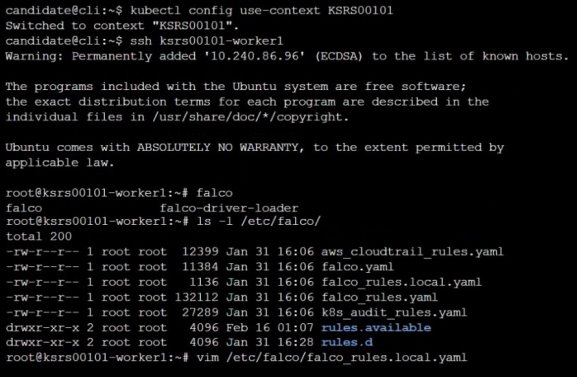
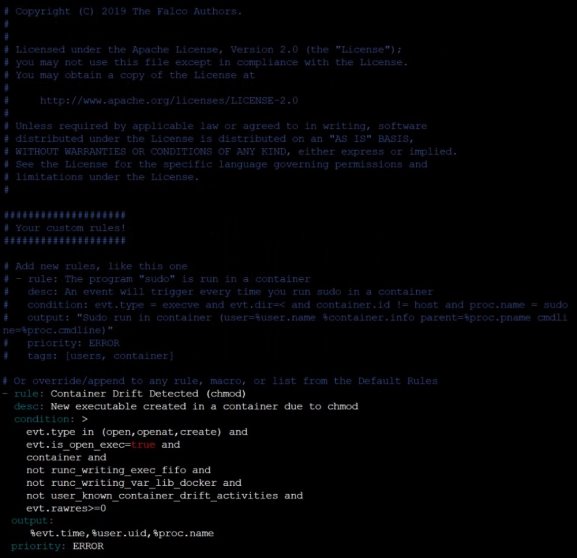
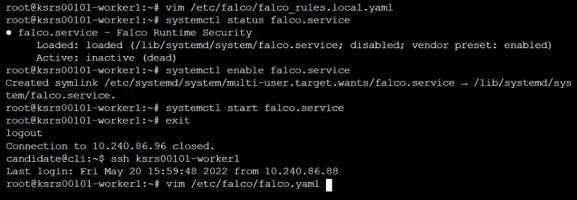
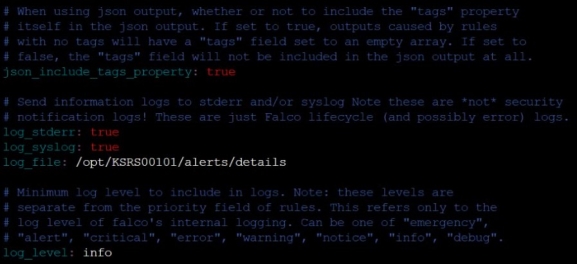
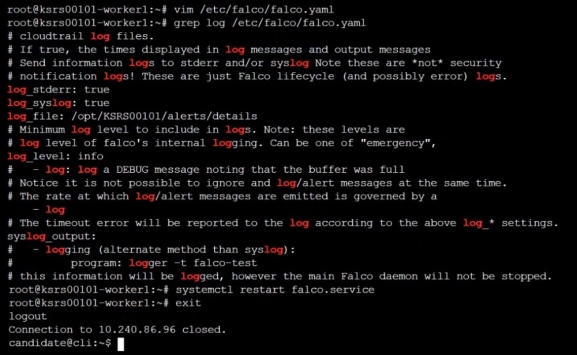
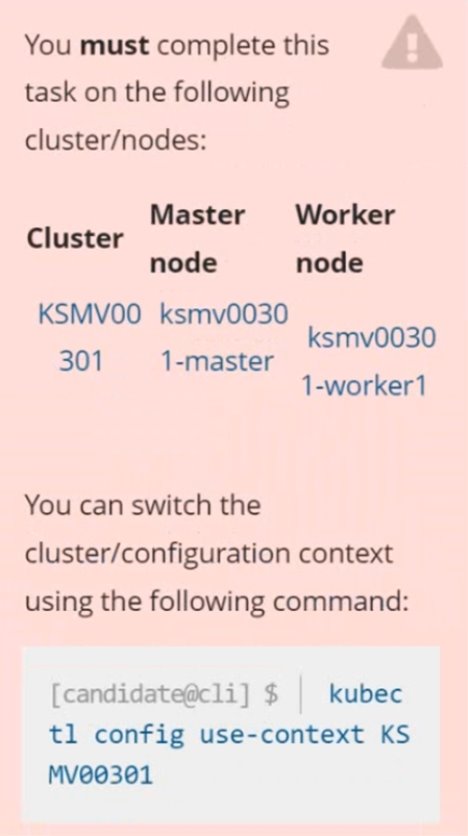
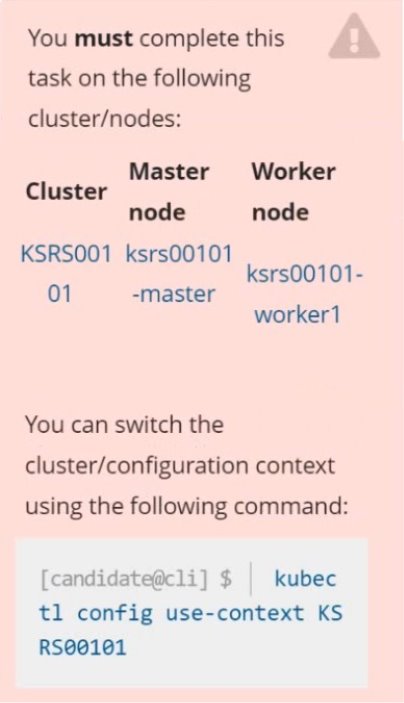
Two tools are pre-installed on the cluster's worker node:
sysdig
falco
Using the tool of your choice (including any non pre-installed tool), analyze the container's behavior for at least 30 seconds, using filters that detect newly spawning and executing processes.
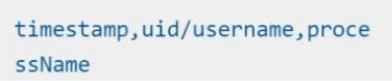
Store an incident file at /opt/KSRS00101/alerts/details, containing the detected incidents, one per line, in the following format:
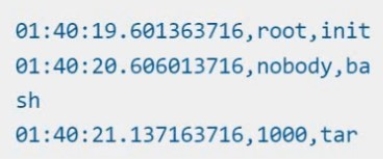
The following example shows a properly formatted incident file:
You can switch the cluster/configuration context using the following command:
[desk@cli] $ kubectl config use-context prod
Task:Analyse and edit the given Dockerfile (based on the ubuntu:18:04 image)/home/cert_masters/Dockerfile fixing two instructions present in the file being prominent security/best-practice issues.
Analyse and edit the given manifest file/home/cert_masters/mydeployment.yaml fixing two fields present in the file being prominent security/best-practice issues.
Note: Don't add or remove configuration settings; only modify the existing configuration settings, so that two configuration settings each are no longer security/best-practice concerns.Should you need an unprivileged user for any of the tasks, use user nobody with user id 65535
Answer is in the explanation below.
Ask AI for More Explanation
— your own AI account, opens inside the app
Reference / correct answer:
Seetheexplanationbelow
1. For Dockerfile: Fix the image version & user name in Dockerfile2. For mydeployment.yaml : Fix security contexts
Explanation
[desk@cli] $ vim /home/cert_masters/Dockerfile
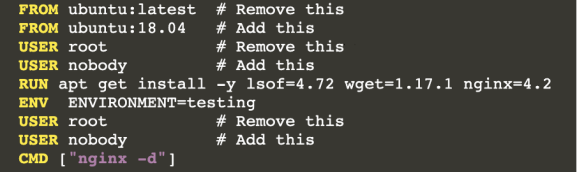
FROM ubuntu:latest # Remove this
FROM ubuntu:18.04 # Add this
USER root # Remove this
USER nobody # Add this
RUN apt get install -y lsof=4.72 wget=1.17.1 nginx=4.2
ENV ENVIRONMENT=testing
USER root # Remove this
USER nobody # Add this
CMD ["nginx -d"]
[desk@cli] $ vim /home/cert_masters/mydeployment.yaml
apiVersion: apps/v1
kind: Deployment
metadata:
creationTimestamp: null
labels:
app: kafka
name: kafka
spec:
replicas: 1
selector:
matchLabels:
app: kafka
strategy: {}
template:
metadata:
creationTimestamp: null
labels:
app: kafka
spec:
containers:
- image: bitnami/kafka
name: kafka
volumeMounts:
- name: kafka-vol
mountPath: /var/lib/kafka
securityContext:
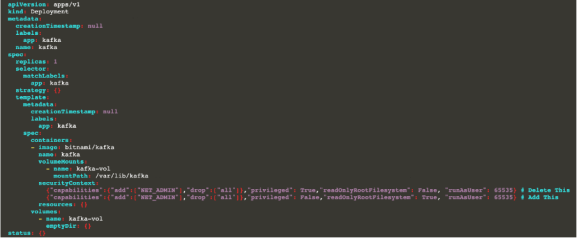
{"capabilities":{"add":["NET_ADMIN"],"drop":["all"]},"privileged": True,"readOnlyRootFilesystem": False, "runAsUser": 65535} # Delete This
{"capabilities":{"add":["NET_ADMIN"],"drop":["all"]},"privileged": False,"readOnlyRootFilesystem": True, "runAsUser": 65535} # Add This
resources: {}
volumes:
- name: kafka-vol
emptyDir: {}
status: {}
Pictorial View:[desk@cli] $ vim /home/cert_masters/mydeployment.yaml
You can switch the cluster/configuration context using the following command:[desk@cli] $ kubectl config use-context dev
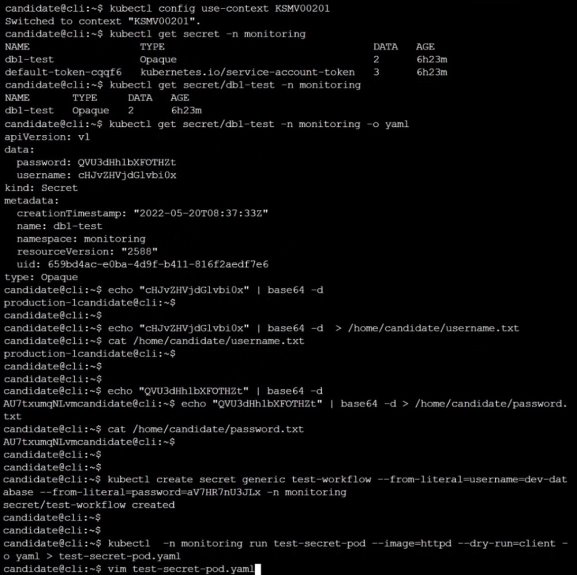
Task:Retrieve the content of the existing secret named adam in the safe namespace.
Store the username field in a file names /home/cert-masters/username.txt, and the password field in a file named /home/cert-masters/password.txt.
1. You must create both files; they don't exist yet.2. Do not use/modify the created files in the following steps, create new temporary files if needed.
Create a new secret names newsecret in the safe namespace, with the following content:Username: dbadminPassword: moresecurepas
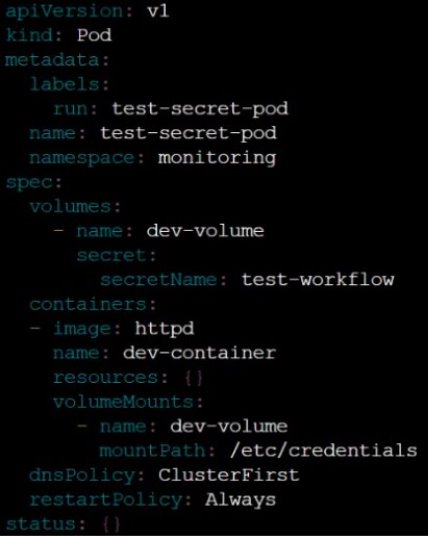
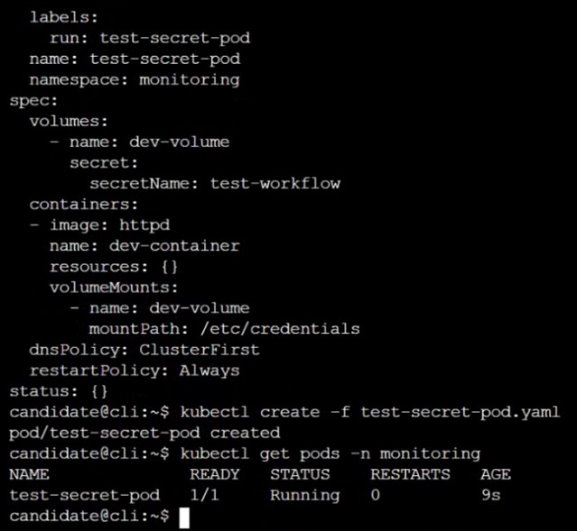
Finally, create a new Pod that has access to the secret newsecret via a volume:
Answer is in the explanation below.
Ask AI for More Explanation
— your own AI account, opens inside the app
Reference / correct answer:
Seetheexplanationbelow
Question 4
You can switch the cluster/configuration context using the following command:[desk@cli] $ kubectl config use-context stage Context:A PodSecurityPolicy shall prevent the creation of privileged Pods in a specific namespace.Task:1. Create a new PodSecurityPolcy named deny-policy, which prevents the creation of privileged Pods.2. Create a new ClusterRole name deny-access-role, which uses the newly created PodSecurityPolicy deny-policy.3. Create a new ServiceAccount named psd-denial-sa in the existing namespace development.Finally, create a new ClusterRoleBindind named restrict-access-bind, which binds the newly created ClusterRole deny-access-role to the newly created ServiceAccount psp-denial-sa
Answer is in the explanation below.
Ask AI for More Explanation
— your own AI account, opens inside the app
Reference / correct answer:
Seetheexplanationbelow
Create psp to disallow privileged container
k create sa psp-denial-sa -n development
namespace: development
Explanation
master1 $ vim psp.yaml
apiVersion: policy/v1beta1
kind: PodSecurityPolicy
metadata:
name: deny-policy
spec:
privileged: false # Don't allow privileged pods!
seLinux:
rule: RunAsAny
supplementalGroups:
rule: RunAsAny
runAsUser:
rule: RunAsAny
fsGroup:
rule: RunAsAny
volumes:
- '*'
master1 $ vim cr1.yaml
apiVersion: rbac.authorization.k8s.io/v1
kind: ClusterRole
metadata:
name: deny-access-role
rules:
- apiGroups: ['policy']
resources: ['podsecuritypolicies']
verbs: ['use']
resourceNames:
- “deny-policy”
master1 $ k create sa psp-denial-sa -n developmentmaster1 $ vim cb1.yaml
You can switch the cluster/configuration context using the following command:
[desk@cli] $ kubectl config use-context scanner
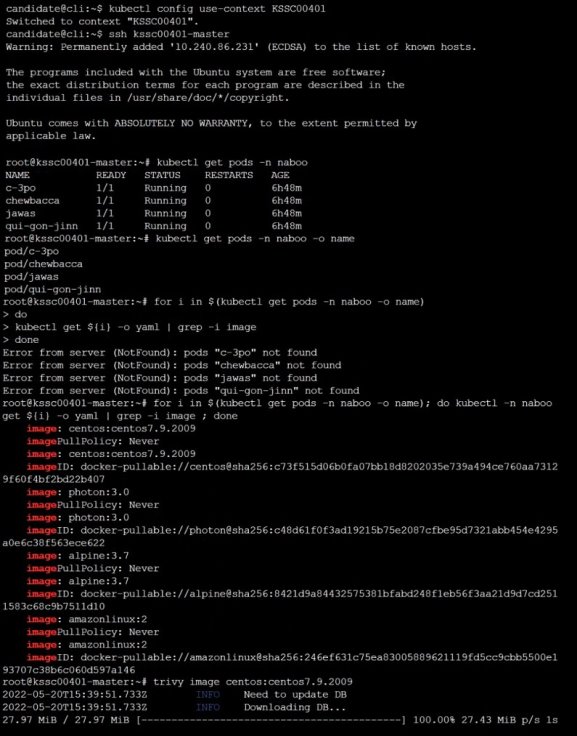
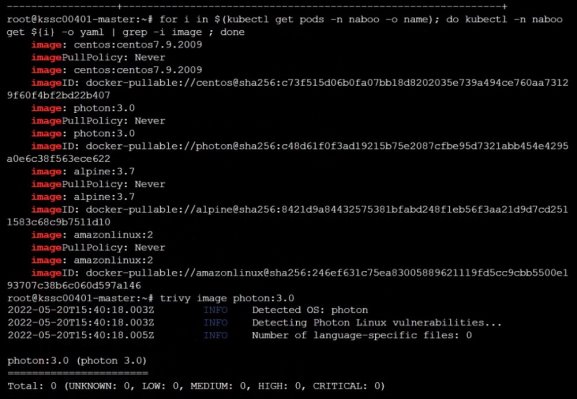
Given:You may use Trivy's documentation.
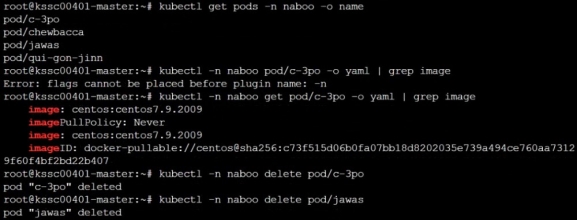
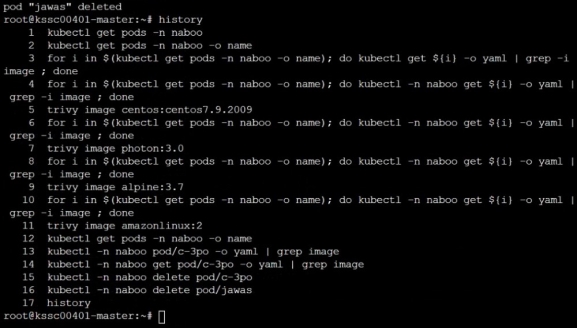
Task:Use the Trivy open-source container scanner to detect images with severe vulnerabilities used by Pods in the namespace nato.
Look for images with High or Critical severity vulnerabilities and delete the Pods that use those images.Trivy is pre-installed on the cluster's master node. Use cluster's master node to use Trivy.
Prepare for the Certified Kubernetes Security Specialist (CKS) exam with this free practice test from Study4Pass, built around the real Linux Foundation syllabus. You will find 10 free questions, drawn from the full Study4Pass practice set of 48 questions for this exam. The free sample is made up of 10 hands-on lab questions, each with a full explanation. The questions follow the same topic balance as the real exam: Such as authentication, Authorization, Network security and Image security. The Linux Foundation Certified Kubernetes Security Specialist (CKS) exam is a performance-based certification exam that tests a candidate's ability to secure a Kubernetes cluster and the applications running on it.
The target audience of the Linux Foundation Certified Kubernetes Security Specialist (CKS) exam is system administrators, DevOps engineers, and other IT professionals who are responsible for the security of Kubernetes… The Prerequisite for Linux Foundation Certified Kubernetes Security Specialist (CKS) Exam is that you must have a valid Certified Kubernetes Administrator (CKA) certification.
Free on this page: 10 practice questions with answers and explanations
Full practice set: 48 questions
Use the sample the way you would use the real thing: answer each question on your own first, then open the explanation and make sure you understand why the right answer is right. That habit — reasoning instead of memorizing — is what carries over to exam day. When a topic keeps tripping you up, that is your study plan telling you where to go next.
When you finish the sample, do not just count the score — read it. Every missed question names a topic, and the full set lets you train that topic on its own until it stops costing you marks. That loop of test, review and targeted practice is how this set is designed to be used, from the first free question to the last simulation.
Inside the full CKS practice set:
All 48 questions with answers and explanations
Timed Exam Simulation that mirrors the real exam pressure
Topic Training to drill one domain at a time
Ask AI for More Explanation on every question
Flag questions and review them before you finish
How to use this CKS free practice test
Pick an answer for each question and check it straight away — the correct answer and a full explanation appear under the question. There is no time limit and nothing to sign up for. When an explanation is not enough, use Ask AI: this is an AI-Enabled practice test, and Ask AI explains the concept behind the question in plain language. When the free sample feels comfortable, the full set of 48 questions adds timed Exam Simulation, topic-by-topic training, and flagged-question review — the closest thing to exam day you can get before the real thing.
What to study for each CKS domain
Such as authentication — Drill Such as authentication with the questions above, and revisit any explanation that surprises you — surprises are exactly what to fix before the exam.
Authorization — Work through the Authorization questions until the reasoning behind each answer is clear — guessing your way past this area will show up on exam day.
Network security — Use the practice questions to find your gaps in Network security first, then read the official Linux Foundation documentation for anything you missed.
Image security — For Image security, focus on understanding why each correct answer is right; the real exam rewards reasoning over recall.
And more — Drill And more with the questions above, and revisit any explanation that surprises you — surprises are exactly what to fix before the exam.
CKS practice test — quick questions
Is this CKS practice test free?
Yes. Every question on this page — all 10 of them — is free to use, and you never need to create an account to try them.
How many questions are in the full CKS set?
The full Study4Pass set for CKS has 48 practice questions. This page gives you 10 of them free so you can judge the quality and difficulty first.
Does the free test show the answers?
Yes. Check any question to reveal the correct answer and its explanation, and use Ask AI whenever you want the underlying concept explained step by step.
Is this the real CKS exam?
No — these are practice questions built to match the CKS domains and difficulty level, so you can prepare for the real exam with confidence.
 sysdig