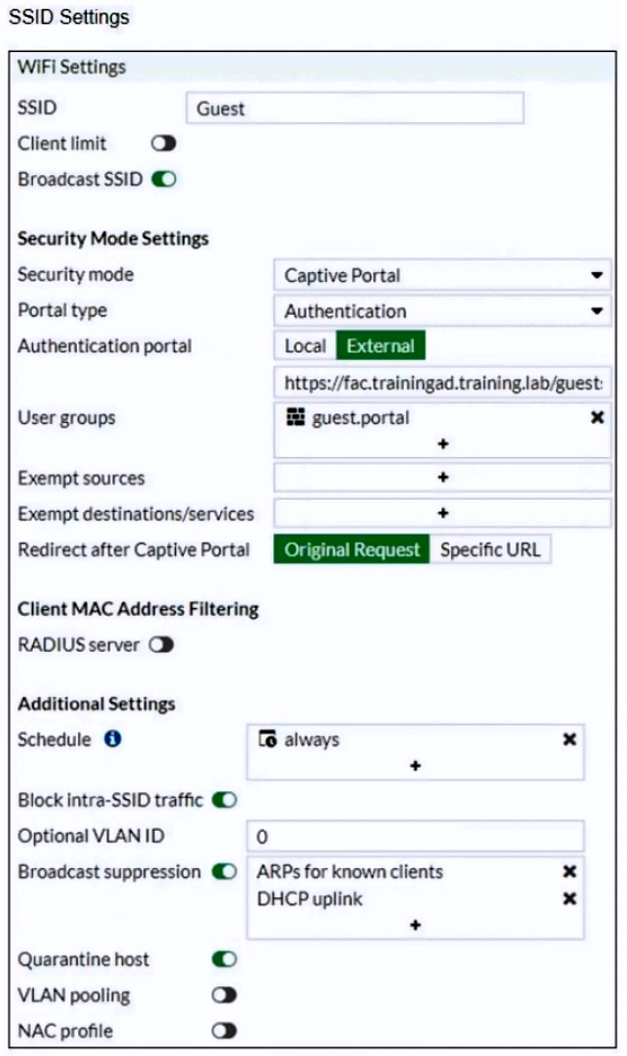
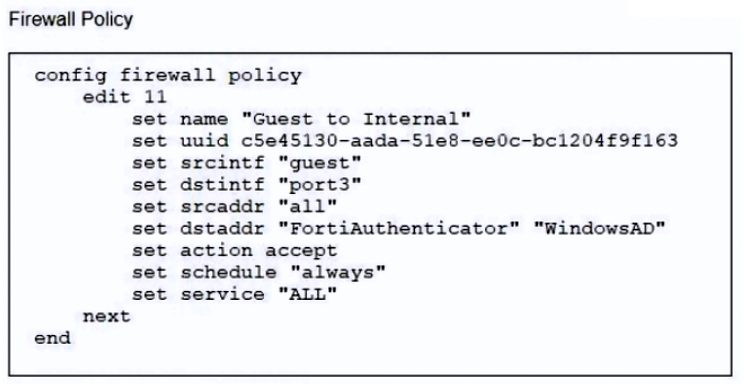
Refer to the exhibits. Examine the firewall policy configuration and SSID settings. An administrator has configured a guest wireless network on FortiGate using the external captive portal. The administrator has verified that the external captive portal URL is correct. However, wireless users are not able to see the captive portal login page. Given the configuration shown in the exhibit and the SSID settings, which configuration change should the administrator make to fix the problem?
Select an option, then click Submit answer.
Reference / correct answer:
Enable the captive-portal-exempt option in the firewall policy with the ID 11.
Most accepted answer: B. Enable the captive-portal-exempt option in the firewall policy with the ID 11.
Community votes: B=3, C=2, D=1
Selected Answer: D I would say D upvoted 1 times
Selected Answer: B I choose B because guest.portal user group may be defined after CP authentication upvoted 1 times
it was difficult to analize this part, but my logic says is C. upvoted 1 times e8a82ad 1 year, 10 months ago Scenario 1: Because on the SSID there is a field called Exempt destinations on Guide page 363 that must have a corresponding firewall policy in place, that firewall policy has ipv4 DST Addr pointing to the FortiAuthenticator (or any External server), It means if the SSID has the Excempt destination with one entry then the answer is B and you MUST enable the exempt from captive portal on the firewall policy in order to allow the traffic to the Destination server and Services like DNS, HTTP, HTTPS, ping. upvoted 1 times e8a82ad 1 year, 10 months ago Scenario2: When the SSID is not including any Exempt destinations (is empty), then the Answer is C, and on this case the image shows the SSID with this field empty, as a consequence all taks are done from the Firewall policy on guide page365 using the Source user group along with its services HTTP, HTTPS, at this point you DO NOT NEED to enable the Exempt from captive portal option inside the firewall policy, otherwise all traffic will be allowed and no captive portal will be presented. As a summary on this scenario C is the correct one. upvoted 1 times ... ...
Scenario 1: Because on the SSID there is a field called Exempt destinations on Guide page 363 that must have a corresponding firewall policy in place, that firewall policy has ipv4 DST Addr pointing to the FortiAuthenticator (or any External server), It means if the SSID has the Excempt destination with one entry then the answer is B and you MUST enable the exempt from captive portal on the firewall policy in order to allow the traffic to the Destination server and Services like DNS, HTTP, HTTPS, ping. upvoted 1 times e8a82ad 1 year, 10 months ago Scenario2: When the SSID is not including any Exempt destinations (is empty), then the Answer is C, and on this case the image shows the SSID with this field empty, as a consequence all taks are done from the Firewall policy on guide page365 using the Source user group along with its services HTTP, HTTPS, at this point you DO NOT NEED to enable the Exempt from captive portal option inside the firewall policy, otherwise all traffic will be allowed and no captive portal will be presented. As a summary on this scenario C is the correct one. upvoted 1 times ...
Scenario2: When the SSID is not including any Exempt destinations (is empty), then the Answer is C, and on this case the image shows the SSID with this field empty, as a consequence all taks are done from the Firewall policy on guide page365 using the Source user group along with its services HTTP, HTTPS, at this point you DO NOT NEED to enable the Exempt from captive portal option inside the firewall policy, otherwise all traffic will be allowed and no captive portal will be presented. As a summary on this scenario C is the correct one. upvoted 1 times