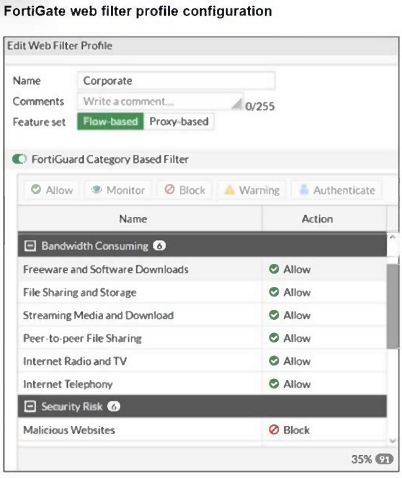
Refer to the exhibit. The exhibit shows the FortiGuard Category Based Filter section of a corporate web filter profile. An administrator must block access to download.com, which belongs to the Freeware and Software Downloads category. The administrator must also allow other websites in the same category. What are two solutions for satisfying the requirement? (Choose two.)
Select an option, then click Submit answer.
Reference / correct answer:
Configure a static URL filter entry for download.com with Type and Action set to Wildcard and Block, respectively.
Most accepted answer: D. Configure a static URL filter entry for download.com with Type and Action set to Wildcard and Block, respectively.
Community votes: A=3, C=5, D=8
Selected Answer: AD A & D is correct. upvoted 1 times
Selected Answer: AD IT THE BEST ANSWER A AND D upvoted 1 times
Selected Answer: AD Fortinet Best Practice: Fortinet recommends using Static URL Filter or FQDN objects in policy when you want precise control over specific domains, even if they belong to allowed categories. upvoted 1 times
Selected Answer: CD A - mostly does not work ... wildcard URL address object matching is very straight forward & limiting, and it simply won't match actual download site that it may redirecting user. upvoted 3 times
Selected Answer: CD Correct answer: Use C and D for a more direct and efficient solution. A. Incorrect: A separate firewall policy for *.download.com would work but is less efficient for this specific case. B. Incorrect: Setting the category to "Warning" does not block download.com. C. Correct: A web rating override reclassifies download.com as "Malicious Websites," blocking it without affecting the rest of the category. D. Correct: A static URL filter blocks download.com specifically while keeping other sites in the same category accessible. upvoted 2 times