C_THR92_2211 SAP Certified Application AssociateSAP SuccessFactors People Analytics: Reporting 1H/2022

Loading demo links...

Showing 7–9 of 10 questions

Question 7

When a user builds a query, what is the default People Scope of the query?

Select an option, then click Submit answer.

  • All Reports of the logged-in user

  • All employees in the department of the logged-in user

  • Direct Reports of the logged-in user

  • The matrix reports of the logged-in user
Question 8

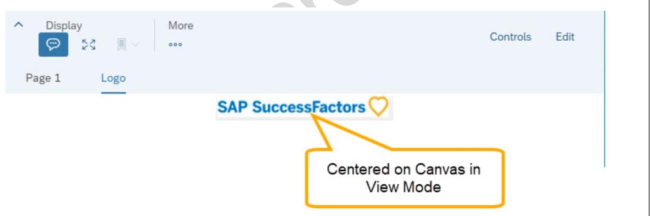
You are configuring a story report. You add the image widget to the top-left corner of the canvas. You then upload the SuccessFactors logo in the Builder and select the logo image so it

displays on the canvas. When you preview the report in View Mode, the logo appears centered on the canvas.

What action do you take so the Logo appears in the top-left corner when viewing the report in view mode?

Select an option, then click Submit answer.

  • In Builder for the image, set the image to Dynamic.

  • In Styling for the page, set the Page Size to Fixed.

  • In Designer Mode, add another widget under the image.

  • In Styling for the image, set the Image Properties to Pan.

Question 9

How do you give an analyst permission to build tiles?

Select an option, then click Submit answer.

  • Add the analyst to the role-based permission group Dashboard Administrators.

  • Assign the analyst as a dashboard administrator in Provisioning.

  • Assign the role-based permission in the Manage Dashboards/Reports RBP Category.

  • Assign the role-based permission in the Analytics RBP Category.