MS-700 Managing Microsoft Teams

Loading demo links...

Showing 4–6 of 15 questions

Question 4 (Mixed Questions)

HOTSPOT

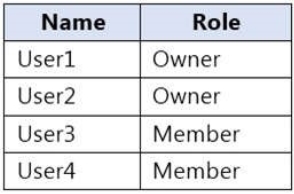
You have a Microsoft 365 E5 subscription that contains a Microsoft Teams team named Sales Team. Sales Team contains the members shown in the following table.
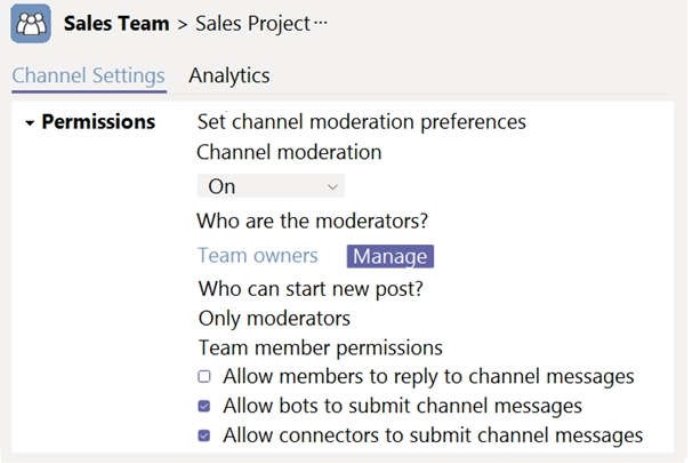
You create a channel named Sales Project and configure the Channel moderation settings as shown in the following exhibit.
For each of the following statements, select Yes if the statement is true. Otherwise, select No.

NOTE: Each correct selection is worth one point.

Hot Area:
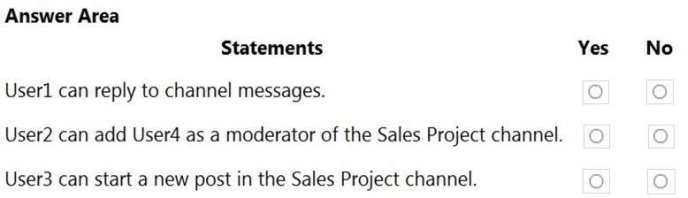
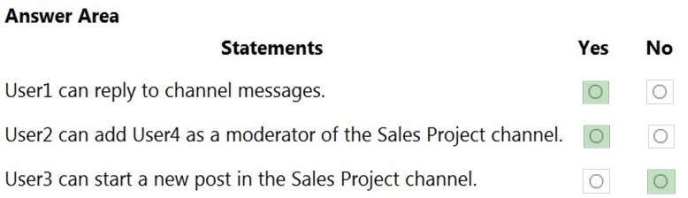
Answer is in the explanation below.
Question 5 (Mixed Questions)

Your organization holds a Microsoft 365 subscription. A user known as User5 is unable to initiate calls using Microsoft Teams. Upon inspecting the Microsoft Teams client for User5, you notice that the dial pad is missing. However, other employees within the company experience no difficulty in making calls. What two steps should you take to resolve this issue and enable User5 to make calls successfully? Each correct step is a part of the solution.

NOTE: Selecting each correct option earns you one point.

Select all that apply, then click Submit answer.

  • Modify the caller ID properties of User5.
  • Assign a Phone System license to User5.
  • Assign a SIP address to User5.
  • Assign an app setup policy to User5.
  • Enable User5 for Enterprise Voice.

Question 6 (Mixed Questions)

Your organization has a subscription to Microsoft 365. Recently, you updated the company's Microsoft Teams upgrade policy to utilize the Teams only coexistence mode. Despite this, a user has notified you that several of their online meetings are still set to use Microsoft Skype for Business. Your task is to transition these online meetings on the user's calendar to utilize Microsoft Teams instead.

Which two methods can accomplish this goal? Each correct answer provides a complete solution.

Note: Each correct choice is worth one point.

Select all that apply, then click Submit answer.

  • From PowerShell, run the Start-CsExMeetingMigration cmdlet and specify the -identity parameter.
  • Run the Skype for Business Meeting Migration tool.
  • From the Microsoft Teams admin center, modify the meeting policy.
  • From PowerShell, run the Set-CsTeamsUpgradeConfiguration cmdlet.
  • From the Microsoft Teams admin center, modify the Microsoft Teams upgrade policy.