AZ-600 Configuring and Operating a Hybrid Cloud with Microsoft Azure Stack Hub

Loading demo links...

Showing 4–6 of 10 questions

Question 4 (Mixed Questions)

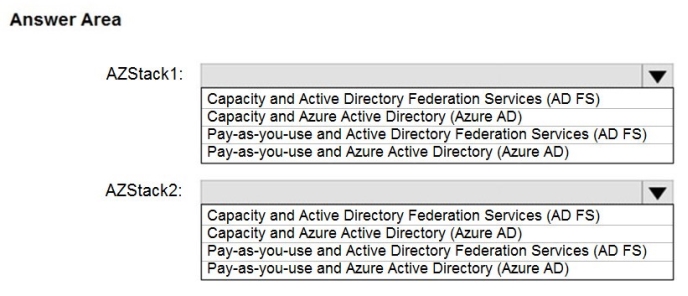
HOTSPOT

You plan to deploy two Azure Stack Hub integrated systems named AZStack1 and AZStack2.

AZStack1 must meet the following requirements:

Connect to the Internet.

Have minimal capital expenditures.

Use the minimum number of on-premises servers for identity.

Have no existing licenses for Windows virtual machines deployed.

AZStack2 must meet the following requirements:

Be disconnected from the Internet.

Use the minimum number of on-premises servers for identity.

Support the syndication of Azure Stack Hub Marketplace items.

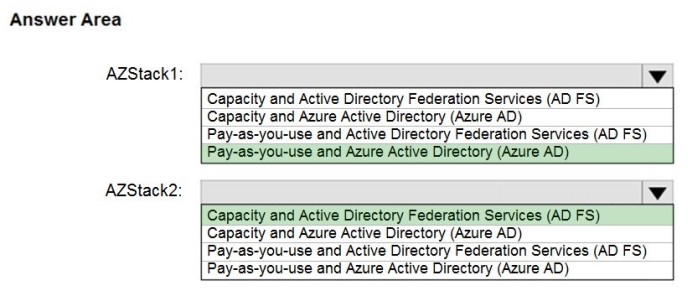
Which identity provider and licensing model should you use for each integrated system? To answer, select the appropriate options in the answer area.

NOTE: Each correct selection is worth one point.

Hot Area:
Answer is in the explanation below.
Question 5 (New Update)

You are planning an Azure Slack Hub deployment for an enterprise customer.

You need to identify an appropriate identity model for the customer. The solution must use capacity-based billing. Which two identity providers can you use for the customer? Each correct answer presents a complete solution. NOTE: Each correct selection is worth one point.

Select all that apply, then click Submit answer.

  • Active Directory Federation Services (AD FS) in an Enterprise Agreement (EA)

  • Azure Active Directory (Azure AD) in a Cloud Solution Provider (CSP) subscription

  • Azure Active Directory (Azure AD) in an Enterprise Agreement (EA)

  • Active Directory Federation Services (AD FS) in a Cloud Solution Provider (CSP) subscription

Question 6 (Mixed Questions)

You have an Azure Stack Hub integrated system that connects to the Internet. The integrated system uses an Azure Active Directory (Azure AD) identity provider.

You need to update the Azure App Service resource provider.

Which two actions should you perform? Each correct answer presents part of the solution.

NOTE: Each correct selection is worth one point.

Select all that apply, then click Submit answer.

  • Download the App Service installer to a computer that can connect to the Azure Stack Hub endpoints

  • Run appservice.exe as a local administrator

  • From the Updates blade of the administrator portal, select the Resource providers section

  • From the Updates blade of the administrator portal, select the infrastructure section

  • From the administrator portal, select the update, download the update, and then install the update