Your network contains one Active Directory domain. The domain contains an enterprise certification authority (CA). You need to ensure that members of a group named Group1 can issue certificates for the User certificate template only.
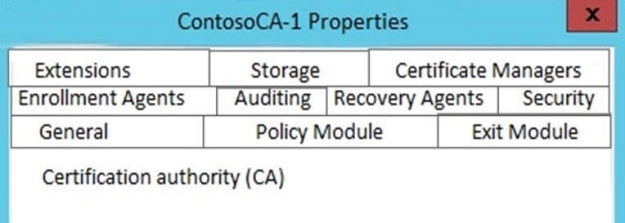
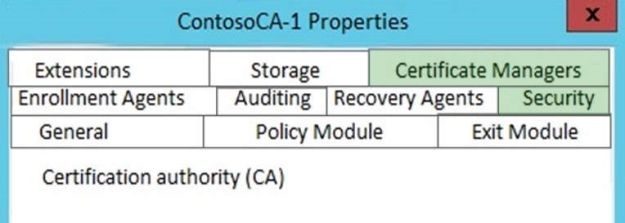
Which two tabs should you use to perform the configuration? To answer, select the appropriate tabs in the answer area.
Hot Area:
Answer is in the explanation below.
Reference / correct answer:
To configure certificate manager restrictions for a CA
1. Open the Certification Authority snap-in, and right-click the name of the CA.
2. Click Properties, and then click the Security tab.
3. Verify that the user or group that you have selected has Issue and Manage Certificates permission. If they do not yet have this permission, select the Allow check box, and then click Apply.
4. Click the Certificate Managers tab.
5. Click Restrict certificate managers, and verify that the name of the group or user is displayed.
6. Under Certificate Templates, click Add, select the template for the certificates that you want this user or group to manage, and then click OK. Repeat this step until you have selected all certificate templates that you want to allow this certificate manager to manage.
7. Under Permissions, click Add, type the name of the client for whom you want the certificate manager to manage the defined certificate types, and then click OK.
8. If you want to block the certificate manager from managing certificates for a specific user, computer, or group, under Permissions, select this user, computer, or group, and click Deny.
9. When you are finished configuring certificate manager restrictions, click OK or Apply. References: https://technet.microsoft.com/en-us/library/cc753372.aspx
Question 5
Your network contains one Active Directory domain named contoso.com.
The domain contains 20-member server and five domain controllers. All domain controllers run Windows Server 2012 R2. The domain contains 500 client computers. You plan to deploy a domain controller for contoso.com in Microsoft Azure.
You need to prepare the environment for the planned deployment. The solution must ensure that the domain controller hosted in Azure always has the same IP address.
Which two actions should you perform? Each correct answer presents part of solution.
Select all that apply, then click Submit answer.
○
Deploy a site-to-site virtual private network (VPN).
○
From an Azure virtual machine, run the Set-NetIPAddress cmdlet.
○
From an Azure virtual machine, run the Set-AzureStaticVNetIP cmdlet.
○
From a domain controller, run the Set-NetIPAddress cmdlet.
○
From a domain controller, run adprep.exe.
Reference / correct answer:
Deploy a site-to-site virtual private network (VPN).
From an Azure virtual machine, run the Set-AzureStaticVNetIP cmdlet.
Your network contains an Active Directory domain named adatum.com. The domain contains a member server named Host1. Host1 runs Windows Server 2012 R2 and has the Hyper-V server role installed.
Host1 hosts two virtual machines named VM5 and VM6. Both virtual machines connect to a virtual switch named Virtual1.
On VM5, you install a network monitoring application named Monitor1.
You need to capture all of the inbound and outbound traffic to VM6 by using Monitor1.
Which two commands should you run from Windows PowerShell? (Each correct answer presents part of the solution. Choose two.)
PortMirroring specifies the port mirroring mode for the network adapter. This can be set to None, Source, and Destination.
If set to Source, a copy of every network packet it sends or receives is forwarded to a virtual network adapter configured to receive the packets. If set to Destination, it receives copied packets from the source virtual network adapter.
In this scenario, VM5 is the destination which must receive a copy of the network packets from VM6, which is the source.
 If set to Source, a copy of every network packet it sends or receives is forwarded to a virtual network adapter configured to receive the packets.