Free ENOV612-PRG – V6 ENOVIA V6 Program Central (V6R2012) Practice Test Question

Free demo downloads

Loading demo links...

Showing 4–6 of 10 questions

Question 4

What types of Objects can be included as content into Routes?

Select an option, then click Submit answer.

  • ○

    Any type of Object

  • ○

    Documents and Parts

  • ○

    Documents only

  • ○

    Parts only

Question 5

To add a subtask under a parent task, on the WBS screen you would select the parent task and then click

Select an option, then click Submit answer.

  • ○

    Add to Selected

  • ○

    Add Under Selected

  • ○

    Add Subtask Below

  • ○

    Insert Under Selected

Question 6

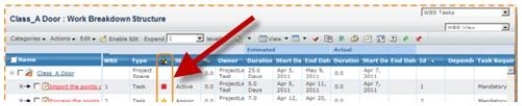
In the dashboard Image below, what is the red square indicating?

Select an option, then click Submit answer.

  • ○

    The task is Complete

  • ○

    The task is not complete but not late or at risk

  • ○

    The task is a Milestone and is pending

  • ○

    The task is late