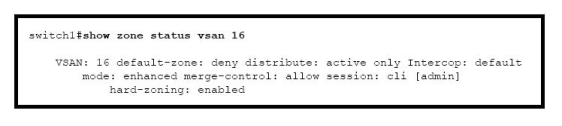
Refer to the exhibit. Which two CLI actions are appropriate to try to resolve the enhanced zoning lock problem? (Choose two.)
Select all that apply, then click Submit answer.
-
○
Use theclear zone lockcommand to remove the lock. Use this command on each switch in thefabric for VSAN 16 only.
-
○
Using either Cisco Fabric Manager or the CLI, reactivate the existing zone set for VSAN 16. Be careful to only reactivate and not deactivate activate to avoid a disruption in service.
-
○
Use theshow zone internal vsan 16commandto determine the IP address of the user and MDS switch where the lock is currently held.
-
○
Use theno zone commit vsan
forcecommand on the switch that holds the lock to release the lock if another user holds the lock. -
○
Use theno zone commitvsancommand on the switch that holds the lock to release the lock if you are the holder of the lock.
