Instructions
THIS TASK DOES NOT REQUIRE DEVICE CONFIGURATION.
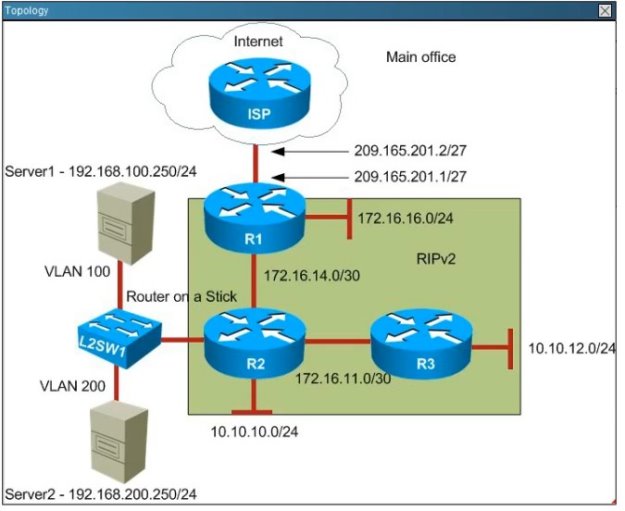
Click the Scenario tab for background information and the Topology tab for the network diagram.
To access to the console of a device, click the device icon on the Topology tab or click a device tab.
To access the four multiple-choice questions, click the Questions tab then click the boxes numbered 1 through 4 on the top left of the panel. Be sure to answer all four questions before clicking Next.
Scenario:
Router R1 connects the main office to internet, and routers R2 and R3 are internal routers
NAT is enabled on Router R1
The routing protocol that is enabled between R1, R2 and R3 is RIPv2
R1 sends default route into RIPv2 for internal routers to forward internet traffic to R1
Server1 and Server 2 are placed in VLAN 100 and 200 respectively, and are still running router on stick configuration with router R2.
You have console access on R1, R2, R3 and L2SW1 devices.
Use only show commands to troubleshoot the issues.


Users in the main office complain that they are unable to reach Internet sites. You observe that traffic destined for the ISP router is not forwarded correctly on R1. What is the root cause of the issue?
Ping to Internet server shows the following results from R1:
R1#ping 209.165.200.225
Type escape sequence to abort
Sending 5, 100-byte ICMP Echos to 209.165.200.225, timeout is 2 seconds:
…
Success rate is 0 percent(0/5)
Select an option, then click Submit answer.
Reference / correct answer:
The default route that is to the ISP router is not configured on R1