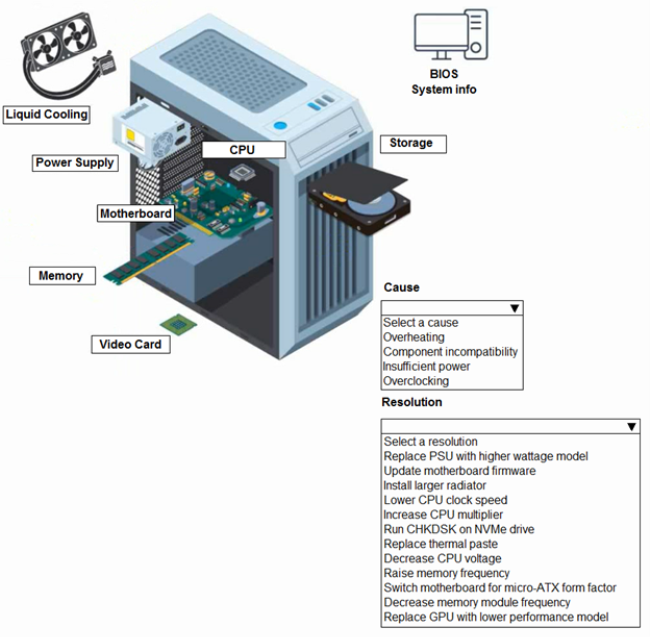
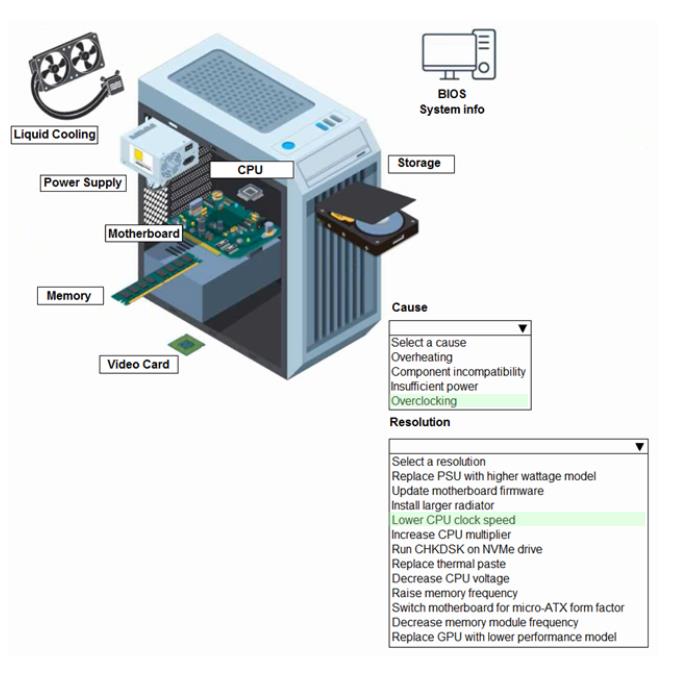
A customer built a computer for gaming, sourcing individual components and then assembling the system. The OS starts up, but within a few minutes the machine locks up. The customer brought the computer to a technician to diagnose the issue.
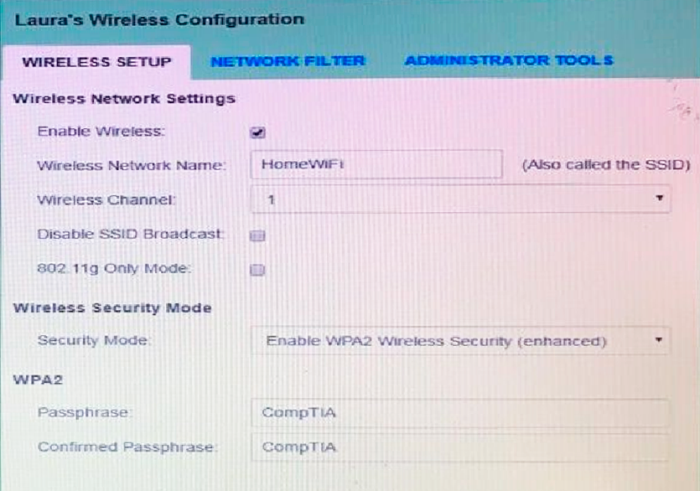
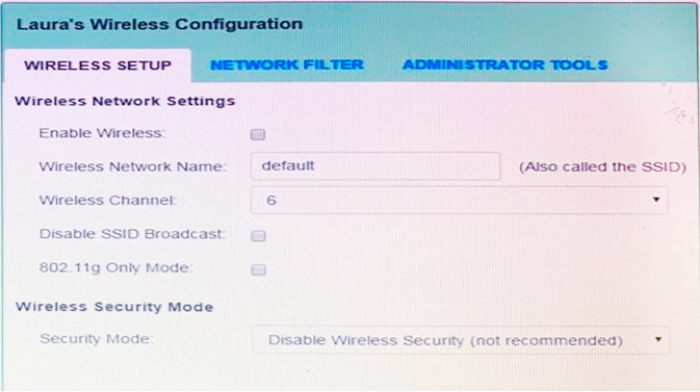
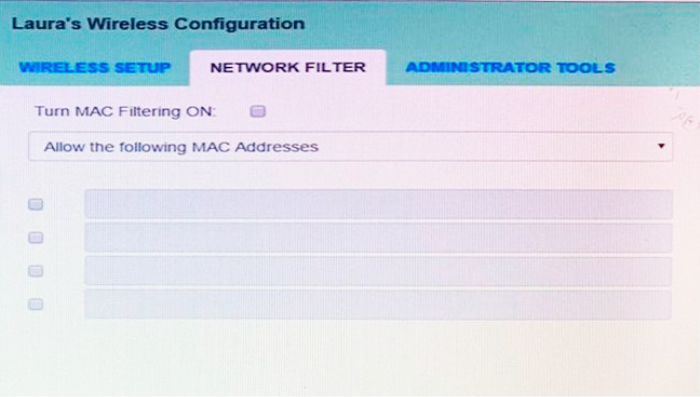
Laura, a customer, has instructed you to configure her home office wireless access point.
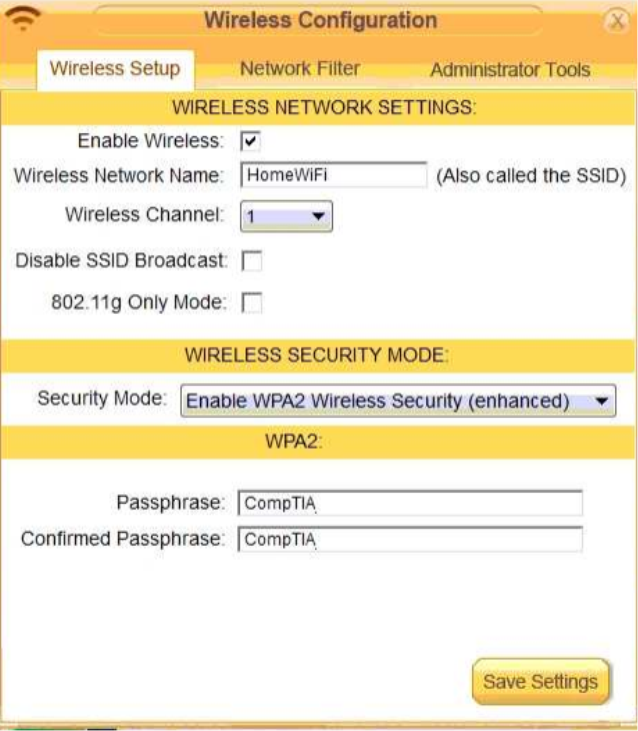
She plans to use the wireless network for finances and has requested that the network be setup with the highest encryption possible.
Additionally, Laura knows that her neighbors have wireless networks and wants to ensure that her network is not being interfered with by the other networks.
She requests that the default settings be changed to the following.
Wireless Name: HomeWiFi
Shared Key: CompTIA
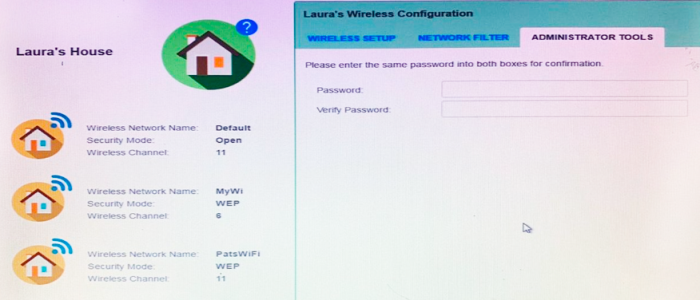
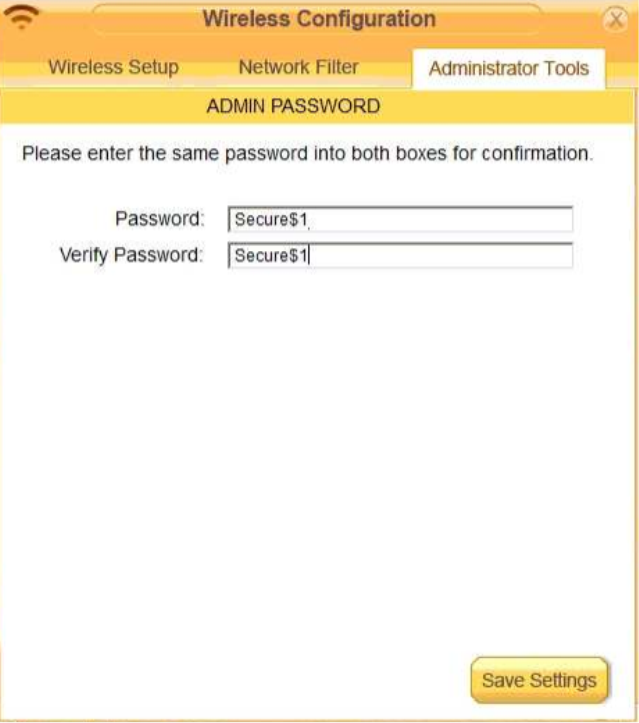
Router Password: Secure$1
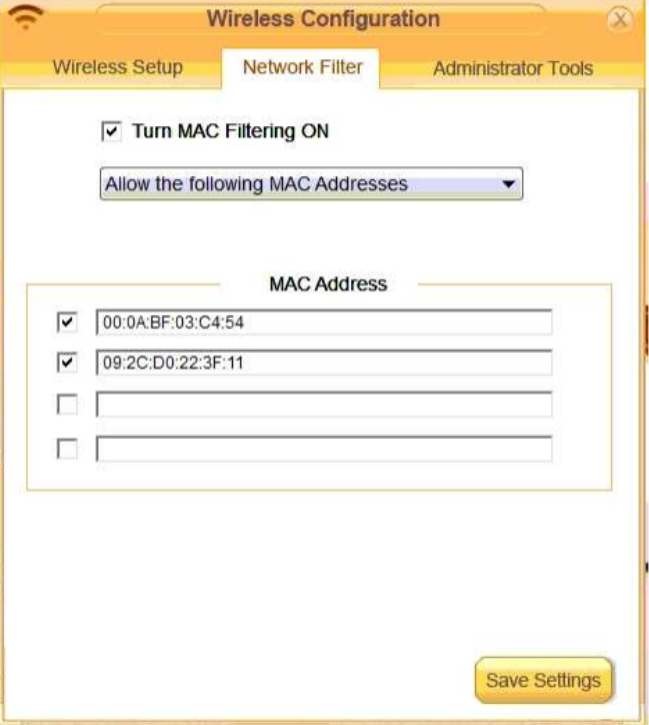
Finally, Laura wants to ensure that only her laptop and Smartphone can connect to the network.
Laptop: IP Address 192.168.1.100
Hardware Address: 00:0A:BF:03:C4:54
Smartphone: IP Address 192.168.1.101
Hardware Address: 09:2C:D0:22:3F:11
INSTRUCTIONS
Configure Laura’s wireless network using the network adapter window.
If at any time you would like to bring back the initial state of the situation, please click the Reset All button.
Answer is in the explanation below.
Ask AI for More Explanation
— your own AI account, opens inside the app
Reference / correct answer:
Seetheexplanationbelow
solution as
Question 3
A user reports a cell phone is getting hot. Which of the following are MOST likely to be possible causes? (Select THREE).
Select all that apply, then click Submit answer.
○
Using the device as a Wi-Fi hotspot
○
A cracked screen
○
A failing battery
○
Less than 15% free storage space on the phone
○
Privileged control
○
Recurring prompts to install OS updates
○
Granting too many application camera permissions
○
Too many open applications
Ask AI for More Explanation
— your own AI account, opens inside the app
Reference / correct answer:
Using the device as a Wi-Fi hotspot
A failing battery
Too many open applications
Question 4
The owner of a restaurant reports that wireless network connections are lost intermittently throughout the day. Which of the following steps should a technician take to troubleshoot the issue? (Select TWO).
Select all that apply, then click Submit answer.
○
Identify the location of devices that utilize 2.4GHz.
○
Check to see if the phones are IJTP or STP lines.
○
Test to see if the copper electrical Wires are causing interference.
○
Map all of the wireless signals in the restaurant.
○
Verify T568B is being used in the wiring closet patch panel.
○
Schedule timed router reboots throughout the day.
Ask AI for More Explanation
— your own AI account, opens inside the app
Reference / correct answer:
Identify the location of devices that utilize 2.4GHz.
Map all of the wireless signals in the restaurant.
The correct answers are A. Identify the location of devices that utilize 2.4GHz and D. Map all of the wireless signals in the restaurant. In order to troubleshoot the issue, the technician should first identify the location of devices that utilize the 2.4GHz frequency, as this can cause interference with the wireless signal. Additionally, the technician should map all of the wireless signals in the restaurant in order to identify any potential sources of interference. Checking to see if the phones are IJTP or STP lines, testing to see if the copper electrical wires are causing interference, verifying T568B is being used in the wiring closet patch panel, and scheduling timed router reboots throughout the day are not necessary steps for troubleshooting this issue.
Question 5
Which of the following are default ports for HTTP and HTTPS traffic? (Select TWO).
Select all that apply, then click Submit answer.
○
23
○
25
○
80
○
143
○
389
○
443
Ask AI for More Explanation
— your own AI account, opens inside the app
Reference / correct answer:
80
443
Question 6
A user reboots a machine. On rebooting, the user hears one beep, and then an error message is displayed. Which of the following are MOST likely causing this issue? (Select TWO).
Select all that apply, then click Submit answer.
○
RAM module
○
Graphics card
○
CPU
○
Boot order
○
USB flash drive
○
Power supply
Ask AI for More Explanation
— your own AI account, opens inside the app
Reference / correct answer:
RAM module
Boot order
Question 7
A technician needs to fix a Cat 5 cable issue. The cable, which is connected to a network jack, fails when it is moved around. Which of the following items must the technician use to fix the issue? (Select TWO).
Select all that apply, then click Submit answer.
○
Scissors
○
Network tap
○
Magnetized screwdriver
○
Tone generator
○
RJ45 connector
○
Crimper
Ask AI for More Explanation
— your own AI account, opens inside the app
Reference / correct answer:
RJ45 connector
Crimper
To fix a Cat 5 cable issue where the cable fails when it is moved around, the technician would need to use an RJ45 connector (option E) and a crimper (option F). The technician can use the crimper to attach a new RJ45 connector to the end of the cable, which should resolve the issue.
An RJ45 connector (option E) is a type of connector commonly used for Ethernet networking. It is an 8-position, 8-contact (8P8C) modular plug and jack that is used to terminate Cat 5 and other types of twisted pair cables. A crimper (option F) is a tool used to attach connectors to the ends of cables. In this case, the technician would use the crimper to attach a new RJ45 connector to the end of the Cat 5 cable.
When a cable fails when it is moved around, it often indicates that there is a problem with the connector at the end of the cable. By attaching a new RJ45 connector using a crimper, the technician can ensure that the cable has a secure and reliable connection.
Question 8
Which of the following options provides correct information about 2.4GHz and 5GHz wireless frequencies? (Select TWO)
Select all that apply, then click Submit answer.
○
2.4GHz has less interference. 5GHz transmits inlower speed.
○
2.4GHz penetrates solid objects more effectively. 5GHz provides faster data connections.
○
2.4GHz has a higher data rate. 5GHz has 23 channels.
○
2.4GHz has Il channels. 5GHz has no data interference.
○
2.4GHz has a higher coverage area. 5GHz has higher bandwidth.
○
2.4GHz has a higher bandwidth. 5GHz has lower transmit power.
Ask AI for More Explanation
— your own AI account, opens inside the app
Reference / correct answer:
2.4GHz penetrates solid objects more effectively. 5GHz provides faster data connections.
2.4GHz has a higher coverage area. 5GHz has higher bandwidth.
The correct answers are B. 2.4GHz penetrates solid objects more effectively. 5GHz provides faster data connections and E. 2.4GHz has a higher coverage area. 5GHz has higher bandwidth. The 2.4GHz frequency has a lower data rate compared to 5GHz, but it can penetrate solid objects more effectively and has a higher coverage area. The 5GHz frequency, on the other hand, provides faster data connections and has higher bandwidth, but it has fewer channels and lower transmit power.
Question 9
Which of the following describes the operational difference between hubs and switches when transmitting data to a specific computer inside the network?
Select an option, then click Submit answer.
○
Switches only send data to the specific computer, while hubs send data to all computers inside the network.
○
Switches compress data while hubs send uncompressed data
○
Switches receive data and route it to all computers inside the network while hubs receive data and do not route
○
Switches scramble data, while hubs send data in the original form.
Ask AI for More Explanation
— your own AI account, opens inside the app
Reference / correct answer:
Switches only send data to the specific computer, while hubs send data to all computers inside the network.
Question 10
A startup company is outgrowing its current office space and is requiring employees to work remotely. The company must comply with government-enforced requirements to safeguard all aspects of data, so the IT department plans to maintain complete control over users' operating systems. Which of the following should the IT department implement?
A user in a medical office contacts a technician regarding a printer that is used to print A4-sized labels. After the labels are printed, they mistakenly contain white space in the middle of the page. Which of the following would MOST likely be the cause?
A university student was able to boot from a live Linux CD on a computer in a shared space on campus. Which of the following will BEST prevent this type of action from occurring in the future?
Select an option, then click Submit answer.
○
Require TPM security features.
○
Set a boot password.
○
Disable all media options.
○
Enable secure boot.
Ask AI for More Explanation
— your own AI account, opens inside the app
Reference / correct answer:
Enable secure boot.
Enabling secure boot will verify the digital signature of the bootloader and operating system, ensuring that the system only boots from trusted and authorised sources. This can prevent booting from an unauthorised live CD or other external media.
The best way to prevent booting from a live Linux CD on a computer in a shared space on campus is to enable secure boot. Secure boot is a feature that ensures that the system only runs software that is signed by an authorized party. This means that the system will not boot from any unauthorized media, including live Linux CDs.
A field technician has been dispatched to a site with an internet outage. Upon arriving, the technician discovers that the POTS lines are not working as well. Which of the following technologies is the site MOST likely using?
Select an option, then click Submit answer.
○
Fiber
○
Cable
○
DSL
○
Satellite
Ask AI for More Explanation
— your own AI account, opens inside the app
Reference / correct answer:
DSL
Question 14
Which of the following types of devices MOST often uses a Thunderbolt cable?
Select an option, then click Submit answer.
○
Linux PC
○
Android mobile
○
Apple laptop
○
Chromebook
Ask AI for More Explanation
— your own AI account, opens inside the app
Reference / correct answer:
Apple laptop
Question 15
A user who works with sensitive data has a computer configured with hard drive encryption The TPM is active and hosting the encrypted key. After an upgrade to the motherboard. RAM and video card the hard drive is not booting and data cannot be accessed from the hard drive. Which of the following should the technician do to enable the system to boot again and get access to the stored data?
Select an option, then click Submit answer.
○
Use data recovery software to find and recover the hard drive information
○
Access the BIOS and select to rebuild the degraded RAID array
○
Boot into the BIOS and enable the TPM on the new motherboard.
○
Return the replaced motherboard back to the computer
Ask AI for More Explanation
— your own AI account, opens inside the app
Reference / correct answer:
Boot into the BIOS and enable the TPM on the new motherboard.
This page holds a free practice test for the CompTIA A+ Certification Exam: Core 1 (220-1201) certification from CompTIA. The 15 questions come free from the full 240-question Study4Pass practice set — a quick, honest check of where you stand. The free sample includes 7 single-answer, 6 multiple-answer, 1 interactive and 1 hands-on lab questions — the same mix of formats you will meet in the full set. The set follows the real exam’s spread of topics: Mobile Devices, Networking, Hardware and Virtualization and Cloud Computing. CompTIA 220-1001 is the exam for the CompTIA A+ Core 1 certification.
The target audience of the CompTIA 220-1001 exam includes individuals interested in becoming certified IT professionals, such as those seeking to become CompTIA A+ certified. The CompTIA 220-1001 exam does not have any prerequisites, however it is recommended that the candidate have at least six to twelve months of hands-on experience with computer hardware, network…
Free on this page: 15 practice questions with answers and explanations
Full practice set: 240 questions
Work through the questions one at a time and read every explanation, even for the ones you get right — the reasoning behind an answer is what the real exam tests. If one area keeps costing you marks, you have found exactly what to revise before exam day.
Think of the result as a map, not a verdict. The questions you miss point straight at the topics that need work, and the explanations tell you why the correct option wins. Candidates who loop through that cycle — practise, review the reasoning, re-test — walk into the real exam having already seen their weak spots and fixed them.
Inside the full 220-1201 practice set:
All 240 questions with answers and explanations
Timed Exam Simulation that mirrors the real exam pressure
Topic Training to drill one domain at a time
Ask AI for More Explanation on every question
Flag questions and review them before you finish
How to use this 220-1201 free practice test
There is no clock and no account needed. Answer each question, check the result, and read the explanation before moving on. For anything that still feels unclear, Ask AI is built into this AI-Enabled practice test — it explains the concept behind the question so the next one like it gets easier. Ready for more? The full 240-question set adds a timed Exam Simulation mode, topic training for your weak areas, and a flagged-question review, so you can practise the way the real exam feels.
What to study for each 220-1201 domain
Mobile Devices (13%) — For Mobile Devices, focus on understanding why each correct answer is right; the real exam rewards reasoning over recall.
Networking (23%) — Drill Networking with the questions above, and revisit any explanation that surprises you — surprises are exactly what to fix before the exam.
Hardware (25%) — Work through the Hardware questions until the reasoning behind each answer is clear — guessing your way past this area will show up on exam day.
Virtualization and Cloud Computing (11%) — Use the practice questions to find your gaps in Virtualization and Cloud Computing first, then read the official CompTIA documentation for anything you missed.
Hardware and Network Troubleshooting (28%) — This is the largest section of the 220-1201 exam at 28% — give it the most study time, and do not book the exam until these questions feel comfortable.
220-1201 practice test — quick questions
Is this 220-1201 practice test free?
Yes — the 15 questions on this page are completely free, with no signup and no payment details needed.
How many questions are in the full 220-1201 set?
240 questions. The 15 free questions above are a sample of that full set, in the same style and topic balance.
Does the free test show the answers?
Yes — every question shows the correct answer with an explanation, and Ask AI can explain the concept behind a question in plain words if you want to go deeper.
Is this the real 220-1201 exam?
No. This is a practice test: the questions are written to mirror the real 220-1201 exam’s topics and difficulty, not copied from it.