5V0-41.20 VMware SD-WAN Troubleshoot

Loading demo links...

Showing 1–3 of 5 questions

Question 1

Scenario 3:

After resolving numerous connectivity Issues throughout the various branch sites, connectivity between applications and users is finally present. The network administrator is informed that during certain tests, applications are not performing as they are expected to. Users report that call quality has not fully improved and that some of their calls either drop or have poor voice quality where the conversation is breaking up. Other users are noticing that file transfers are slower than expect. A group of users from a few sites have reported slowness in accessing internal and external applications.

Exhibit.
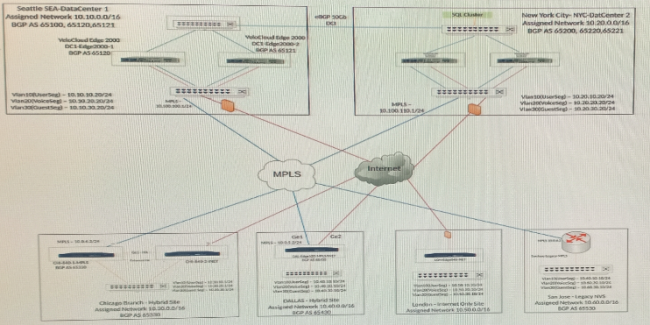
Users at a remote office are complaining about poor performance with certain applications. The network administrator has already verified the configuration is correct.

Which two parameters should the administrator review to troubleshoot this issue? (Choose two.)

Select all that apply, then click Submit answer.

  • Check the underlay network (bandwidth, latency, jitter, packet loss)

  • Change the bandwidth measurement under WAN Overlay Advanced Settings

  • Check the flows to verify which Business Policy the traffic of interest is matching

  • Look under Monitor, check Business priority tab
Question 2

Scenario 2:

After completing the branch activation activities for all required branches, the network administrator attempts to test connectivity between the various branches and between the hubs and branches. The administrator notices a lack of connectivity despite being certain that configurations have been complete. The administrator also observed that several users are reporting intermittent connectivity to some of the applications they are accessing. Other users are reporting no access to these applications. Other users at some of the branches claim they cannot get to certain public resources. The administrator wants to ensure that all sites can talk to each other and all resources are accessible.

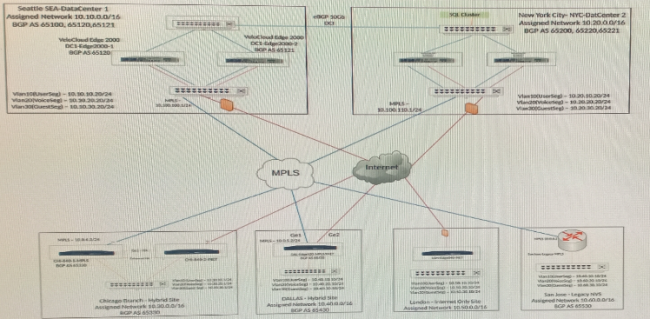
Exhibit.

The tunnel from spoke to hub is not coming up. What are the two possible reasons? (Choose two.)

Select all that apply, then click Submit answer.

  • Spoke Edge and hub Edge are two different Edge models.

  • Spoke Edge and hub Edge have a mismatch certificate authentication mode.

  • Hub WAN Interface might be behind the NAT Device or firewall.

  • Dynamic Branch to Branch is not enabled.

Question 3

Scenario 1:

The Dallas Branch location is having issues getting activated. The local network administrator is aware that the Edge device received a DHCP address and was able to connect to the internet. The Orchestrator is reporting the Edge as Down. No other changes were made post activation.

A network administrator is tasked with enabling SD-WAN at three branch locations. A topology has been provided for reference. For each site, the administrator is having issues bringing edges

online, as another administrator has gone ahead and created a configuration ahead of time. The organization has several branch sites. One is am Internet-only site and two are Hybrid locations with both internet and MPLS. The last location is MPLS only. There are hub data center locations in this environment as well. Please refer to the topology.

Refer to the Exhibit(s).

What is the cause of this issue?

Select an option, then click Submit answer.

  • The activation link did not specify the updated image location requiring the Edge to be re-activated.

  • The activation link did not contain any post-activation configuration to allow the Orchestrator to communicate with the Edge.

  • The Edge will be offline for about 4 hours until it has completed the factory image installation.

  • The activation link contained incorrect configurations for WAN overlays and WAN interfaces.