VCS-279 Administration of Veritas NetBackup 8.1.2 and NetBackup Appliances 3.1

Loading demo links...

Showing 1–3 of 10 questions

Question 1

An administrator is configuring a new device and receives the following error message:

Unable to determine robot type

What are two possible solutions? (Choose two.)

Select all that apply, then click Submit answer.

  • download a new device_mapping file from the Veritas Support website

  • ensure the tape drive is closed and ready for use

  • perform a rescan of the available tape drives

  • verify compatibility for the library with NetBackup

  • select the correct device type for the drives

Question 2

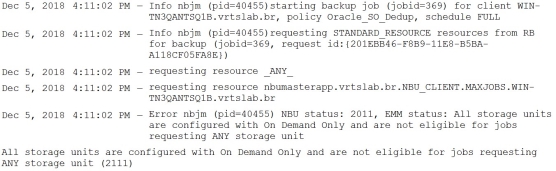
A backup job is showing the following error message:

Which two actions can an administrator perform to ensure the backup completes successfully? (Choose two.)

Select all that apply, then click Submit answer.

  • ensure at least one storage unit is without the On Demand Only option selected

  • increase the Multiplexing value on the Storage Unit

  • increase the “Maximum concurrent jobs” parameter on the Storage Unit

  • assign a specific Storage Unit for that policy

  • increase the “Limit I/O streams” parameter on the disk volume


Question 3

After creating a NBU-Catalog type backup policy, an administrator receives the following message:

DR file is on the same partition as your catalog and will be unusable in an actual disaster or disk failure.

Which two options are available to the administrator to ensure the DR file is available for future use? (Choose two.)

Select all that apply, then click Submit answer.

  • ensure the folder DR file is on a non-root volume

  • ensure the DR file is created on a volume other than the NetBackup volume

  • ensure the NetBackup catalog is on a non-root volume

  • configure a valid email address of the administrator in the “Send email” option

  • configure Auto Image Replication to send the DR file to a remote master server