UiARD UiPath Certified Advanced RPA Developer

Loading demo links...

Showing 1–3 of 10 questions

Question 1

DRAG DROP

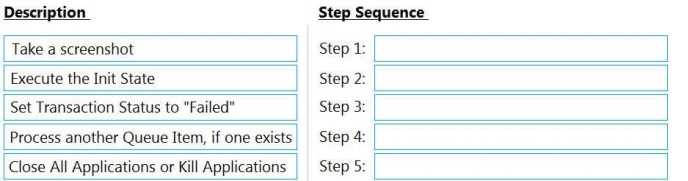
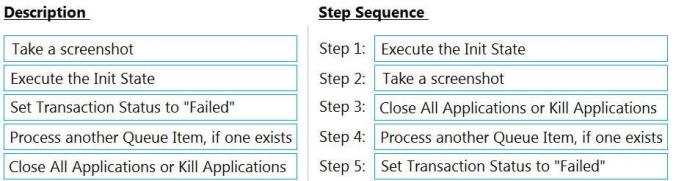
In a Robotic Enterprise (RE) Framework project that is connected to Orchestrator, what is the correct sequence of steps if an application exception occurs on a Queue Item in the Process Transaction state?

NOTE: Drag the Description found on the “Left” and drop on the correct Step Sequence found on the “Right”.

Select and Place:
Answer is in the explanation below.
Question 2

In UiPath Studio, what describes project validation and workflow analysis?

Select an option, then click Submit answer.

  • Validation of the file or project is performed whenever the Workflow Analyzer is triggered.

  • Validation of the file or project is performed after the Workflow Analyzer finishes the report.

  • Validation of the file or project is performed only if the user triggers Validate File and Validate Project.

  • Validation of the file or project is performed only when running or debugging.

Question 3

A developer used the Robotic Enterprise (RE) Framework to implement an automation of a website. For security reasons, the credentials for the login are stored in the Orchestrator.

Which steps should the developer perform to use these credentials in the project?

Select an option, then click Submit answer.

  • Add a row in the Constants sheet in Config.xlsx with the name of the Orchestrator asset. Use the Get Credential activity in the login workflow to get the username and password.

  • Add a row in the Settings sheet in Config.xlsx with the name of the Orchestrator asset.
    Use the Get Credential activity in the login workflow to retrieve the username and password.

  • Add a row in the Assets sheet in Config.xlsx with the name of the Orchestrator asset.
    Use the Get Credential activity in the login workflow to get the username and password.

  • Add a row in the Assets sheet in Config.xlsx with the name of the Orchestrator asset. In the login workflow, retrieve the username and password by referencing the Config dictionary.