Which of the following are correct ways to define a join in Tableau version 2020.3 and above?
Select all that apply, then click Submit answer.
Reference / correct answer:
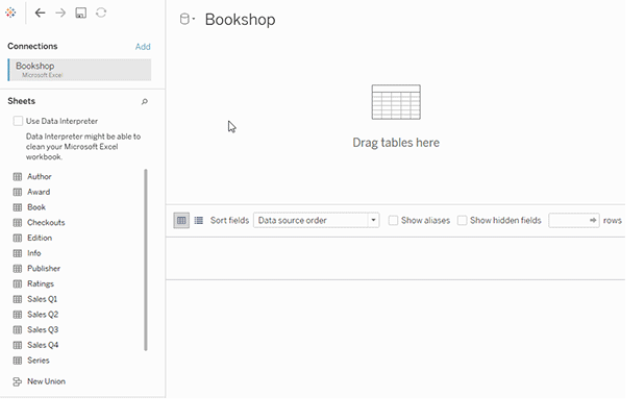
Right-click a logical table and click on open to go to the Join/Union canvas in the physical layer and add joins or unions.
Double-click a logical table to go to the Join/Union canvas in the physical layer and add joins or unions.
Explanation
Remember that joins are defined in the physical layer and relationships in the logical layer.
You can still specify joins between tables in the physical layer of a data source. Double-click a logical table to go to the Join/Union canvas in the physical layer and add joins or unions.
Every top-level, logical table contains at least one physical table. Open a logical table to view, edit, or create joins between its physical tables. Right-click a logical table, and then click Open. Or, just double-click the table to open it.

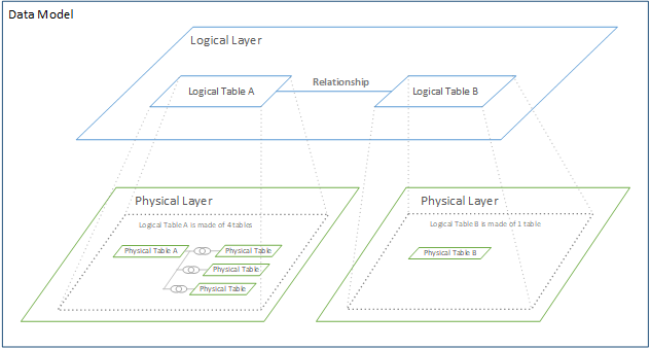
When you create a data source, it has two layers. The top-level layer is the logical layer of the data source. You combine data between tables in the logical layer using relationships.
The next layer is the physical layer of the data source. You combine data between tables at the physical layer using joins. For more information, see Logical and physical tables in the data model

Reference: https://help.tableau.com/current/online/en-us/datasource_relationships_learnmorepage.htm