QSSA2018 Qlik Sense System Administrator Certification Exam

Loading demo links...

Showing 7–9 of 9 questions

Question 7

The sales department in an organization is consolidating from three regional sales groups to one global sales group. The department still has three different streams in the hub, one for each region. The organization needs the stream structure to match the department structure.

What should the administrator create to meet this requirement?

Select an option, then click Submit answer.

  • A global sales group stream and three regional streams

  • A custom property named “global” and bind it to all three streams

  • A global sales group login security run

  • A global sales group stream for all three regions

Question 8

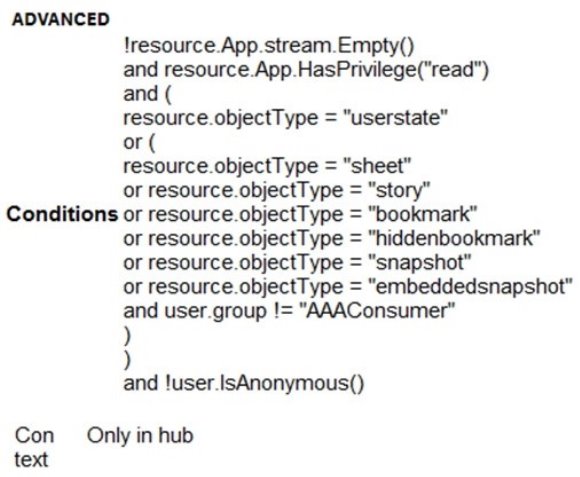
Refer to the exhibit.

A system administrator creates the security rule shown. No other custom security rules exist.

What effect will the security rule have when applied to a user?

Select an option, then click Submit answer.

  • If the user is in AAAConsumer group, the user can create app objects in published apps

  • If the user is NOT in AAAConsumer group, the user cannot create sheets

  • If the user is NOT in AAAConsumer group, the user can create app objects in published apps

  • If the user is NOT in AAAConsumer group, the user can create app objects in non-published apps

Question 9

A Qlik Sense environment has users from Active Directory. A system administrator creates a task to synchronize the users from Active Directory with Qlik Sense.

The system administrator adds a new user to Active Directory, and manually executes the synchronization task in Qlik Sense. The administrator observes that the new user was NOT added to the Qlik Sense environment.

What should the system administrator do to ensure the new user is added?

Select an option, then click Submit answer.

  • Look for an LDAP filter on the UDC for users from Active Directory

  • Ensure the synchronization task has sufficient rights to find new users

  • Wait 10 minutes for the new user in Active Directory to become visible for Qlik Sense

  • In the UDC, check Sync user data for existing users and re-run the synchronization task