1z0-588 Oracle Hyperion Data Relationship Management Essentials

Loading demo links...

Showing 7–9 of 10 questions

Question 7

Per the following example:

All Products
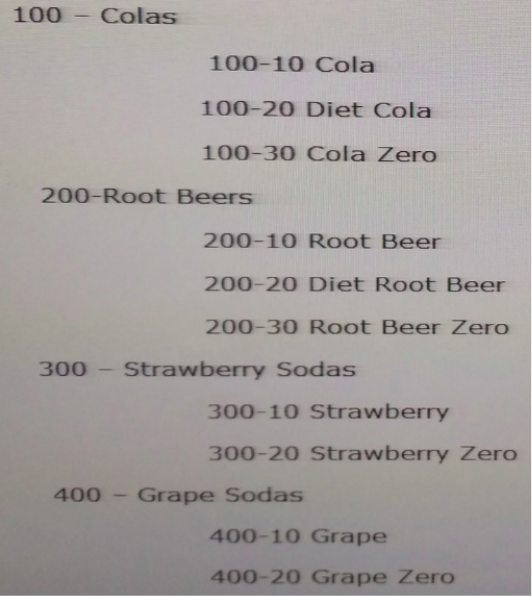
The product team has decided to group 300 and 400 product categories into a single "Fruity" product category. Which three statements are true about performing this change within a single hierarchy?

Select an option, then click Submit answer.

  • Users can create a new node called "Fruity" and drag and drop the 300 and 400 nodes to the new Fruity node. This will also move all of the children of 300 and 400.

  • Users can use the right-click menu items to Take and Put the nodes under a new node called
    "Fruity."

  • Users can use the Add option to insert the existing nodes under a new node called "Fruity."

  • DRM tracks the move action, user ID, date, and time in the Transaction History.

  • If the DRM administrator defined a batch validation in which a product category must be a three digit number, the user would not be allowed to create the new product node "Fruity".

Question 8

Your budget office is preparing the Entity dimension for the upcoming year with organisation changes. They are working in a version called '"Budget". This version has a Working status until the Entity hierarchy is finalized. The budget office user has received new information from management that requires him to back out the numerous changes he has made over the last five days. The AllowAsOf system preference is set to True. What is the next step?

Select an option, then click Submit answer.

  • To manually back out the changes in the Budget version.

  • To recover the DRM application from a backup.

  • To use the copy feature to copy the version and enter the "As Of" date to create the version as of the certain date.

  • To use the Create As Of Version feature to create a copy of the version as of a specified date.

    E) To use the Copy feature to copy the baseline version to a new version and re-apply changes "As Of" the desired date.

Question 9

The images or icons in the first two columns of the properties Tab indicate the following about a property:

1. Local property or global property

2. Locally inherited or globally inherited

3. Value is overridden

4. Value is default

5. Value is calculated

6. Value is manually entered

Select an option, then click Submit answer.

  • 1, 2 only

  • 1, 2, 3 only

  • 1, 2, 4 only

  • 1, 4 only

  • 1, 2, 3, 4, 6 only

  • 1, 2, 3, 4, 5 only