1z0-1058-22 Oracle Risk Management Cloud 2022 Implementation Professional

Loading demo links...

Showing 7–9 of 10 questions

Question 7

You are implementing Advanced Access Controls and there is a requirement for a control to monitor user access to specific, client-defined access points which give users the ability to both initiate a purchase order and approve payments on that purchase order.

Which is a valid option to implement the control?

Select an option, then click Submit answer.

  • From the “Access Entitlements” page create two entitlements containing the respective client-defined access points. Create an access model from the “Models” tab of Advanced Controls, based on the entitlements you created.

  • Select Actions > Create Access Control from the “Controls” tab of Advanced Controls.

  • Create an access model from the “Models” tab of Advanced Controls, and then define an access point filter for each individual client-defined access point.

  • From the “Access Entitlements” page create two entitlements containing the respective client-defined access points. Create an access model from the “Models” tab of Advanced Controls, based on the entitlements you created. Finally, deploy an access control in the “Controls” tab of Advanced Controls, and select the access model you created.

  • Create an access entitlement from the “Access Entitlements” page, then select Actions > Create Access Control from the “Controls” tab of Advanced Controls, and select the entitlement you created.
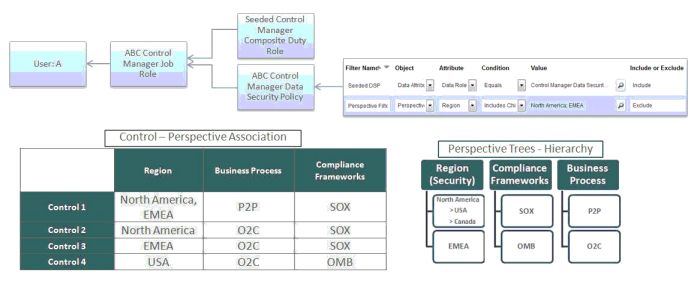
Question 8

Which controls can user A access and manage for the following Control Manager role configuration? See details of perspective trees and control-perspective association below.

Select an option, then click Submit answer.

  • None

  • Controls 2 and 3

  • Only Control 1

  • All controls

  • Controls 1, 2, and 3

Question 9

An organization has a list of companies with which they no longer wish to do business. The list is not stored in their ERP Could but is stored in a file.

Which transaction model will identify payments made to these companies?

Select an option, then click Submit answer.

  • Create an Imported business object that can be used in conjunction with Oracle’s pre-built “Payment” object. One both objects are in your model, add this standard filter: the “Payment” object’s “Remit to Supplier Name” is similar to the custom object’s “Company Name” by 95%.

  • Add a configurable attribute “Company Name” to Oracle’s pre-built “Payment” object. Then add this standard filter: “Remit to Supplier Name” equals “Company Name”.

  • You cannot define this model because imported objects from a file cannot be used with delivered objects.

  • Create an Imported business object that can be used in conjunction with Oracle’s pre-built “Payables Invoice” object. Once both objects are in your model, add this standard filter: the “Payables Invoice” object’s “Supplier Name” equals the custom object’s “Company Name”.