NCS-Core Nutanix Certified Services Core Infrastructure Professional

Loading demo links...

Showing 4–6 of 10 questions

Question 4

To prepare for a new Nutanix installation, a consultant downloads the Foundation VM, imports the VM to their Desktop Virtualization Solution, and powers on the VM. The IPv4 static address on the host workstation and the Foundation VM have been configured, but pings between them fail.

Which two troubleshooting steps should the consultant perform? (Choose two.)

Select all that apply, then click Submit answer.

  • Remove and re-import the Foundation VM to ensure the virtual NIC is set to Host-Only.

  • Verify the virtual NIC in the Foundation VM is bound to the correct physical Host adapter.

  • Confirm the IP addresses and subnet masks are correct.

  • Verify the virtual NIC in the Foundation VM is bound to the correct wireless network adapter.
Question 5

An administrator knows that the disks in a cluster are out of date and a new firmware is available. For security reasons, these clusters do not have access to theInternet.

Which two steps must be completed to update the firmware? (Choose two.)

Select all that apply, then click Submit answer.

  • Configure LCM with a URL to access the firmware bundle.

  • Download a dark site bundle and stage it on an internal webserver.

  • Download the updated firmware .tgz file from the Nutanix portal.

  • Select Upgrade Software, then select disks and upload the updated firmware.


Question 6

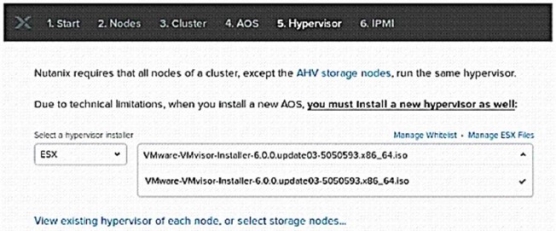
Refer to the exhibit.

A consultant is installing AOS 5.10 and ESXi 6.5 on three nodes. During the Foundation process, ESXi 6.5 is not available as one of the choices for hypervisor.

Which solution should the consultant use?

Select an option, then click Submit answer.

  • Upload ESXi image to /home/Nutanix/foundation/nos/hypervisor/esx.

  • Restart Foundation VM and refresh Foundation page.

  • Update the Foundation whitelist from the support portal.

  • Upload ESXi image to /home/Nutanix/foundation/isos/hypervisor/esx.