You are building an API that will return a user’s documents from a Microsoft SharePoint Online site.
You need to ensure that the API can use the Microsoft Authentication Library (MSAL) to access the SharePoint site. The solution must use the principle of least privilege.
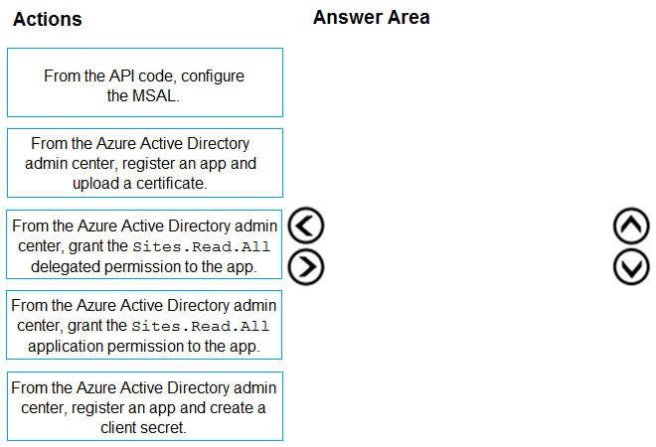
Which three actions should you perform in sequence? To answer, move all actions from the list of actions to the answer area and arrange them in the correct order.
NOTE: More than one order of answer choice is correct. You will receive credit for any of the correct orders you select.
Select and Place:
Answer is in the explanation below.
Reference / correct answer:
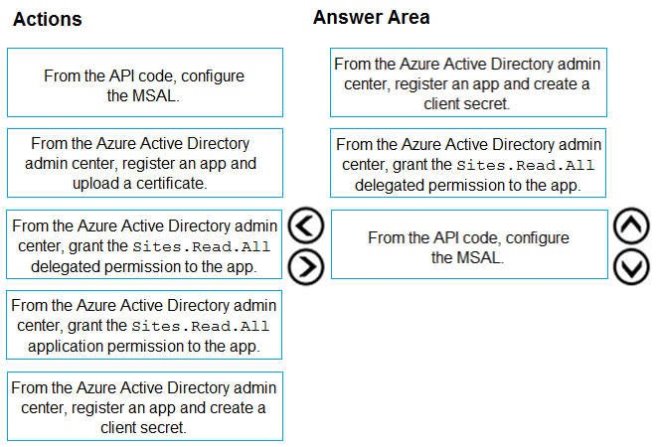
Step 1: From Azure Active Directory admin center, register an app and create a client secret
Register your application in Azure AD. Service-to-service calls require that your application use an X.509 certificate to create client assertion in the form of a base64-encoded, SHA256 signed JWT bearer token.
Generate a new key for your application. Keys, also known as client secrets, are used when exchanging an authorization code for an access token.
Step 2: From the Azure Active Directory admin center, grant the Sites.Read.All delegated permission to the app.
Delegated Permissions. Enables your client app to perform operations on behalf of the signed-in user, such as reading email or modifying the user's profile.
Incorrect Answers:
Application Permissions. Permissions that enable the client app to authenticate as itself without user interaction or consent, such as an app used by background services or daemon apps.
Step 3: From the API code, configure the MSAL.
When have registered your app in Azure AD and configured it with the necessary permissions, you're ready to build your app.
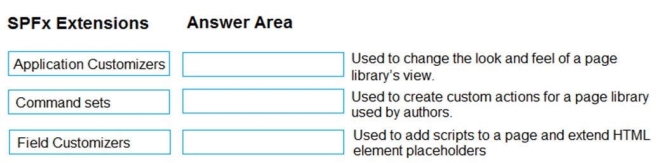
Match the SharePoint Framework (SPFx) extensions to the correct descriptions.
To answer, drag the appropriate SPFx extension from the column on the left to its description on the right. Each SPFx extension may be used once, more than once, or not at all.
NOTE: Each correct match is worth one point.
Select and Place:
Answer is in the explanation below.
Reference / correct answer:
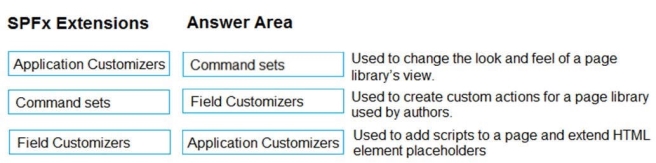
Box 1: Command sets
SharePoint Framework List View Command Set is used to add some action in the toolbar/context menu of list / library.
Box 2: Field Customizers
Field Customizer is a type of SPFx extensions, which allows us to define a custom display style for a field or column.
Box 3: Application Customizers
Application Customizers provide access to well-known locations on SharePoint pages that you can modify based on your business and functional requirements. For example, you can create dynamic header and footer experiences that render across all the pages in SharePoint Online.
 Application Permissions. Permissions that enable the client app to authenticate as itself without user interaction or consent, such as an app used by background services or daemon apps.