You have a Microsoft 365 E5 subscription that contains the groups shown in the following table.

You create a Conditional Access policy named CAPolicy1 that will block access to Microsoft Exchange Online from iOS devices. You assign CAPolicy1 to Group1.
You discover that User1 can still connect to Exchange Online from an iOS device. You need to ensure that CAPolicy1 is enforced.
What should you do?
Select an option, then click Submit answer.
Reference / correct answer:
Assign CAPolicy1 to Group2.
Conditional Access policies are applied based on the assignment of users or devices to the policy. In this scenario, CAPolicy1 is assigned to Group1, which includes the user User1. However, the policy blocks access from iOS devices, and the devices themselves are in Group2 (which contain iOS devices).
Since CAPolicy1 is assigned to the user group (Group1) but not to the iOS device group (Group2), the policy does not effectively target iOS devices used by User1. To ensure that the policy blocks access from iOS devices for User1, you need to assign the policy to the group containing the iOS devices (Group2).
Therefore, assigning CAPolicy1 to Group2 will enforce the policy on those devices, preventing User1 from connecting to Exchange Online from an iOS device.
Reference: https://learn.microsoft.com/en-us/azure/active-directory/conditional-access/overview






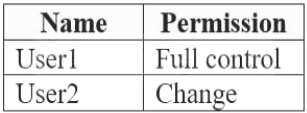
 On Computer1, you create an NTFS folder and assign Full control permissions to Everyone. You share the folder as Share1 and assign the permissions shown in the following table.