MB-200 Microsoft Power Platform + Dynamics 365 Core

Loading demo links...

Showing 4–6 of 10 questions

Question 4 (Mixed Questions)

HOTSPOT

You are a Dynamics 365 for Customer Service system administrator.

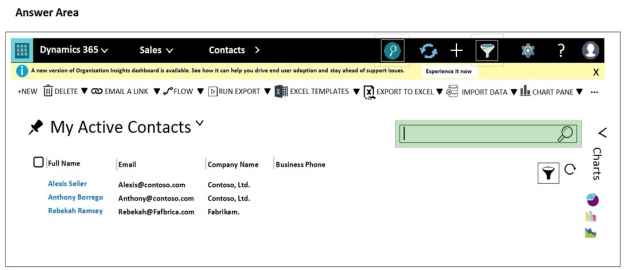
You enable the Quick Find view to look up First Name, Last Name, Email, and City on the Contact entity.

You need to identify where the Quick Find search will be used.

NOTE: Each correct selection is worth one point.

Hot Area:
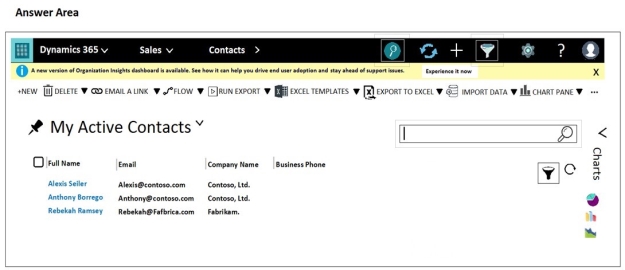
Answer is in the explanation below.
Question 5 (Mixed Questions)

You are a Dynamics 365 for Customer Service administrator. Sales team members record leads in a Microsoft Excel workbook after conferences.

The system must prevent the addition of duplicate leads from the workbooks.

Sales team members must be able to manually create a duplicate lead record.

You need to configure duplicate detection settings.

Which two actions should you perform? Each correct answer presents part of the solution.

NOTE: Each correct selection is worth one point.

Select all that apply, then click Submit answer.

  • Create a duplicate detection job for all active accounts.

  • Set the value of When a record is created or updated to on.

  • Set the value of When a record is created or updated to off.

  • Set the value of Enable duplicate detection to off.

  • Set the value of During import to on.

Question 6 (Mixed Questions)

You are a Dynamics 365 for Customer Service developer. You create a custom entity and add custom fields to the case entity.

You must create a solution to include only the custom entity and case entity changes. The solution must allow import and export without errors.

You need to create the solution.

Which two actions should you perform? Each correct answer presents part of the solution.

NOTE: Each correct selection is worth one point.

Select all that apply, then click Submit answer.

  • Add an existing unused entity to the solution. Rename the entity to the custom entity. Add fields needed for the case entity.

  • Create a case entity in the new solution and add the custom fields to the new case entity.

  • Create the custom entity and custom fields in the case entity within the default solution.

  • Create the custom entity in the new solution and add the appropriate fields, forms, and views.

  • Create a new solution and add the entity named Case to the solution. Add the custom fields to the case entity.