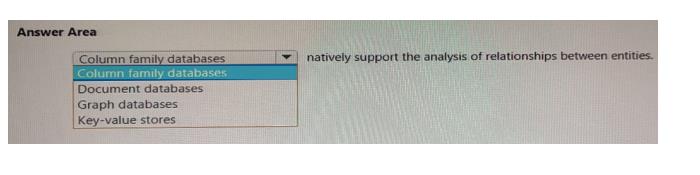
Question 1(Describe an analytics workload on Azure)
DRAG DROP
Match the types of activities to the appropriate Azure Data Factory activities.
To answer, drag the appropriate activity type from the column on the left to its Data Factory activity on the right. Each activity type may be used once, more than once, or not at all.
NOTE: Each correct match is worth one point.
Select and Place:
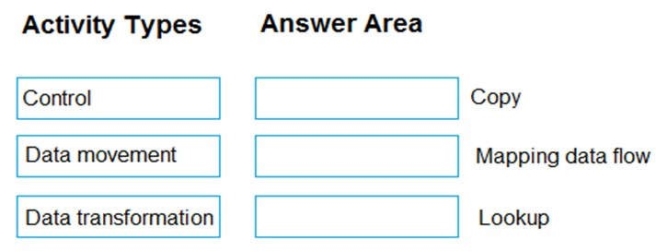
Answer is in the explanation below.
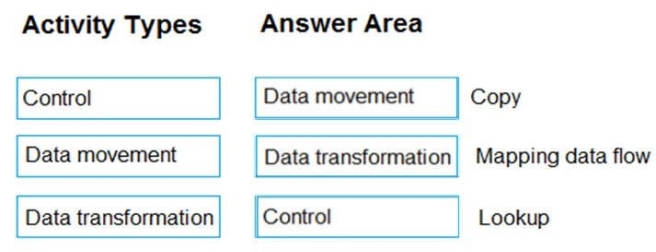
Reference / correct answer:
Box 1: Data movement
Box 2: Data transformation
A pipeline could contain a set of activities that ingest and clean log data, and then kick off a mapping data flow to analyze the log data.
Box 3: Control
Lookup Activity is a control flow activity.
Lookup Activity can be used to read or look up a record/ table name/ value from any external source. This output can further be referenced by succeeding activities.
Question 2(Describe an analytics workload on Azure)
DRAG DROP
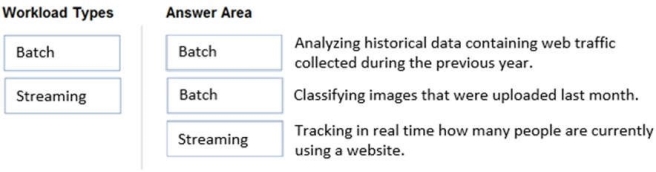
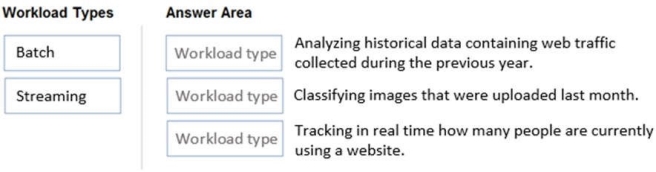
Match the types of workloads to the appropriate scenarios.
To answer, drag the appropriate workload type from the column on the left to its scenario on the right. Each workload type may be used once, more than once, or not at all.
NOTE: Each correct match is worth one point.
Select and Place:
Answer is in the explanation below.
Reference / correct answer:
Box 1: Batch
The batch processing model requires a set of data that is collected over time while the stream processing model requires data to be fed into an analytics tool, often in micro-batches, and in real-time.
The batch Processing model handles a large batch of data while the Stream processing model handles individual records or micro-batches of few records. In Batch Processing, it processes over all or most of the data but in Stream Processing, it processes over data on a rolling window or most recent record.