AZ-800 Administering Windows Server Hybrid Core Infrastructure

Loading demo links...

Showing 4–6 of 10 questions

Question 4 (Case Study 2)

HOTSPOT

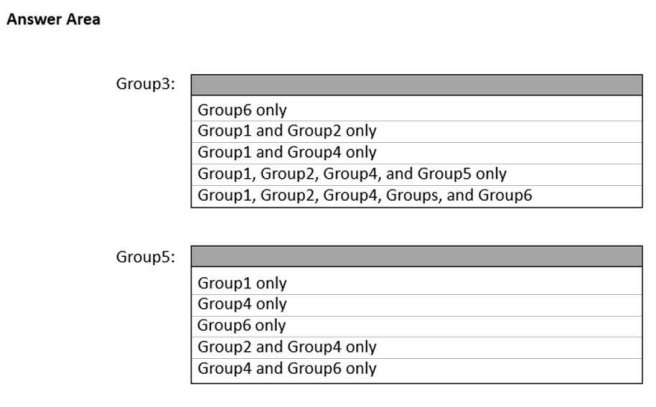
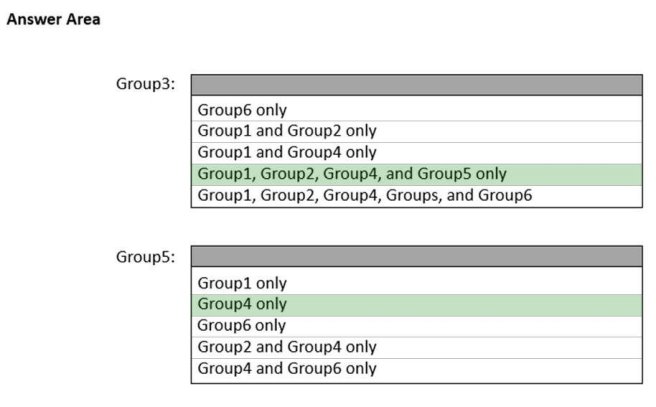
Which groups can you add to Group3 and Group5? To answer, select the appropriate options in the answer area.

NOTE: Each correct selection is worth one point.

Hot Area:

Answer is in the explanation below.

Question 5 (Mixed Questions)

You have a server named Host1 that has the Hyper-V server role installed. Host1 hosts a virtual machine named VM1.

You have a management server named Server1 that runs Windows Server. You remotely manage Host1 from Server1 by using Hyper-V Manager.

You need to ensure that you can access a USB hard drive connected to Server1 when you connect to VM1 by using Virtual Machine Connection.

Which two actions should you perform? Each correct answer presents part of the solution.

NOTE: Each correct selection is worth one point.

Select all that apply, then click Submit answer.

  • From the Hyper-V Settings of Host1, select Allow enhanced session mode.

  • From Virtual Machine Connection, select Show Options, and then select the USB hard drive.

  • From Virtual Machine Connection, switch to a basic session.

  • From Disk Management on Host1, select Rescan Disks.

  • From Disk Management on Host1, attach a virtual hard disk.

Question 6 (Case Study 4)

You need to implement a name resolution solution that meets the networking requirements.

Which two actions should you perform? Each correct answer presents part of the solution.

NOTE: Each correct selection is worth one point.

Select all that apply, then click Submit answer.

  • Configure the DNS Servers settings for Vnet1.

  • On DC3, install the DNS Server role.

  • Create a virtual network link in the corp.fabrikam.com Azure private DNS zone.

  • Configure a conditional forwarder on DC3.

  • Enable autoregistration in the corp.fabrikam.com Azure private DNS zone.

  • Create an Azure private DNZ zone named corp.fabrikam.com.

  • Create an Azure DNZ zone named corp.fabrikam.com.