You manage an Azure point-to-site (P2S) VPN deployment. All users connect regularly from their personal Windows computer through a P2S VPN by using certificate-based authentication.
A new user attempts to establish a P25S VPN connection. The user receives the following error message:
A certificate could not be found that can be used with this Extensible Authentication protocol. (Error 798)
You need to assists the user with resolving the certificate issue.
What should you do? To answer, drag the appropriate locations to the correct task. Each location maybe used once, more than once, or not at all. You may need to drag the split bar between panes or scroll to view content.
NOTE: Each correct selection is worth one point.
Answer is in the explanation below.
Reference / correct answer:
A) Provide the target certificate location for importing a Client Authentication key usage certificate file with the .pfx extension.
B) Provide the target certificate location for importing a Certificate Signing certificate key usage file with the .cer extension
Local Computer\Trusted Root Certification Authorities
This is the location where the root certificate should be installed on the user’s personal Windows computer. The root certificate is a self-signed certificate that is used to sign the client certificates. The root certificate public key data is also uploaded to Azure point-to-site VPN configuration. The root certificate is exported with the .cer extension1.
Question 2(Contoso Ltd, Case Study)
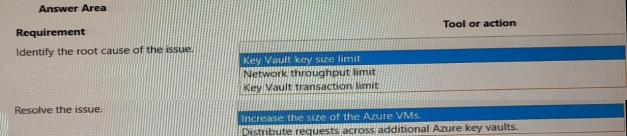
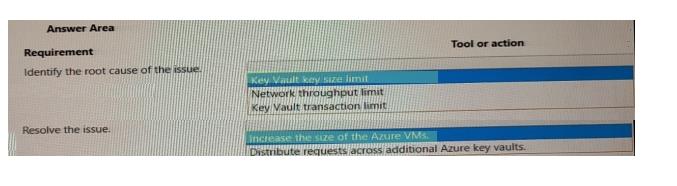
You need to troubleshoot the Azure Key Vault issues.
What should you do? To answer, select the appropriate options in the answer area.
NOTE: Each correct selection is worth one point.
Answer is in the explanation below.
Reference / correct answer:
Box 1: Key Vault transaction limit.Based on the given scenario, the issue is related to the number of transactions per second (TPS) being throttled. The Azure Key Vault has a transaction limit, which varies depending on the service tier. In the provided images, the error message states that the request rate is too large, indicating that the transaction limit has been reached. To resolve this issue, you can either distribute the transactions over a longer period, implement a retry policy, or consider upgrading to a higher service tier if the current tier's transaction limit is insufficient for your needs. Reference: https://docs.microsoft.com/en-us/azure/key-vault/general/service-limits
Box : 2 Distribute requests across additional Azure Key vaults
In the provided scenario, the issue is that the Azure Key Vault is experiencing throttling due to too many requests per second. Throttling occurs when the number of requests exceeds the allowed limits for a given time period. To resolve this issue, you should distribute the requests across additional Azure Key Vaults. By doing so, you can balance the load and prevent exceeding the request limits, thus avoiding throttling. Reference: https://docs.microsoft.com/en-us/azure/key-vault/general/overview-throttling
Question 3(Misc. Questions Set)
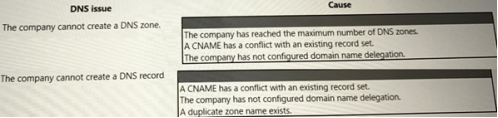
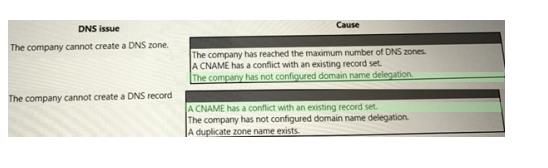
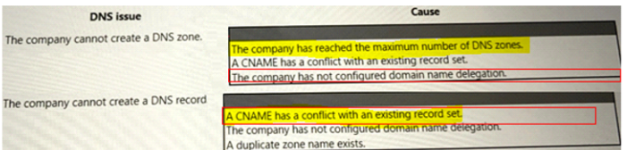
A company uses public Azure DNS zones.
The company reports DNS record creation and name resolution issues.
You need to troubleshoot the issues.
What are the causes of the issues?
Answer is in the explanation below.
Reference / correct answer:
Limited Time Offer – Save Now!
Don’t miss out — get full access at the best price.