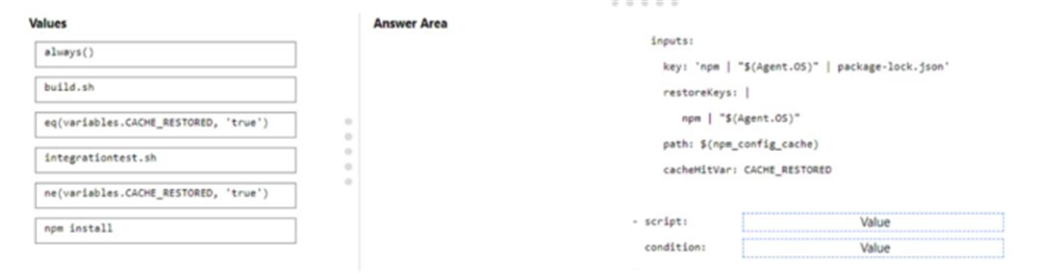
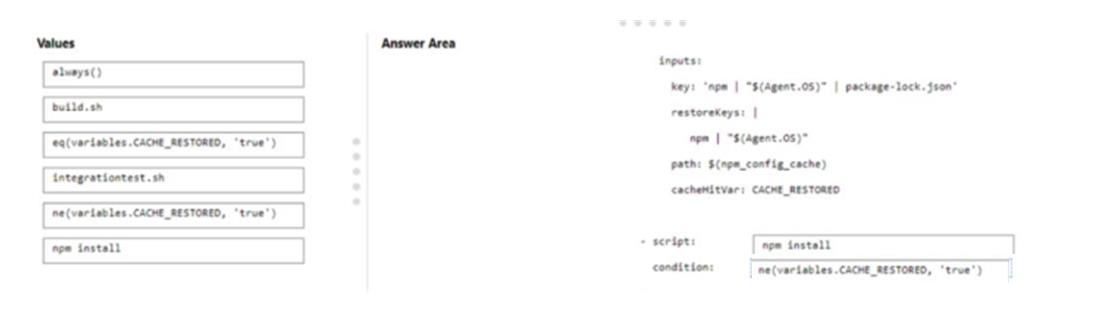
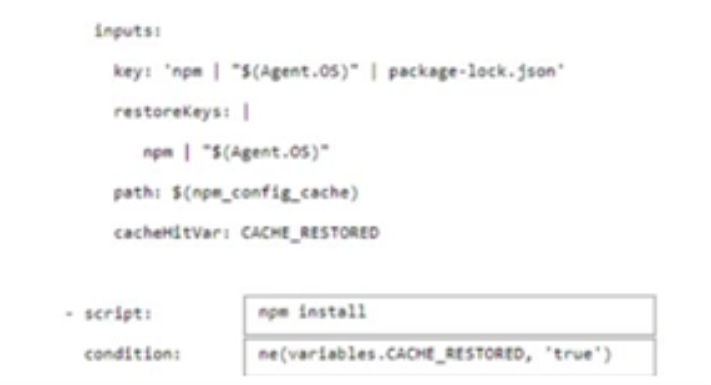
You have an Azure DevOps pipeline that is used to deploy a Node.js app.
You need to ensure that the dependencies are cached between builds.
How should you configure the deployment YAML? To answer, drag the appropriate values to the correct targets. Each value may be used once, more than once, or not at all. You may need to drag the split bar between panes or scroll to view content.
NOTE Each correct selection is worth one point.
Answer is in the explanation below.
Ask AI for More Explanation
— your own AI account, opens inside the app
Reference / correct answer:
Question 2(Mixed Questions)
DRAG DROP
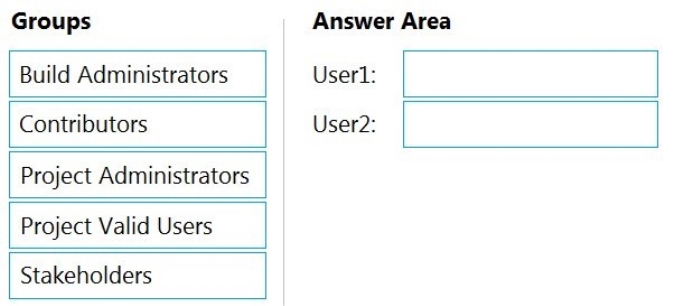
You have a private project in Azure DevOps and two users named User1 and User2.
You need to add User1 and User2 to groups to meet the following requirements:
User1 must be able to create a code wiki.
User2 must be able to edit wiki pages.
The solution must use the principle of least privilege.
To which group should you add each user? To answer, drag the appropriate groups to the correct users. Each group may be used once, more than once, or not at all. You may need to drag the split bar between panes or scroll to view content.
NOTE: Each correct selection is worth one point.
Select and Place:
Answer is in the explanation below.
Ask AI for More Explanation
— your own AI account, opens inside the app
Reference / correct answer:
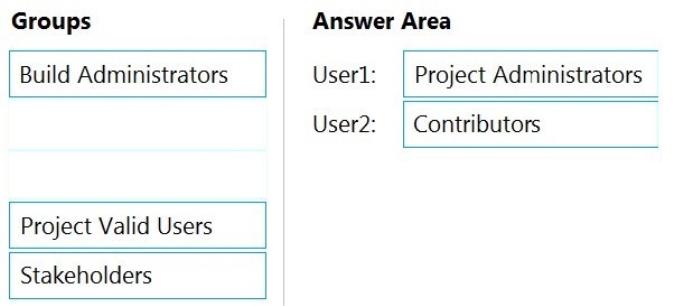
User1: Project Administrators
You must have the permission Create Repository to publish code as wiki. By default, this permission is set for members of the Project Administrators group.
User2: Contributors
Anyone who is a member of the Contributors security group can add or edit wiki pages.
Anyone with access to the team project, including stakeholders, can view the wiki.
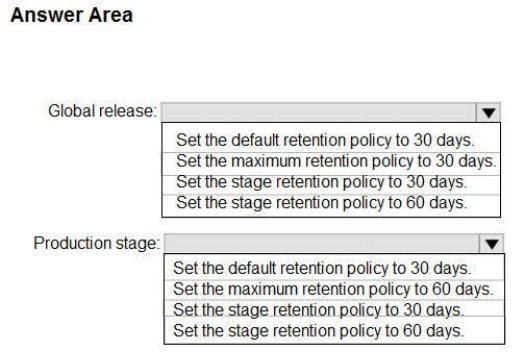
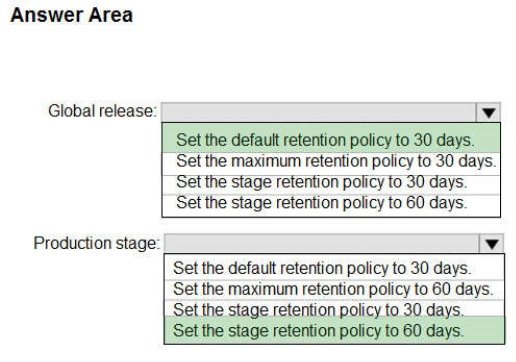
How should you configure the release retention policy for the investment planning applications suite? To answer, select the appropriate options in the answer area.
NOTE: Each correct selection is worth one point.
Hot Area:
Answer is in the explanation below.
Ask AI for More Explanation
— your own AI account, opens inside the app
Reference / correct answer:
Scenario: By default, all releases must remain available for 30 days, except for production releases, which must be kept for 60 days.
Box 1: Set the default retention policy to 30 days
The Global default retention policy sets the default retention values for all the build pipelines. Authors of build pipelines can override these values.
Box 2: Set the stage retention policy to 60 days
You may want to retain more releases that have been deployed to specific stages.
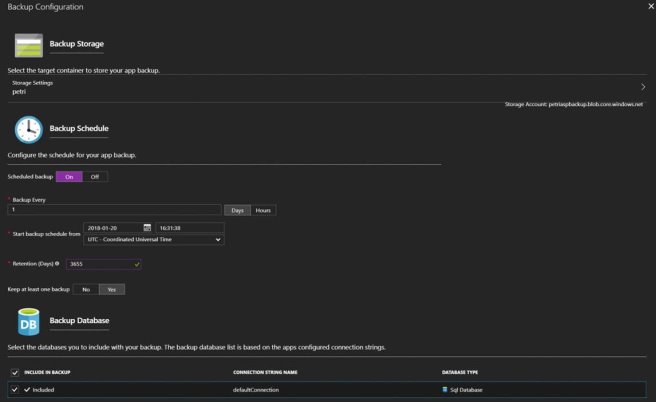
Your company plans to implement a new compliance strategy that will require all Azure web apps to be backed up every five hours.
You need to back up an Azure web app named az400-123456789-main every five hours to an Azure Storage account in your resource group.
To complete this task, sign in to the Microsoft Azure portal.
Answer is in the explanation below.
Ask AI for More Explanation
— your own AI account, opens inside the app
Reference / correct answer:
See explanation below.
With the storage account ready, you can configure backs up in the web app or App Service.
1. Open the App Service az400-123456789-main, which you want to protect, in the Azure Portal and browse to Settings > Backups. Click Configure and a Backup Configuration blade should appear.
2. Select the storage account.
3. Click + to create a private container. You could name this container after the web app or App Service.
4. Select the container.
5. If you want to schedule backups, then set Scheduled Backup to On and configure a schedule: every five hours 6. Select your retention. Note that 0 means never delete backups.
7. Decide if at least one backup should always be retained.
8. Choose if any connected databases should be included in the web app backup.
9. Click Save to finalize the backup configuration.
Reference:
https://petri.com/backing-azure-app-service
Question 7(Mixed Questions)
You plan to use Terraform to deploy an Azure resource group from a Windows system.
You need to install the required frameworks to support the planned deployment.
Which two frameworks should you install? Each correct answer presents part of the solution.
NOTE: Each correct selection is worth one point.
Select all that apply, then click Submit answer.
○
Vault
○
Terratest
○
Node.js
○
Yeoman
○
Tiller
Ask AI for More Explanation
— your own AI account, opens inside the app
Reference / correct answer:
Terratest
Yeoman
You can use the combination of Terraform and Yeoman. Terraform is a tool for creating infrastructure on Azure. Yeoman makes it easy to create Terraform modules.
Terratest provides a collection of helper functions and patterns for common infrastructure testing tasks, like making HTTP requests and using SSH to access a specific virtual machine. The following list describes some of the major advantages of using Terratest:
Convenient helpers to check infrastructure - This feature is useful when you want to verify your real infrastructure in the real environment.
Organized folder structure - Your test cases are organized clearly and follow the standard Terraform module folder structure.
Test cases are written in Go - Many developers who use Terraform are Go developers. If you're a Go developer, you don't have to learn another programming language to use Terratest. Extensible infrastructure - You can extend additional functions on top of Terratest, including Azure-specific features.
You have an Azure DevOps project named Project1 and an Azure subscription named Sub1. Sub1 contains an Azure virtual machine scale set named VMSS1. VMSS1 hosts a web application named
WebApp1. WebApp1 uses stateful sessions.
The WebApp1 installation is managed by using the Custom Script extension. The script resides in an Azure Storage account named sa1.
You plan to make a minor change to a UI element of WebApp1 and to gather user feedback about the change.
You need to implement limited user testing for the new version of WebApp1 on VMSS1.
Which three actions should you perform? Each correct answer presents part of the solution.
NOTE: Each correct selection is worth one point.
Select all that apply, then click Submit answer.
○
Modify the load balancer settings of VMSS1.
○
Redeploy VMSS1.
○
Upload a custom script file to sa1.
○
Modify the Custom Script extension settings of VMSS1.
○
Update the configuration of a virtual machine in VMSS1.
Ask AI for More Explanation
— your own AI account, opens inside the app
Reference / correct answer:
Redeploy VMSS1.
Upload a custom script file to sa1.
Modify the Custom Script extension settings of VMSS1.
Question 9(New Update)
You use GitHub for source control.
A file that contains sensitive data is committed accidentally to the Git repository of a project.
You need to delete the file and its history form the repository.
Which two tools can you use? Each correct answer presents a complete solution.
NOTE: Each correct selection is worth one point.
Select all that apply, then click Submit answer.
○
the git filter-branch command
○
BFG Repo-Cleaner
○
the git rebase command
○
GitHub Desktop
Ask AI for More Explanation
— your own AI account, opens inside the app
Reference / correct answer:
the git filter-branch command
BFG Repo-Cleaner
To entirely remove unwanted files from a repository's history you can use either the git filter-branch command or the BFG Repo-Cleaner open source tool.
You use GitHub for source control and Azure Boards for project management. GitHub and Azure Boards are integrated.
You plan to create a pull request in GitHub.
You need to automatically link the request to an existing Azure Boards work item by using the text of AB#.
To which two elements can you add the text? Each correct answer presents a complete solution.
NOTE: Each correct selection is worth one point.
Select all that apply, then click Submit answer.
○
milestone
○
comment
○
title
○
description
○
label
Ask AI for More Explanation
— your own AI account, opens inside the app
Reference / correct answer:
title
description
You can add the text "AB#" to the title or description of the pull request in GitHub, which will automatically link the request to an existing Azure Boards work item with that number.
Reference:
Question 11(Mixed Questions)
You are building an ASP.NET Core application.
You plan to create an application utilization baseline by capturing telemetry data.
You need to add code to the application to capture the telemetry data. The solution must minimize the costs of storing the telemetry data.
Which two actions should you perform? Each correct answer presents part of the solution.
NOTE: Each correct selection is worth one point
Select all that apply, then click Submit answer.
○
Add the 99 parameter to the ApplicationInsights.config file.
○
From the code of the application, enable adaptive sampling.
○
From the code of the application, add Azure Application Insights telemetry.
○
Add the 5 parameter to the ApplicationInsights.config file.
○
From the code of the application, disable adaptive sampling.
Ask AI for More Explanation
— your own AI account, opens inside the app
Reference / correct answer:
From the code of the application, enable adaptive sampling.
Add the 5 parameter to the ApplicationInsights.config file.
Sampling is a feature in Azure Application Insights. It is the recommended way to reduce telemetry traffic, data costs, and storage costs, while preserving a statistically correct analysis of application data.
The Application Insights SDK for ASP.NET Core supports both fixed-rate and adaptive sampling. Adaptive sampling is enabled by default.
D: For adaptive sampling: The volume is adjusted automatically to keep within a specified maximum rate of traffic, and is controlled via the setting MaxTelemetryItemsPerSecond. If the application produces a low amount of telemetry, such as when debugging or due to low usage, items won't be dropped by the sampling processor as long as volume is below MaxTelemetryItemsPerSecond.
Note: In ApplicationInsights.config, you can adjust several parameters in the AdaptiveSamplingTelemetryProcessor node. The figures shown are the default values: 5
Your company has a project in Azure DevOps for a new web application.
The company uses ServiceNow for change management.
You need to ensure that a change request is processed before any components can be deployed to the production environment.
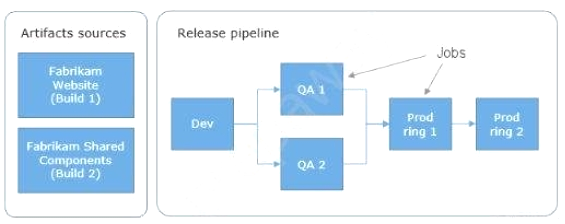
What are two ways to integrate ServiceNow into the Azure DevOps release pipeline? Each correct answer presents a complete solution.
NOTE: Each correct selection is worth one point.
Select all that apply, then click Submit answer.
○
Define a deployment control that invokes the ServiceNow REST API.
○
Define a pre-deployment gate before the deployment to the Prod stage.
○
Define a deployment control that invokes the ServiceNow SOAP API.
○
Define a post-deployment gate after the deployment to the QA stage.
Ask AI for More Explanation
— your own AI account, opens inside the app
Reference / correct answer:
Define a pre-deployment gate before the deployment to the Prod stage.
Define a post-deployment gate after the deployment to the QA stage.
An example of a release pipeline that can be modeled through a release pipeline in shown below:
In this example, a release of a website is created by collecting specific versions of two builds (artifacts), each from a different build pipeline. The release is first deployed to a Dev stage and then forked to two QA stages in parallel. If the deployment succeeds in both the QA stages, the release is deployed to Prod ring 1 and then to Prod ring 2. Each production ring represents multiple instances of the same website deployed at various locations around the globe.
You are deploying a server application that will run on a Server Core installation of Windows Server 2019.
You create an Azure key vault and a secret.
You need to use the key vault to secure API secrets for third-party integrations.
Which three actions should you perform? Each correct answer presents part of the solution.
NOTE: Each correct selection is worth one point.
D18912E1457D5D1DDCBD40AB3BF70D5D
Select all that apply, then click Submit answer.
○
Configure RBAC for the key vault.
○
Modify the application to access the key vault.
○
Configure a Key Vault access policy.
○
Deploy an Azure Desired State Configuration (DSC) extension.
○
Deploy a virtual machine that uses a system-assigned managed identity.
Ask AI for More Explanation
— your own AI account, opens inside the app
Reference / correct answer:
Modify the application to access the key vault.
Configure a Key Vault access policy.
Deploy a virtual machine that uses a system-assigned managed identity.
BE: An app deployed to Azure can take advantage of Managed identities for Azure resources, which allows the app to authenticate with Azure Key Vault using Azure AD authentication without credentials (Application ID and Password/Client Secret) stored in the app.
You have an Azure subscription that contains an Azure pipeline named Pipeline1 and a GitHub repository named Repo1, Repo1 contains Bicep modules. Pipeline1 deploys Azure resources by using the Bicep modules.
You need to ensure that all releases comply With Azure Policy before they are deployed to production.
What should you do?
Select an option, then click Submit answer.
○
Configure a deployment gate for Pipeline' include the Azure DevOps Security and compliance assessment task.
○
Create an Azure DevOps build runs on the creation of a pull request assesses the code tor compliance.
○
To Pipeline1, add a step that runs a What If deployment before the deployment step.
○
Configure a deployment gate for Pipeline' that uses Azure Automation to run a What If deployment
Ask AI for More Explanation
— your own AI account, opens inside the app
Reference / correct answer:
Configure a deployment gate for Pipeline' include the Azure DevOps Security and compliance assessment task.
Question 17(Mixed Questions)
You have a project in Azure DevOps. You have an Azure Resource Group deployment project in Microsoft Visual Studio that is checked in to the Azure DevOps project.
You need to create a release pipeline that will deploy resources by using Azure Resource Manager templates. The solution must minimize administrative effort.
Which task type should you include in the solution?
Select an option, then click Submit answer.
○
Azure Cloud Service Deployment
○
Azure RM Web App Deployment
○
Azure PowerShell
○
Azure App Service Manage
Ask AI for More Explanation
— your own AI account, opens inside the app
Reference / correct answer:
Azure PowerShell
There are two different ways to deploy templates to Azure DevOps Services. Both methods provide the same results, so choose the one that best fits your workflow.
1. Add a single step to your build pipeline that runs the PowerShell script that’s included in the Azure Resource Group deployment project (Deploy-AzureResourceGroup.ps1). The script copies artifacts and then deploys the template.
2. Add multiple Azure DevOps Services build steps, each one performing a stage task.
The first option has the advantage of using the same script used by developers in Visual Studio and providing consistency throughout the lifecycle.
You plan to share packages that you wrote, tested, validated, and deployed by using Azure Artifacts.
You need to release multiple builds of each package by using a single feed. The solution must limit the release of packages that are in development.
What should you use?
Select an option, then click Submit answer.
○
local symbols
○
views
○
global symbols
○
upstream sources
Ask AI for More Explanation
— your own AI account, opens inside the app
Reference / correct answer:
upstream sources
Upstream sources enable you to manage all of your product's dependencies in a single feed. We recommend publishing all of the packages for a given product to that product's feed, and managing that product's dependencies from remote feeds in the same feed, via upstream sources. This setup has a few benefits:
Simplicity: your NuGet.config, .npmrc, or settings.xml contains exactly one feed (your feed).
Determinism: your feed resolves package requests in order, so rebuilding the same codebase at the same commit or changeset uses the same set of packages
Provenance: your feed knows the provenance of packages it saved via upstream sources, so you can verify that you're using the original package, not a custom or malicious copy published to your feed Peace of mind: packages used via upstream sources are guaranteed to be saved in the feed on first use; if the upstream source is disabled/removed, or the remote feed goes down or deletes a package you depend on, you can continue to develop and build
 User1 must be able to create a code wiki.
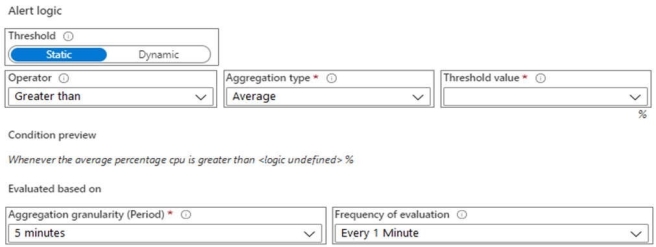
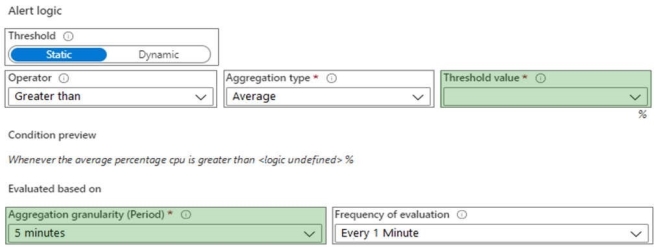
 Be triggered when average CPU usage exceeds 80 percent for 15 minutes.
 Convenient helpers to check infrastructure - This feature is useful when you want to verify your real infrastructure in the real environment.