You are implementing an order processing system. A point of sale application publishes orders to topics in an Azure Service Bus queue. The Label property for the topic includes the following data:
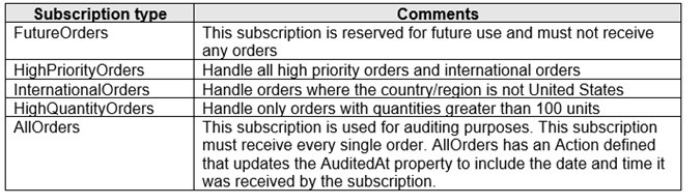
The system has the following requirements for subscriptions:
You need to implement filtering and maximize throughput while evaluating filters.
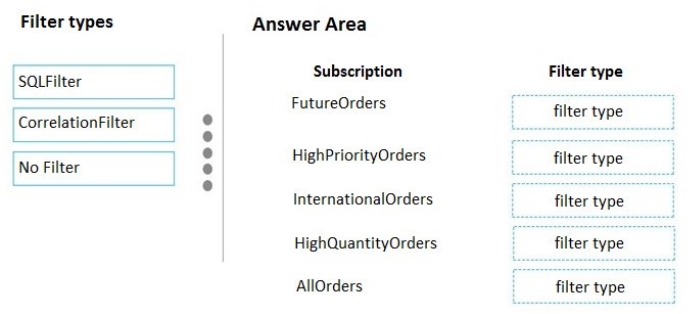
Which filter types should you implement? To answer, drag the appropriate filter types to the correct subscriptions. Each filter type may be used once, more than once, or not at all. You may need to drag the split bar between panes or scroll to view content.
NOTE: Each correct selection is worth one point.
Select and Place:
Answer is in the explanation below.
Reference / correct answer:
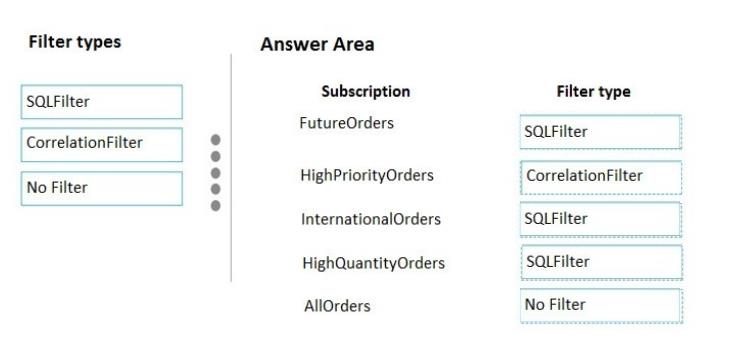
FutureOrders: SQLFilter
HighPriortyOrders: CorrelationFilter CorrelationID only
InternationalOrders: SQLFilter
Country NOT USA requires an SQL Filter
HighQuantityOrders: SQLFilter
Need to use relational operators so an SQL Filter is needed.
AllOrders: No Filter
SQL Filter: SQL Filters - A SqlFilter holds a SQL-like conditional expression that is evaluated in the broker against the arriving messages' user-defined properties and system properties. All system properties must be prefixed with sys. in the conditional expression. The SQL-language subset for filter conditions tests for the existence of properties (EXISTS), as well as for null-values (IS NULL), logical NOT/AND/OR, relational operators, simple numeric arithmetic, and simple text pattern matching with LIKE.
Correlation Filters - A CorrelationFilter holds a set of conditions that are matched against one or more of an arriving message's user and system properties. A common use is to match against the CorrelationId property, but the application can also choose to match against ContentType, Label, MessageId, ReplyTo, ReplyToSessionId, SessionId, To, and any user-defined properties. A match exists when an arriving message's value for a property is equal to the value specified in the correlation filter. For string expressions, the comparison is case-sensitive. When specifying multiple match properties, the filter combines them as a logical AND condition, meaning for the filter to match, all conditions must match.
Boolean filters - The TrueFilter and FalseFilter either cause all arriving messages (true) or none of the arriving messages (false) to be selected for the subscription.
You are a developer for a company that provides a bookings management service in the tourism industry. You are implementing Azure Search for the tour agencies listed in your company's solution.
You create the index in Azure Search. You now need to use the Azure Search .NET SDK to import the relevant data into the Azure Search service.
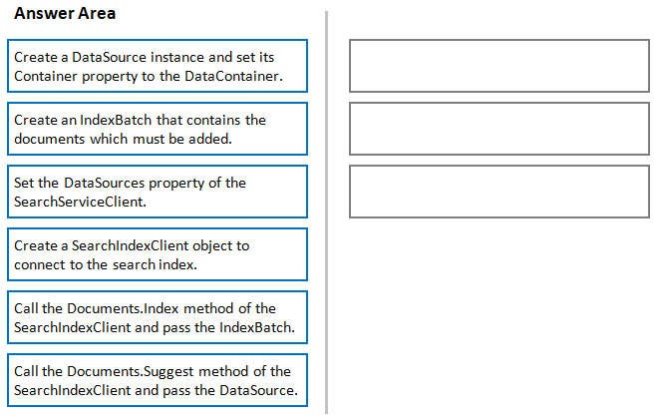
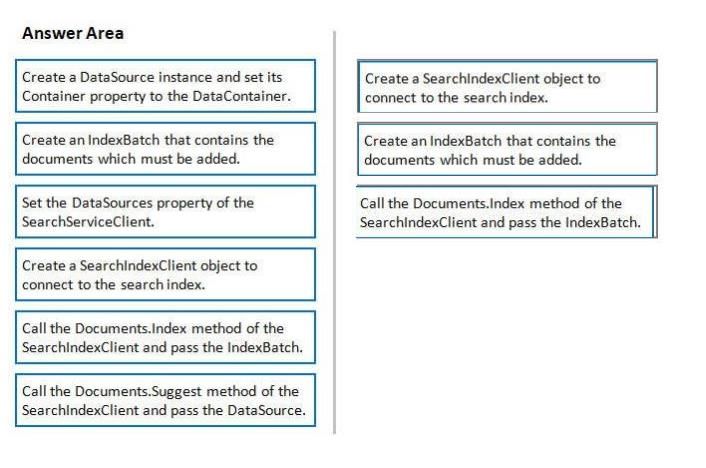
Which three actions should you perform in sequence? To answer, move the appropriate actions from the list of actions to the answer area and arrange them in the correct order.
Select and Place:
Answer is in the explanation below.
Reference / correct answer:
1. The index needs to be populated. To do this, we will need a SearchIndexClient. There are two ways to obtain one: by constructing it, or by calling Indexes.GetClient on the SearchServiceClient. Here wewill use the first method.
2. Create the indexBatch with the documentsSomething like: var hotels = new Hotel[];
{
new Hotel()
{
HotelId = "3",
BaseRate = 129.99,
Description = "Close to town hall and the river"
}
};
…
var batch = IndexBatch.Upload(hotels);
3. The next step is to populate the newly-created indexExample:
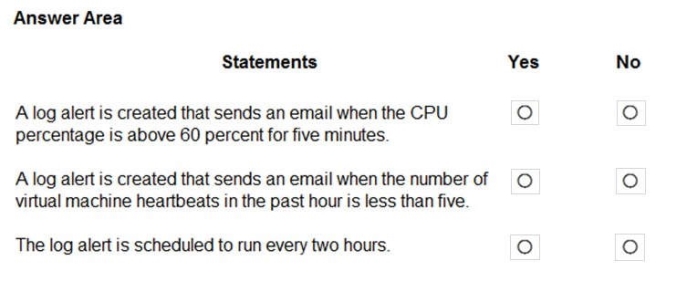
For each of the following statements, select Yes if the statement is true. Otherwise, select No,
NOTE: Each correct selection is worth one point.
Hot Area:
Answer is in the explanation below.
Reference / correct answer:
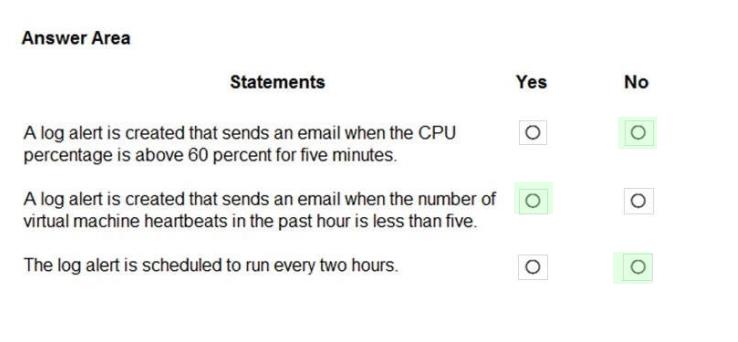
Box 1: No
The AzScheduledQueryRuleSource is Heartbeat, not CPU.
Box 2: Yes
The AzScheduledQueryRuleSource is Heartbeat!
Note: New-AzScheduledQueryRuleTriggerCondition creates an object of type Trigger Condition. This object is to be passed to the command that creates Alerting Action object.
Box 3: No
The schedule is 60 minutes, not two hours.
-FrequencyInMinutes: The alert frequency.
-TimeWindowInMinutes: The alert time window
The New-AzAscheduledQueryRuleSchedule command creates an object of type Schedule. This object is to be passed to the command that creates Log Alert Rule.