You are developing a .NET Core model-view controller (MVC) application hosted on Azure for a health care system that allows providers access to their information.
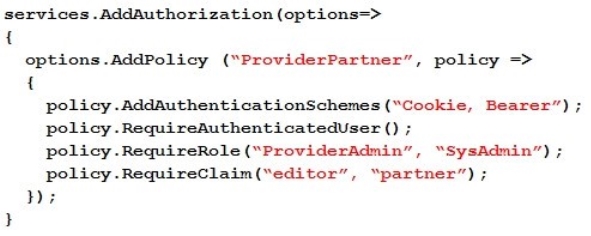
You develop the following code:
You define a role named SysAdmin.
You need to ensure that the application meets the following authorization requirements:
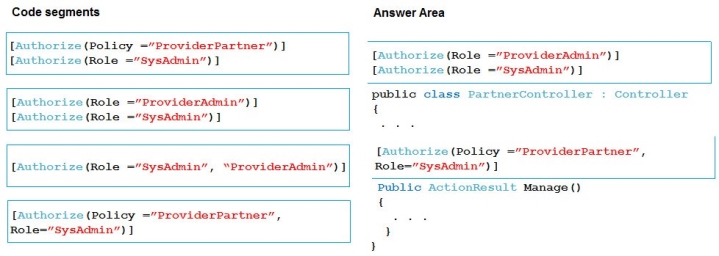
Allow the ProviderAdmin and SysAdmin roles access to the Partner controller regardless of whether the user holds an editor claim of partner. Limit access to the Manage action of the controller to users with an editor claim of partner who are also members of the SysAdmin role.
How should you complete the code? To answer, drag the appropriate code segments to the correct locations. Each code segment may be used once, more than once, or not at all. You may need to drag the split bar between panes or scroll to view content.
NOTE: Each correct selection is worth one point.
Select and Place:
Answer is in the explanation below.
Reference / correct answer:
Box 1:
Allow the ProviderAdmin and SysAdmin roles access to the Partner controller regardless of whether the user holds an editor claim of partner.
Box 2:
Limit access to the Manage action of the controller to users with an editor claim of partner who are also members of the SysAdmin role.
Question 2(Mixed Questions)
DRAG DROP
You develop software solutions for a mobile delivery service. You are developing a mobile app that users can use to order from a restaurant in their area. The app uses the following workflow:
1. - A driver selects the restaurants for which they will deliver orders.
2. - Orders are sent to all available drivers in an area.
3. - Only orders for the selected restaurants will appear for the driver.
4. - The first driver to accept an order removes it from the list of available orders.
You need to implement an Azure Service Bus solution.
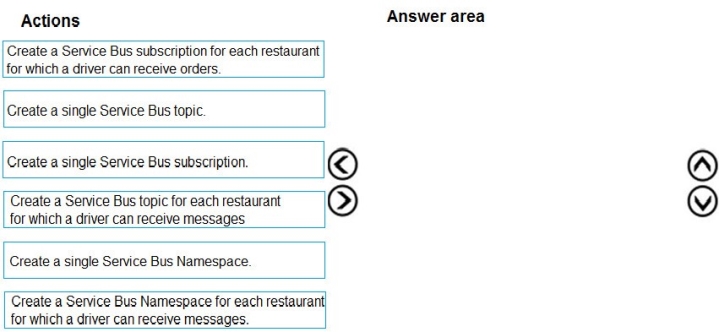
Which three actions should you perform in sequence? To answer, move the appropriate actions from the list of actions to the answer area and arrange them in the correct order.
Select and Place:
Answer is in the explanation below.
Reference / correct answer:
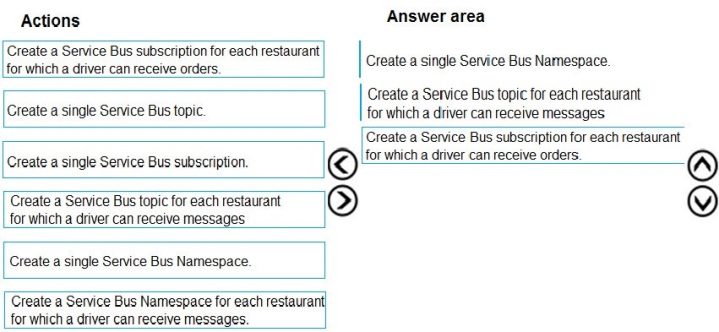
Box 1: Create a single Service Bus Namespace
To begin using Service Bus messaging entities in Azure, you must first create a namespace with a name that is unique across Azure. A namespace provides a scoping container for addressing Service Bus resources within your application.
Box 2: Create a Service Bus Topic for each restaurant for which a driver can receive messages. Create topics.
Box 3: Create a Service Bus subscription for each restaurant for which a driver can receive orders. Topics can have multiple, independent subscriptions.
You are developing a ticket reservation system for an airline.
The storage solution for the application must meet the following requirements:
Ensure at least 99.99% availability and provide low latency.
Accept reservations even when localized network outages or other unforeseen failures occurs
Process reservations in the exact sequence as reservation are submitted to minimize overbooking or selling the same seat to multiple travelers. Allow simultaneous and out-of-order reservations with a maximum five-second tolerance window.
You provision a resource group named airlineResourceGroup in the Azure South-Central US region.
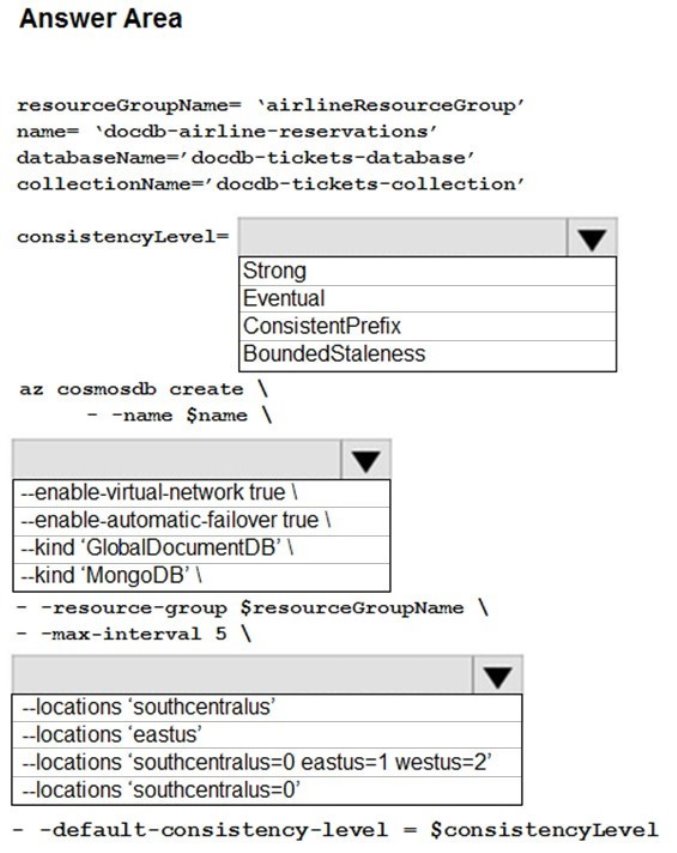
You need to provision a SQL API Cosmos DB account to support the app.
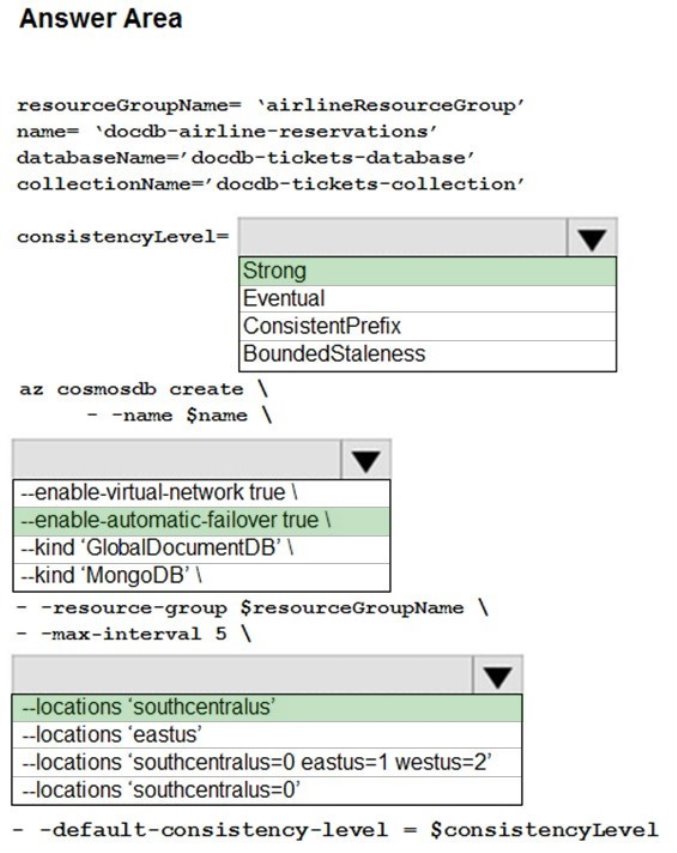
How should you complete the Azure CLI commands? To answer, select the appropriate options in the answer area.
NOTE: Each correct selection is worth one point.
Hot Area:
Answer is in the explanation below.
Reference / correct answer:
Box 1: Strong
Strong consistency offers a linearizability guarantee. The reads are guaranteed to return the most recent committed version of an item. A client never sees an uncommitted or partial write. Users are always guaranteed to read the latest committed write.
" Process reservations in the exact sequence as reservation are submitted to minimize overbooking or selling the same seat to multiple travelers."
Box 2: Enable-automatic-failover
For multi-region Cosmos accounts that are configured with a single-write region, enable automatic-failover by using Azure CLI or Azure portal. After you enable automatic failover, whenever there is a regional disaster, Cosmos DB will automatically failover your account. " Accept reservations even in network outages or other unforseen failures"
Box 3: southcentralus
" You provision a resource group named airlineResourceGroup in the Azure South-Central US region."
 Allow the ProviderAdmin and SysAdmin roles access to the Partner controller regardless of whether the user holds an editor claim of partner.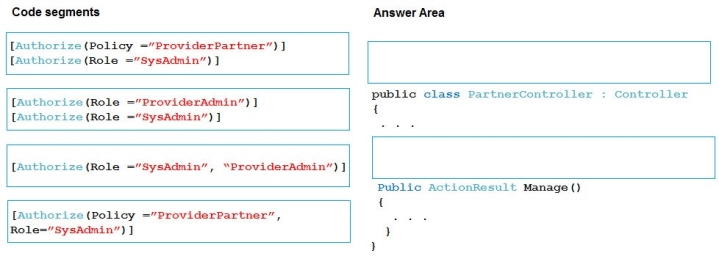
 Ensure at least 99.99% availability and provide low latency.