AZ-140 Configuring and Operating Windows Virtual Desktop on Microsoft Azure

Loading demo links...

Showing 4–6 of 15 questions

Question 4 (New Update)

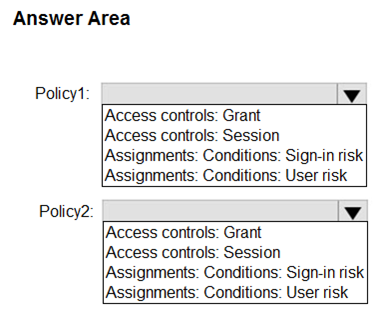
-You have an Azure Virtual Desktop deployment and two Azure Active Directory groups named Group1 and Group2.You create two Conditional Access policies named Policy1 and Policy2.
Policy1 is assigned to Group1. Policy2 is assigned to Group2. Both policies include Azure Virtual Desktop as a cloud app.
You need to meet the following requirements:
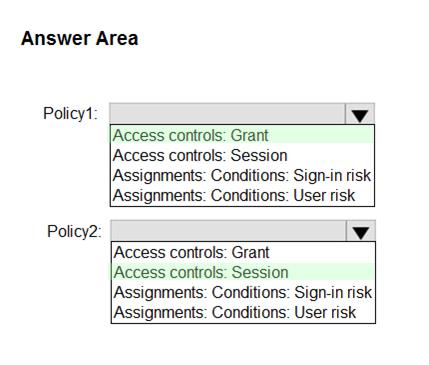
• The users in Group1 must be prompted for multi-factor authentication (MFA) when they connect to Azure Virtual Desktop.
• The users in Group2 must reauthenticate every eight hours while they are connected to Azure Virtual Desktop.

Which settings should you configure in Policy1 and Policy2? To answer, select the appropriate options in the answer area.

NOTE: Each correct selection is worth one point.
Answer is in the explanation below.
Question 5 (New Update)

You have a Windows Virtual Desktop host pool named Pool1 and an Azure Storage account named Storage1.

Storage1 stores FSLogix profile containers in a share folder named share1.

You create a new group named Group1. You provide Group1 with permission to sign in to Pool1.

You need to ensure that the members of Group1 can store the FSLogix profile containers in share1. The solution must use the principle of least privilege.

Which two privileges should you assign to Group1? Each correct answer presents part of the solution.

NOTE: Each correct selection is worth one point.

Select all that apply, then click Submit answer.

  • the Storage Blob Data Contributor role for storage1

  • the List folder / read data NTFS permissions for share1

  • the Modify NTFS permissions for share1

  • the Storage File Data SMB Share Reader role for storage1

  • the Storage File Data SMB Share Elevated Contributor role for storage1

  • the Storage File Data SMB Share Contributor role for storage1

Question 6 (New Update)

You have a Azure Virtual Desktop deployment that uses Microsoft 355 cloud services including Microsoft Teams.

Users use the Remote Desktop client to connect to the deployment from computers that run Windows 10

You need to support audio and video in Azure Virtual Desktop and provide the users with access to Microsoft Teams calling and meeting features.

Which three actions should you perform? Each correct answer presents part of the solution.

NOTE: Each correct selection is worth one point.

Select all that apply, then click Submit answer.

  • Install the Microsoft Teams WebSocket Service on the Windows 10 computers

  • Configure the IsVWDEnvironment registry key on the Windows 10 computers

  • Configure the isWVDEnvironment registry key on the virtual machines

  • Install the Microsoft Teams desktop app on the Windows 10 computers

  • Install the Microsoft Teams WebSocket Service on the virtual machines

  • Install the Microsoft Teams desktop app on the virtual machines