You work as an Office Assistant for Media Perfect Inc. You have created a spreadsheet in Excel 2013 and shared it with the other employees of the company.
You select the Encrypt with Password option as a protection measure for the document you are sharing. Now, you have to specify a password in the Password box in the Encrypt Document dialog box appeared for editing the document. But you have forgotten the password.
What will happen in this situation?
Select an option, then click Submit answer.
Reference / correct answer:
You will fetch the password from the list in which you have saved it.
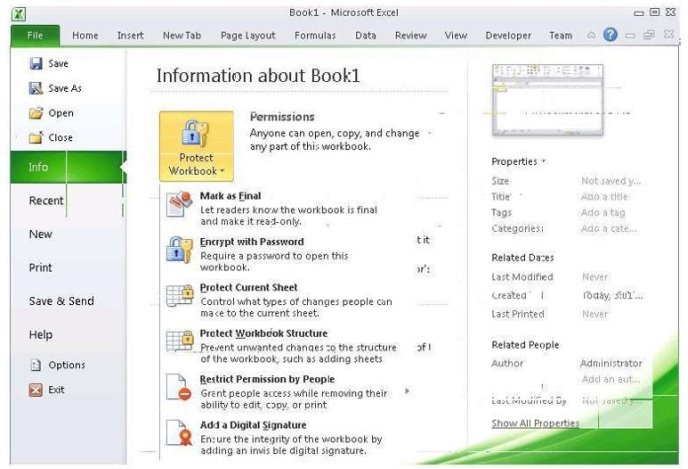
The various Protect Workbook options are as follows:
1. Mark as Final: This option is used to make the document read-only. When a spreadsheet is marked as final, various options such as typing, editing commands, and proofing marks are disabled or turned off and the spreadsheet becomes read-only. This command helps a user to communicate that he is sharing a completed version of a spreadsheet. This command also prevents reviewers or readers from making inadvertent modifications to the spreadsheet. 2. Encrypt with Password: When a user selects the Encrypt with Password option, the Encrypt Document dialog box appears. In the Password box, it is required to specify a password. Microsoft is not able to retrieve lost or forgotten passwords, so it is necessary for a user to keep a list of passwords and corresponding file names in a safe place.
3. Protect Current Sheet: This option is used to select password protection and permit or prohibitother users to select, format, insert, delete, sort, or edit areas of the spreadsheet. This option protects the worksheet and locked cells.
4. Protect Workbook Structure: This option is used to select password protection and selectoptions to prevent users from changing, moving, and deleting important data. This feature enables a user to protect the structure of the worksheet.
5. Restrict Permission by People: This option works on the basis of Window Rights Managementto restrict permissions. A user is required to use a Windows Live ID or a Microsoft Windows account to restrict permissions. These permissions can be applied via a template that is used by the organization in which the user is working. These permissions can also be added by clicking Restrict Access.
6. Add a Digital Signature: This option is used to add a visible or invisible digital signature. Itauthenticates digital information such as documents, e-mail messages, and macros by using computer cryptography. These signatures are created by specifying a signature or by using an image of a signature for establishing authenticity, integrity, and non-repudiation.
C:\Documents and Settings\Administrator\Desktop\1.JPG
Incorrect Answers:
D: You can create a new document with the same details but it will increase the overhead and is a very time consuming process.
References: https://support.office.com/en-us/article/protect-an-excel-file-7359d4ae-7213-4ac2b058-f75e9311b599