70-762 Developing SQL Databases

Loading demo links...

Showing 4–6 of 10 questions

Question 4

HOTSPOT

Note: This question is part of a series of questions that use the same scenario. For your convenience, the scenario is repeated in each question. Each question presents a different goal and answer choices, but the text of the scenario is exactly the same in each question in this series.

You have a database named Sales that contains the following database tables: Customer, Order, and Products. The Products table and the Order table are shown in the following diagram.
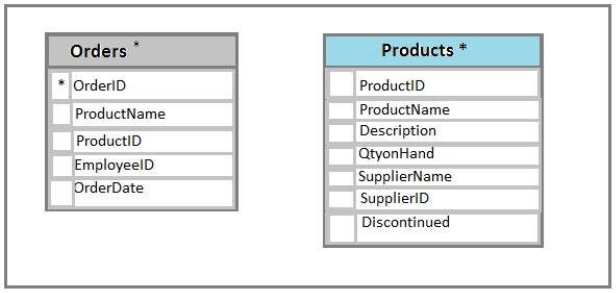
The customer table includes a column that stores the data for the last order that the customer placed.

You plan to create a table named Leads. The Leads table is expected to contain approximately 20,000 records. Storage requirements for the Leads table must be minimized.

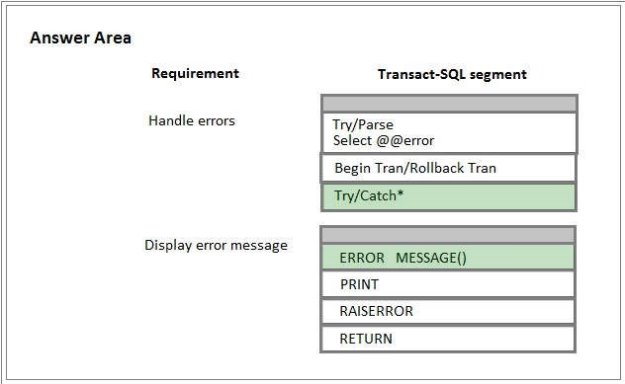
You need to implement a stored procedure that deletes a discontinued product from the Products table. You identify the following requirements:

If an open order includes a discontinued product, the records for the product must not be deleted.

The stored procedure must return a custom error message if a product record cannot be deleted. The message must identify the OrderID for the open order.

What should you do? To answer, select the appropriate Transact-SQL segments in the answer area.

Hot Area:
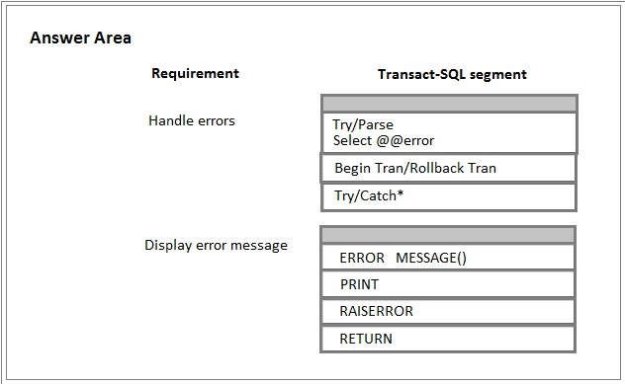
Answer is in the explanation below.
Question 5

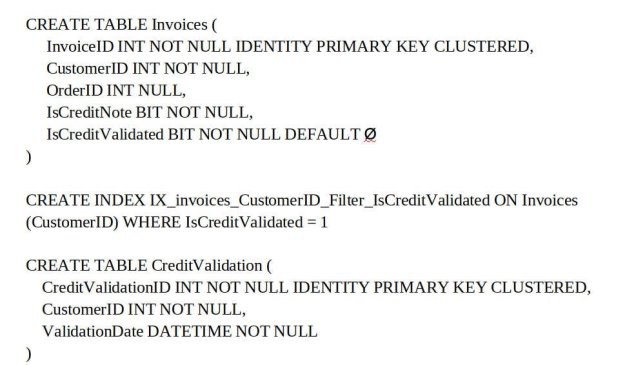
You are optimizing the performance of a batch update process. You have tables and indexes that were created by running the following Transact-SQL statements:

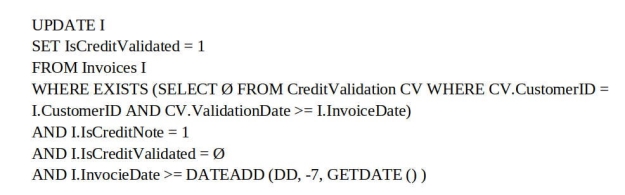
The following query runs nightly to update the isCreditValidated field:

You review the database and make the following observations:

Most of the IsCreditValidated values in the Invoices table are set to a value of 1.

There are many unique InvoiceDate values.

The CreditValidation table does not have an index.

Statistics for the index IX_invoices_CustomerID_Filter_IsCreditValidated indicate there are no individual seeks but multiple individual updates.

You need to ensure that any indexes added can be used by the update query. If the IX_invoices_CustomerId_Filter_IsCreditValidated index cannot be used by the query, it must be removed. Otherwise, the query must be modified to use with the index.

Which three actions should you perform? Each correct answer presents part of the solution.

NOTE: Each correct selection is worth one point.

Select all that apply, then click Submit answer.

  • Add a filtered nonclustered index to Invoices on InvoiceDate that selects where IsCreditNote= 1 and IsCreditValidated = 0.

  • Rewrite the update query so that the condition for IsCreditValidated = 0 precedes the condition for IsCreditNote = 1.

  • Create a nonclustered index for invoices in IsCreditValidated, InvoiceDate with an include statement using IsCreditNote and CustomerID.

  • Add a nonclustered index for CreditValidation on CustomerID.

  • Drop the IX_invoices_CustomerId_Filter_IsCreditValidatedIndex.

Question 6

You have a Microsoft Azure SQL Database. You enable Query Store for the database and configure the store to use the following settings:

SIZE_BASED_CLEANUP_MODE = OFF

STALE_QUERY_THRESHOLD_DAYS = 60

MAX_STORAGE_SIZE_MB = 100

QUERY_CAPTURE_MODE = ALL

You use Azure Query Performance Insight to review queries. You observe that new queries are not displayed after 15 days and that the Query Store is set to read-only mode.

If the Query Store runs low on data space, the store must prioritize queries that run regularly or queries that consume applicant resources.

You must set the Query Store to read_write mode and determine the performance of queries from the past 60 days.

Which three actions should you perform? Each correct step presents part of the solution.

NOTE: Each correct selection is worth one point.

Select all that apply, then click Submit answer.

  • Set the value of the CLEANUP_POLICY setting to (STALE_QUERY_THRESHOLD_DAYS = 75)

  • Set the value of the QUERY_CAPTURE_MODE setting to AUTO

  • Increase the value for the MAX_STORAGE_SIZE_MB setting

  • Set the value of the SIZE_BASED_CLEANUP_MODE setting to AUTO

  • In the Azure portal, navigate to Query Performance Insight. Use the Custom tab to select a period of 2 months.