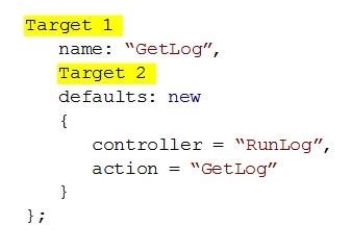
You need to ensure that URLs for log manipulation are mapped to the controller. You have the following code:
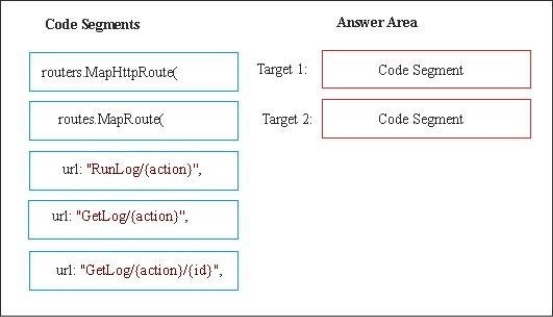
Which code segments should you include in Target 1 and Target 2 to map the URLs? To answer, drag the appropriate code segments to the correct targets. Each code segment may be used once, more than once, or not at all. You need to drag the split bar between panes or scroll to view content.
Select and Place:
Answer is in the explanation below.
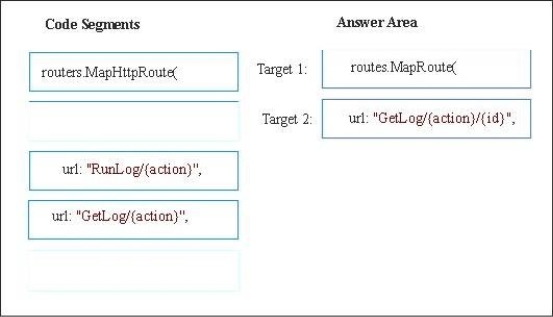
Reference / correct answer:
Target 1: routes.MapRoute(
The MapRoute method takes three parameters: routes, name, and URL. Target 2: url: "GetLog/{action}/{id}",
Example code: routes.MapRoute(
"Default", // Route name
"{controller}/{action}/{id}", // URL with parameters
new { controller ="Home", action = "Index", id = "" } // Parameter defaults
);
Incorrect:
Not routes.MapHttpRoute(:
The MapHttpRoute method takes three parameters: routes, name, and routetemplate, but we need an URL parameter, not a routeTemplate parameter.
You are developing an ASP.NET Core MVC API microservice that calculates and provides loan rates. The microservice is configured to listen on port 6000.
The microservice must be deployed to a Docker container in Windows. You add a file named Dockerfile to the microservice project.
You need to build the Docker image.
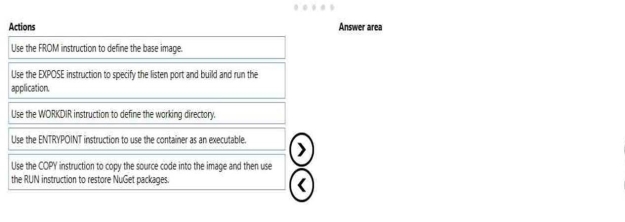
In which order should you perform the actions? To answer, move all actions from the list of actions to the answer area and arrange them in the correct order.
Select and Place:
Answer is in the explanation below.
Reference / correct answer:
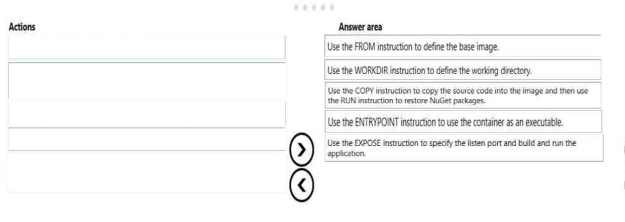
Step 1: Use the FROM instruction to define the base image.
FROM creates a layer from the ubuntu Docker image.
The first FROM command is an important Docker command, allowing you to pull dependencies from other images.
Step 2: Use the WORKDIR instruction to define the working directory
The WORKDIR instruction sets the working directory for any RUN, CMD, ENTRYPOINT, COPY and ADD instructions that follow it in the Dockerfile.
Step 3: Use the COPY instructions to copy the source code into the image and then use the RUN instruction to restore NuGet packages.
Step 4: Use the ENTRYPOINT instruction to use the container as an executable
Step 5: Use the EXPOSE instruction to specify the listen port and build and run the application.