You are using Multidimensional Expressions (MDX) to query a SQL Server Analysis Services (SSAS) cube.
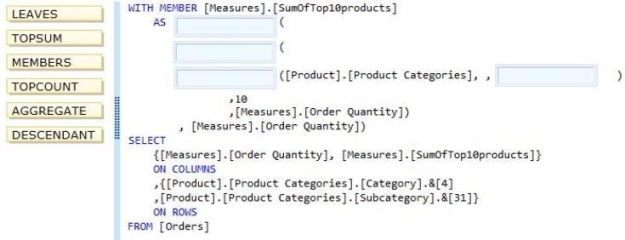
You need to compute the aggregate value of the 10 most-ordered produces in the Product Categories hierarchy. The Product level is the lowest in the hierarchy.
Which functions should you use to complete the MDX query? (To answer, drag the appropriate functions from the list of functions to the correct locations in the answer area.) Select and Place:
NON EMPTY {CROSSJOIN([Markets].[All Markets].Children,{[Measures].Sales})}
ON COLUMNS,
Union([Top25Customers],{[Customers].[All Customers].[Rest of Customers]}) ON ROWS from [SteelWheelsSales]
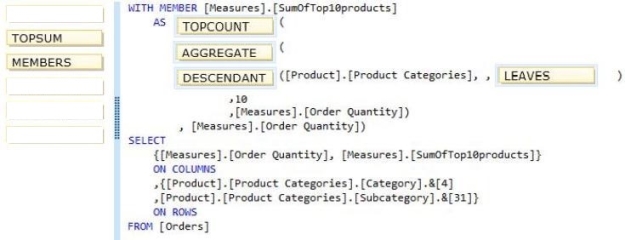
* TopCount: Sorts a set in descending order and returns the specified number of elements with the highest values.*Aggregate:
Returns a number that is calculated by aggregating over the cells returned by the set expression. If a numeric expression is not provided, this function aggregates each measure within the current query context by using the default aggregation operator that is specified for each measure. If a numeric expression is provided, this function first evaluates, and then sums, the numeric expression for each cell in the specified set.
* Example:
One can extract the leaf members of a parent child hierarchy by asking the descendants of the root member with the following expression: Descendants([Organization].[Organizations].&[1], , LEAVES) * Incorrect:
/ Not TopSUM: Returns, in order of decreasing rank, the top-most rows of a table whose cumulative total is at least a specified value.
Question 2(Mixed Questions)
DRAG DROP
You are developing a SQL Server Analysis Services (SSAS) cube.
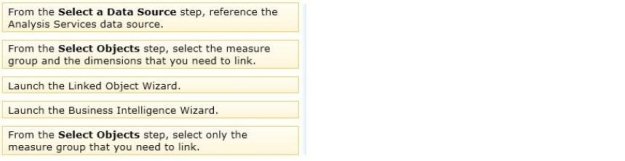
You need to reuse a measure group from a different database.
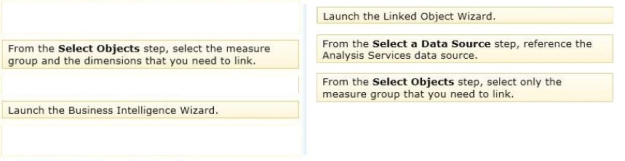
In SQL Server Data Tools (SSDT), which three actions should you perform in sequence? (To answer, move the appropriate actions from the list of actions to the answer area and arrange them in the correct order.) Select and Place:
Answer is in the explanation below.
Reference / correct answer:
Note:
* You can use the Linked Object Wizard to either link to or import cubes, dimensions, measure groups, calculations, and Key Performance Indicators (KPIs). You can link to or import these items from another database on the same server or from adatabase on a remote server
* On the Select a Data Source page of the Linked Object Wizard, choose the Analysis Services data source or create a new one.
* On the Select Objects page of the wizard, choose the dimensions you want to link to in the remote database. You cannot link to linked dimensions in the remote database.
* Incorrect Answers:
The Business Intelligence Wizard can guide you through some or all the following steps:
Define time intelligence for cubes.
Define account intelligence for cubes and dimensions.
Define dimension intelligence for cubes and dimensions. Define unary operators for cubes.
Set custom member formulas for cubes and dimensions.
Specify attribute ordering for dimensions.
Enable dimension writeback for dimensions.
Define semi-additive behavior for cubes. Define currency conversion for cubes.
Reference: Using Linked Objects in a Cube
Question 3(Case Study 1)
HOTSPOT
You create a new SharePoint site to store reports for the manufacturing department.
You need to recommend a solution to meet the security requirements for the sales department users and the manufacturing department users.
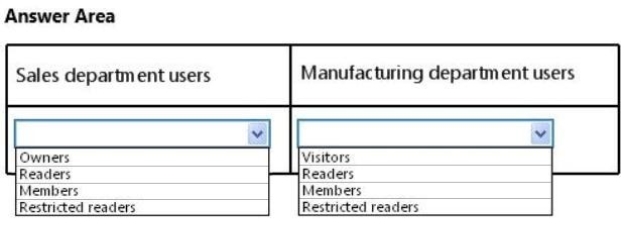
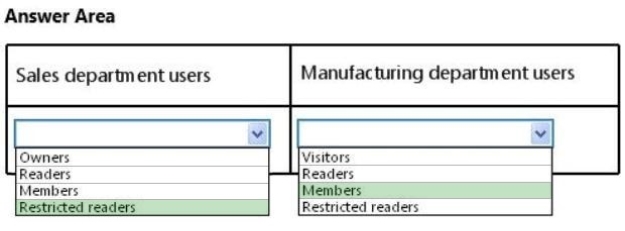
What should you recommend? To answer, select the appropriate group for the sales department users and the manufacturing department users in the answer area.
Hot Area:
Answer is in the explanation below.
Reference / correct answer:
Limited Time Offer – Save Now!
Don’t miss out — get full access at the best price.
 The Business Intelligence Wizard can guide you through some or all the following steps: