You are developing a SQL Server Integration Services (SSIS) package that downloads data from a Microsoft Azure SQL Database database.
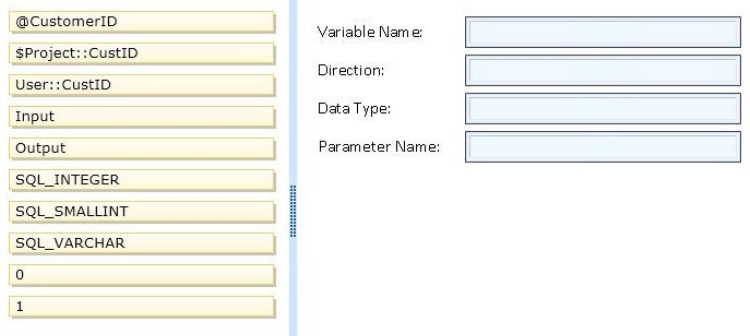
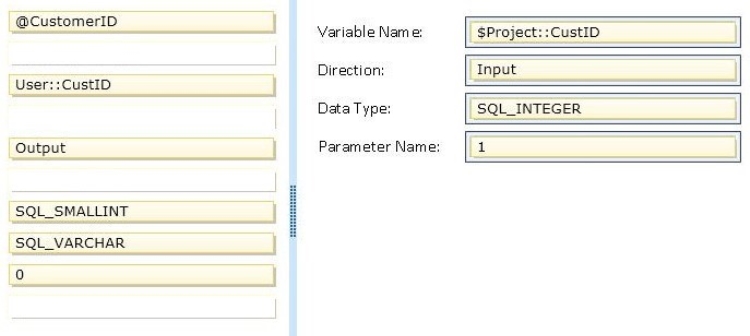
A stored procedure will be called in an Execute SQL task by using an ODBC connection. This stored procedure has only the @CustomerID parameter of type INT.
A project parameter named CustID will be mapped to the stored procedure parameter @CustomerID.
You need to ensure that the value of the CustID parameter is passed to the @CustomerID stored procedure parameter.
In the Parameter Mapping tab of the Execute SQL task editor, how should you configure the parameter? (To answer, drag the appropriate option or options to the correct location or locations in the answer area.) Select and Place:
Answer is in the explanation below.
Reference / correct answer:
Question 2(Volume C)
DRAG DROP
You have a SQL Server Integration Services (SSIS) package that runs on a server named SQL1 and connects to a SQL Server database on a server named SQL2.
You schedule the package to run via a SQL Server Agent job.
The package fails and generates the following error message: “Unknown server or Access is Denied”.
You discover that the package is configured to authenticate by using Windows authentication and that the SQL Server Agent on SQL1 uses NT Service\SQLSERVERAGENT as a service account.
You verify that other jobs run on the server without errors.
You create a user account named CONTOSO\JobProcess1 and provide all of the required access to the tables on SQL2.
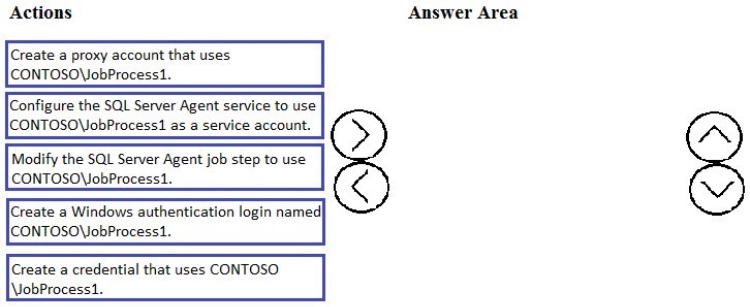
You need to ensure that the package runs successfully via the SQL Server Agent job.
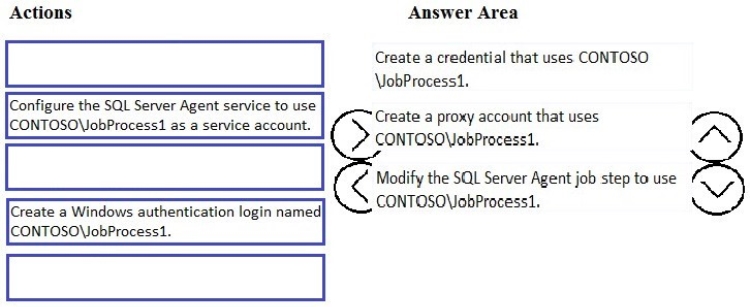
Which three actions should you perform in sequence? To answer, move the appropriate actions from the list of actions to the answer area and arrange them in the correct order.
Select and Place:
Answer is in the explanation below.
Reference / correct answer:
Step 1: Create a credential that uses CONTOSO \JobProcess1
You must create a credential before you create a proxy if one is not already available.
Step 2: Create a proxy account.
Step 3: Modify the SQL Server Agent job step to use.
To automate package execution by using SQL Server Agent …
To create a job, step for the package you want to schedule, click Steps, and then click New.
Select Integration Services Package for the job step type.
In the Run as list, select SQL Server Agent Service Account or select a proxy account that has the credentials that the job step will use.
Using a proxy account instead of the SQL Server Agent Service Account may resolve common issues that can occur when executing a package using the SQL Server Agent.
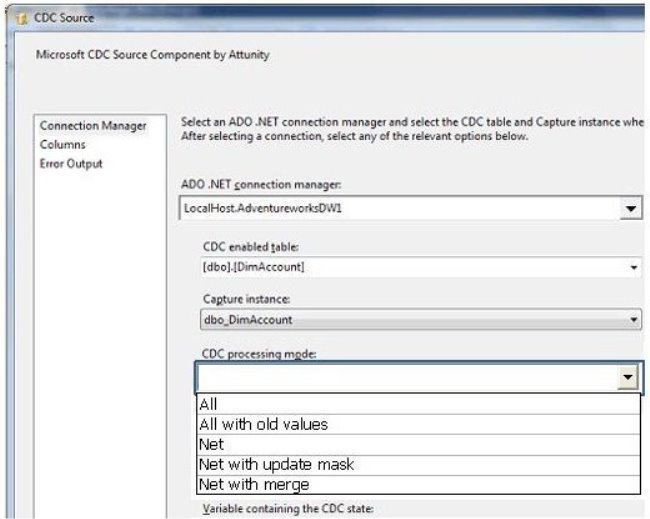
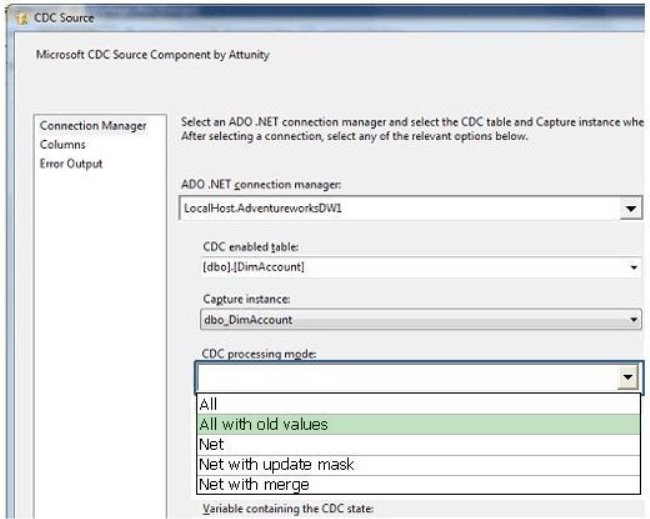
You are developing a SQL Server Integration Services (SSIS) package. The data source for the data flow task is a table that has been configured as a change data capture (CDC) table. You are using a CDC Source component to obtain the CDC data.
The data source will be polled once per hour. The data is updated with multiple important status changes per minute.
For each captured data change, the before and after values must be included.
You need to configure the CDC Source component.
Which CDC processing mode should you select? (To answer, configure the appropriate option in the dialog box in the answer area.) Hot Area:
Answer is in the explanation below.
Reference / correct answer:
Limited Time Offer – Save Now!
Don’t miss out — get full access at the best price.