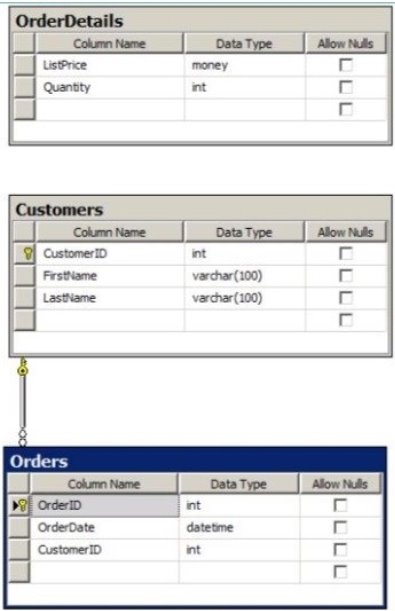
You have a database named Sales that contains the tables shown in the exhibit. (Click the Exhibit button.)
You have an application named Appl. You have a parameter named @Count that uses the int data type. App1 is configured to pass @Count to a stored procedure.
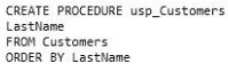
You need to create a stored procedure named usp_Customers for App1 that returns only the number of rows specified by the @Count parameter.
The solution must NOT use BEGIN, END, or DECLARE statements.
Part of the correct Transact-SQL statement has been provided in the answer area. Complete the Transact-SQL statement
Answer is in the explanation below.
Reference / correct answer:
Please review the explanation part for this answer.
SELECT TOP(@Count) LastName
Change the second line to: SELECT TOP(@Count) LastName
The complete code is:
CREATE PROCEDURE usp_Customers @Count int
SELECT TOP(@Count) LastName
FROM Customers
ORDER BY Customers.LastName
Question 5
SIMULATION
The following is a series of questions in which you are required to input one or more lines of code.
To input your response
Type your response into the text entry field in the Answer Area. You may input one or more lines of code. More than one solution may be correct. You will receive credit if your solution matches any of the correct solutions.
To validate code syntax
After entering your code, click the Check Syntax button. This validates code syntax (such as SQL commands) and values (such as table names and variable names) used in your solution. If there are any errors, they will appear in the window next to the Check Syntax button. You may change your code and re-validate the syntax as many times as you want.
Note that Check Syntax does NOT validate whether you have answered the question correctly. It simply validates the accuracy of your syntax.
To view available command keywords
Click the Keywords button to view a list of command keywords. This is a general list provided for reference and is not limited to commands used in the question.
You have a SQL database that contains a table named Products.
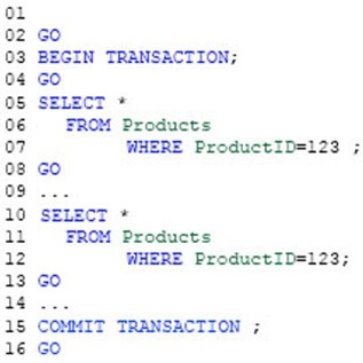
You are implementing a stored procedure that retrieves the list of products, performs custom business logic and then retrieve the list of products again.
The custom business logic in the stored procedure does not modify data from the Products table.
The stored procedure contains the following:
You need to complete line 01 of the stored procedure to ensure that when the transaction occurs, the data read from the SELECT * FROM Products statement on line 05 is identical to the data read from the SELECT * FROM Products statement on line 10. The solution must maximize concurrency.
Part of the correct Transact-SQL has been provided in the answer area below. Enter the code in the answer area that resolves the problem and meets the stated goals or requirements. You can add code within the code that has been provided as well as below it.
Answer is in the explanation below.
Reference / correct answer:
Please review the explanation part for this answer.
Add REPEATABLE READ to line 1 to get:
SET TRANSACTIONISOLATION LEVEL REPEATABLE READ;
REPEATABLE READ specifies that statements cannot read data that has been modified but not yet committed by other transactions and that no other transactions can modify data that has been read by the current transaction until the current transaction completes.
Incorrect Answers:
READ UNCOMMITTED specifies that statements can read rows that have been modified by other transactions but not yet committed.
READ COMMITTED specifies that statements cannot read data that has been modified but not committed by other transactions. This prevents dirty reads. Data can be changed by other transactions between individual statements within the current transaction, resulting in nonrepeatable reads or phantom data. References: https://msdn.microsoft.com/en-us/library/ms173763.aspx
Question 6
You develop a Microsoft SQL Server database.
You need to create and call a stored procedure that meets the following requirements:
Accepts a single input parameter for CustomerID. Returns a single integer to the calling application.
Which two Transact-SQL statements should you use? Each correct answer presents part of the solution.
Select all that apply, then click Submit answer.
○
CREATE PROCEDURE dbo.GetCustomerRating @CustomerID INT, @CustomerRating INT OUTPUT AS SET NOCOUNT ON SELECT @CustomerRating = CustomerOrders/CustomerValue FROM Customers WHERE CustomerID = @CustomerID RETURN GO
○
EXECUTE dbo.GetCustomerRating 1745
○
DECLARE @CustomerRatingByCustomer INT DECLARE @Result INT EXECUTE @Result = dbo.GetCustomerRating 1745, @CustomerRatingByCustomer
○
CREATE PROCEDURE dbo.GetCustomerRating @CustomerID INT, @CustomerRating INT OUTPUT AS SET NOCOUNT ON SELECT @Result = CustomerOrders/CustomerValue FROM Customers WHERE CustomerID = @CustomerID RETURN @Result GO
CREATE PROCEDURE dbo.GetCustomerRating @CustomerID INT AS DECLARE @Result INT SET NOCOUNT ON SELECT @Result = CustomerOrders/CustomerValue FROM Customers WHERE CustomerID = @CustomerID
Reference / correct answer:
CREATE PROCEDURE dbo.GetCustomerRating @CustomerID INT, @CustomerRating INT OUTPUT AS SET NOCOUNT ON SELECT @CustomerRating = CustomerOrders/CustomerValue FROM Customers WHERE CustomerID = @CustomerID RETURN GO

 Accepts a single input parameter for CustomerID.