70-412 Configuring Advanced Windows Server 2012 R2 Services

Loading demo links...

Showing 19–20 of 20 questions

Question 19 (Volume A)

You create a new virtual disk in a storage pool by using the New Virtual Disk Wizard. You discover that the new virtual disk has a write-back cache of 1 GB.

You need to ensure that the virtual disk has a write-back cache of 5 GB.

What should you do?

Select an option, then click Submit answer.

  • Detach the virtual disk, and then run the Resize-VirtualDisk cmdlet.

  • Detach the virtual disk, and then run the Set-VirtualDisk cmdlet.

  • Delete the virtual disk, and then run the New-StorageSubSystemVirtualDisk cmdlet.

  • Delete the virtual disk, and then run the New-VirtualDisk cmdlet.
Question 20 (Volume C)

Your network contains two servers named Server1 and Server2 that run Windows Server 2012

R2. Both servers have the Hyper-V server role installed.

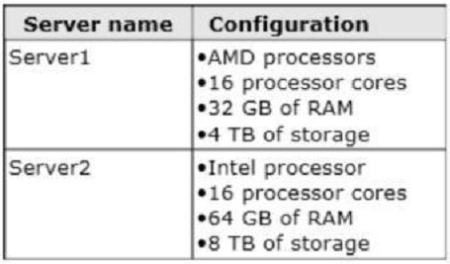
The servers have the hardware configurations shown in the following table.

Server1 hosts five virtual machines that run Windows Server 2012 R2.

You need to move the virtual machines from Server1 to Server2.

The solution must minimize downtime.

What should you do for each virtual machine?

Select an option, then click Submit answer.

  • Export the virtual machines from Server1 and import the virtual machines to Server2.

  • Perform a live migration.

  • Perform a quick migration.

  • Perform a storage migration.