70-410 Installing and Configuring Windows Server 2012

Loading demo links...

Showing 4–6 of 20 questions

Question 4 (Volume A)

HOTSPOT

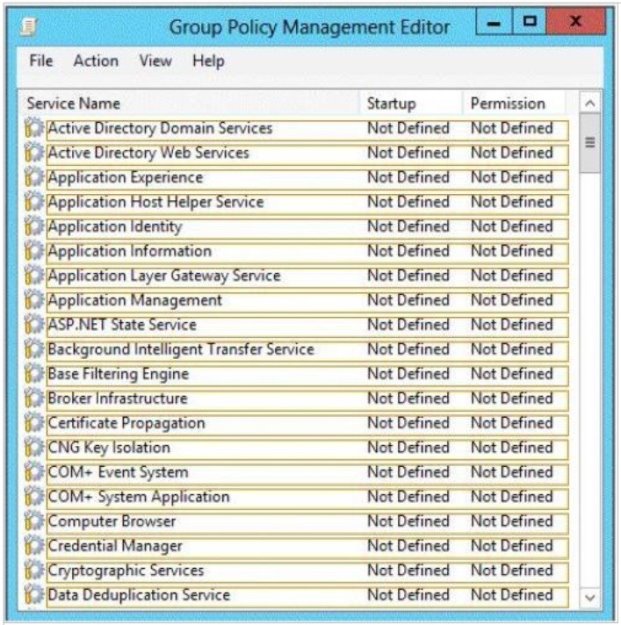
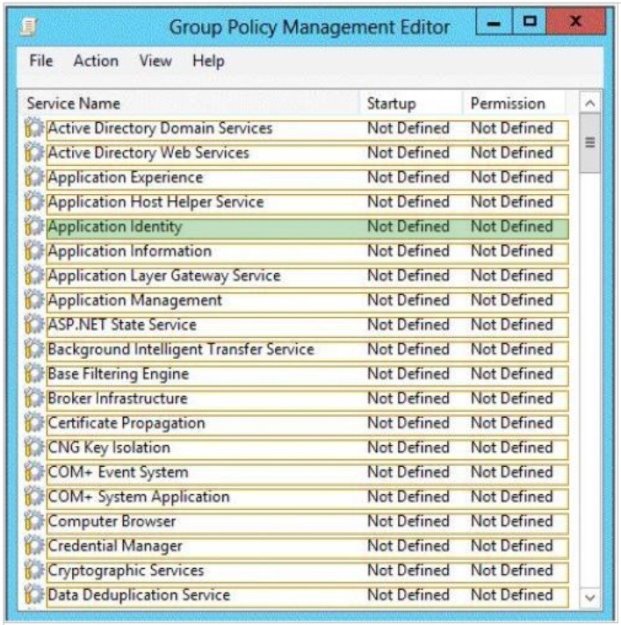
Your network contains an Active Directory domain named contoso.com. Domain controllers run either Windows Server 2008 R2 Service Pack 1 (SP1) or Windows Server 2012 R2. All client computers run Windows 8.1 All computer accounts are located in an organizational unit (OU) named OU1.

You create a Group Policy object (GPO) that contains several AppLocker rules. You link the GPO to OU1.

You need to ensure that the AppLocker rules apply to all of the client computers.

What should you configure in the GPO?

To answer, select the appropriate service in the answer area.

Hot Area:
Answer is in the explanation below.
Question 5 (Volume A)

Your network contains an Active Directory domain named adatum.com. The domain contains a member server named Host1. Host1 runs Windows Server 2012 R2 and has the Hyper-V server role installed.

Host1 hosts two virtual machines named VM5 and VM6. Both virtual machines connect to a virtual switch named Virtual1.

On VM5, you install a network monitoring application named Monitor1.

You need to capture all of the inbound and outbound traffic to VM6 by using Monitor1.

Which two commands should you run from Windows PowerShell? (Each correct answer presents part of the solution. Choose two.)

Select all that apply, then click Submit answer.

  • Get-VM “VM6″ | Set-VMNetworkAdapter-IovWeight 1

  • Get-VM “VM5″ I Set-VMNetworkAdapter -IovWeight 0

  • Get-VM "VM6" | Set-VMNetworkAdapter -PortMirroring Source

  • Get-VM “VM6″ | Set-VMNetworkAdapter -AllowTeaming On

  • Get-VM "VM5" | Set-VMNetworkAdapter -PortMirroring Destination

  • Get-VM “VM5″ | Set-VMNetworkAdapter -AllowTeaming On

Question 6 (Volume E)

In a domain running at the Windows Server 2012 R2 domain functional level, which of the following security principals can be members of a global group? (Choose all answers that are correct.)

Select all that apply, then click Submit answer.

  • Users

  • Computers

  • Universal groups

  • Global groups