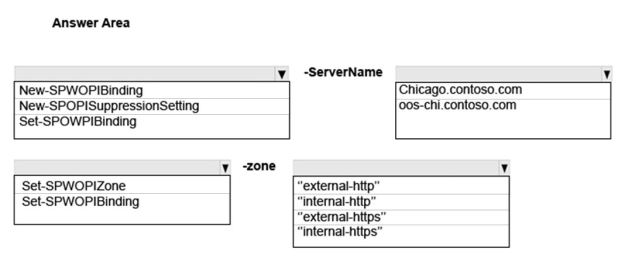
You need to configure Office Online Server integration for Chicago.
How should you complete the Windows PowerShell commands? To answer, select the appropriate Windows PowerShell segment or value from each list in the answer area.
Hot Area:
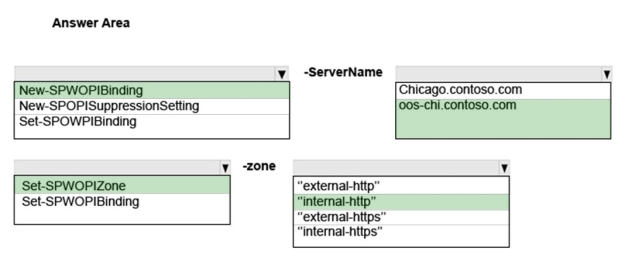
Answer is in the explanation below.
Reference / correct answer:
Box 1: New-SPWOPIBinding
From the SharePoint 2016 Management Shell, run the following commands to register a new WOPI Binding for the Office Online Server and allow authentication over HTTP connections:
Scenario: You must deploy a new Office Online Server farm named oos-chi.contoso.com to the environment. This farm will be used from within the network and externally. All connections to the Office Online Server farm must use IPSec.
Box 3: Set-SPWOPIZone
From the SharePoint 2016 Management Shell, run the following commands to register a new WOPI Binding for the Office Online Server and allow authentication over HTTP connections:
You have an on-premises SharePoint 2016 environment. You want to use Power View and PowerPivot features including Power View reports that are embedded in Microsoft Excel workbooks.
You need to deploy the new features.
Which two actions should you perform? Each correct answer presents part of the solution.
Select all that apply, then click Submit answer.
○
Install PerformancePoint Services.
○
Install SQL Server 2016 Reporting Services (SSRS) in SharePoint integrated mode.
○
Install an Office Online server.
○
Install SQL Server 2016 Reporting Services (SSRS) in native mode.
Reference / correct answer:
Install SQL Server 2016 Reporting Services (SSRS) in SharePoint integrated mode.
Install an Office Online server.
Question 6(Mixed Questions)
You deploy a SharePoint2016 environment.
You configure outgoing email settings for all SharePoint Servers.
You need to enable encrypted communication between all SharePoint Servers and the enterprise SMTP server.
Which two actions should you perform? Each correct answer presents part of the solution.
Select all that apply, then click Submit answer.
○
Configure the SMTP server to support the TLS 1.0, TLS 1.1. or TLS 1.2 protocols.
○
Install a server certificate on the SharePoint Server.
○
Configure the SMTP server to support the SSL 2.0 or SSL 3.0 protocols.
○
Enable STARTTLS encryption on the SharePoint Servers.
○
Enable STARTTLS encryption on the enterprise SMTP server.
Reference / correct answer:
Configure the SMTP server to support the TLS 1.0, TLS 1.1. or TLS 1.2 protocols.
Enable STARTTLS encryption on the enterprise SMTP server.
Limited Time Offer – Save Now!
Don’t miss out — get full access at the best price.