70-334 Core Solutions of Microsoft Skype for Business 2015

Loading demo links...

Showing 4–6 of 10 questions

Question 4 (Mixed Questions)

HOTSPOT

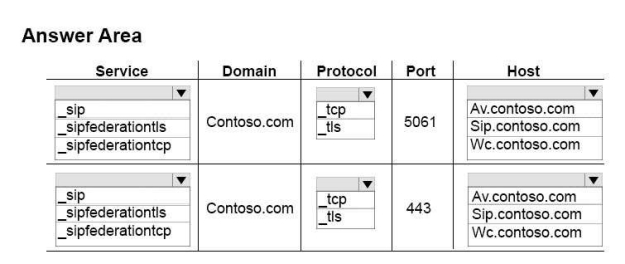
You plan to deploy a Skype for Business Server 2015 Edge Server infrastructure. The Edge Server deployment will be configured as shown in the following table.

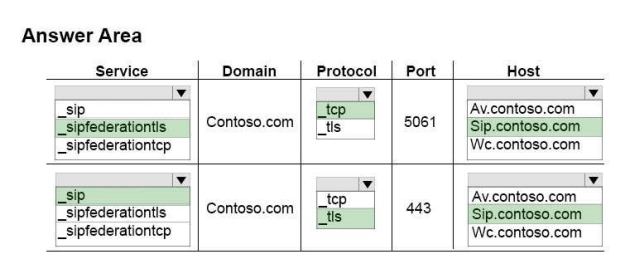
You need to configure the DNS records for Server1 to support the following features:

Automatic client sign-in

Discovery of federated partners

Which DNS records should you configure?

To answer, configure the correct service, protocol, and host for each SRV record in the answer area.

Hot Area:
Answer is in the explanation below.
Question 5 (Case Study 1)

You need to implement the planned unified contact store.

Which three actions should you perform? Each correct answer presents part of the solution. (Choose three.)

Select all that apply, then click Submit answer.

  • From a server that has Skype for Business Server 2015 deployed, run the New-CsPartnerApplicationSkype for Business Management Shell cmdlet.

  • From a server that has Exchange Server 2013 deployed, run theExchUCUtil.pslscript.

  • From a server that has Skype for Business Server 2015 deployed, run theSet-CsUserServicesPolicySkype for Business Management Shell cmdlet.

  • From a server that has Exchange Server 2013 deployed, run the Configure-EnterprisePartnerApplication.pslscript.

  • From a server that has Skype for Business Server 2015 deployed, run the Set-CsClientPolicySkype for Business Management Shell cmdlet.

Question 6 (Mixed Questions)

You support a Skype for Business Server 2015 environment that includes:

a single Standard Edition server a single Edge Server

a single reverse proxy that is acting as an HTTP(s) reverse proxy

Remote users report that the company logo is not being displayed alongside the text in their Online Meeting invites.

You need to find out why the logo is not being retrieved.

Which two actions should you perform? Each correct answer presents part of the solution.

Select all that apply, then click Submit answer.

  • Run the following Skype for Business Server 2015 Management Shell command: Get-CsWebServiceConfiguration | FL Identity,LogoURL

  • Using the Skype for Business Server 2015 Logging Tool, debug traffic on the Skype for Business Server 2015 Edge Server.

  • Using a test client inside the corporate network, run an HTTP tracing tool to debug the traffic.

  • Run the following Skype for Business Server 2015 Management Shell command:Get-CsMeetingConfiguration | FL Identity,LogoURL

  • Using a test client outside the corporate network, run an HTTP tracing tool to debug the traffic.