JN0-250 Mist AI. Associate (JNCIA-MistAI)

Loading demo links...

Showing 1–3 of 10 questions

Question 1

You are the backup administrator for your company. You are responsible for ensuring that all data on ten files servers are protected against data loss. Normal business hours from 8 A.M. to 5 P.M., Monday through Friday, are observed. Network access is prohibited outside normal business hours.

A member server named File1 contains shared folder accessed by users in the sales department. The disk structure of File1 is shown in the following exhibit:
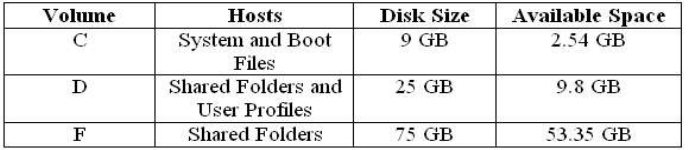
You have scheduled a daily backup of File1 as shown in the exhibit. (Click the Exhibit(s) button.) Users in the Sales department frequently leave documents open on their desktops when they leave work. These users occasionally request that you restore a previous version of a file from backup. However, some of these files are not included in recent backup sets. You must modify the backup procedures for File1 so that all files, including open documents, will be included in the daily backup. You also want to provide users with the ability to restore their files.

What should you do? Each correct answer presents part of the solution. (Choose all that apply.)

Select all that apply, then click Submit answer.

  • Move all shared user data folders from drive D to drive F.

  • Move all shared folders user data from drive F to drive D.

  • Enable Shadow Copies of Shared Folders on drive F.

  • Enable Volume shadow copy for the scheduled backup job.

  • Select the Disable volume shadow copy option for the scheduled backup job.

  • Install the Previous Versions Client software on all Sales department computers.

  • Create a new daily backup job by using the same settings, but clear the Disable volume shadow copy option.

Question 2

You administer your company's Windows network. The network consists of 25 Windows Server computers. The network contains an offline root Certification Authority (CA) located in the main office and a subordinate issuing CA in the main office and each of the remaining four retail locations.

One of the four retail locations has been purchased and will operate as a franchise. You must ensure that resources on the company network will not accept certificates from the associated subordinate CA in this retail location after the sale is completed. Your solution must use a minimum amount of administrative effort. What should you do? Each correct answer presents part of the solution. (Choose three.)

Select all that apply, then click Submit answer.

  • On the company's root CA, revoke the certificate of the subordinate CA.

  • Disconnect the subordinate CA from the network.

  • On the subordinate CA, remove the CA software and remove the CA files.

  • On the subordinate CA, revoke the certificates that it has issued.

  • Publish a new Certificate Revocation List.

  • Copy the Edb.log file from the root CA to its Certification Distribution Point on your network.

  • Copy the Edb.log file from the subordinate CA to its Certification Distribution Point on your network.

  • Copy the Certificate Revocation List file to the Certificate Distribution Point on your network.

Question 3

You are the network administrator for your company. The network consists of a single Active Directory domain with five domain controllers that run Windows Server, Enterprise Edition. You are updating the public key infrastructure (PKI) for your company. Issuing Certification Authorities (CAs) have been provided certificates with a validity period of five years. Certificates are issued to enable network users to encrypt files on their computers. Basic EFS certificates have been issued and have been configured with the default validity period. You want to configure all new EFS certificates so that they are valid for up to three years.

What should you do? Each correct answer presents part of the solution. (Choose all that apply.)

Select all that apply, then click Submit answer.

  • Duplicate and rename the Basic EFS certificate template.

  • Open the Basic EFS certificate template Properties dialog box.

  • Select the General tab and edit the validity period.

  • Select the General tab and edit the renewal period.

  • Select the Security tab and change the permission for the Administrators group to Enroll.