C2090-011 IBM SPSS Statistics Level 1 v2

Loading demo links...

Showing 1–3 of 10 questions

Question 1

When you read data stored in an Excel file via File ... Open ... Data, you may need to specify which options? (Choose three.)

Select all that apply, then click Submit answer.

  • Read variable names from the first row of data

  • Read a Range of cells

  • Specify the Worksheet to read/import

  • Number of Worksheets to read/import

Question 2

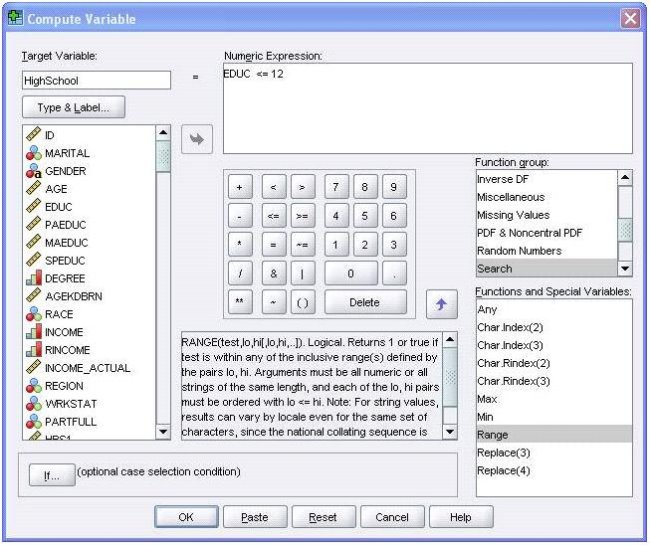
Using the Compute Variable dialog below, the target variable HighSchool will have the following values. (Choose two.)

C:\Documents and Settings\user-nwz\Desktop\1.JPG

Select all that apply, then click Submit answer.

  • Value 1 if EDUC is less than or equal to 12

  • System-missing value if EDUC is greater than 12

  • The same value as EDUC if EDUC is less than or equal to 12

  • Value 0 if EDUC is greater than 12

Question 3

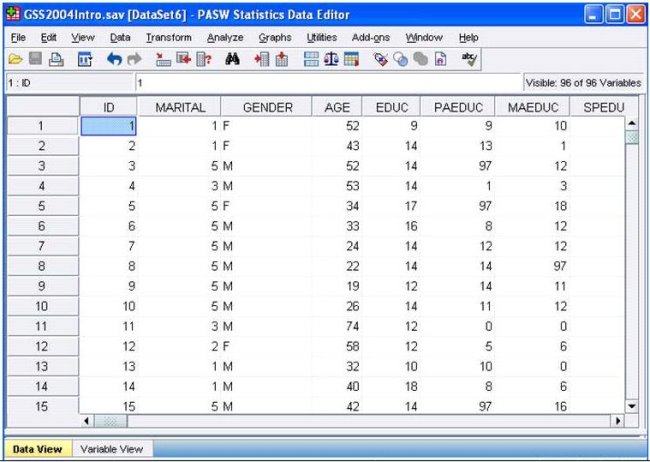
Consider the variable AGE in the data file below. You have been asked to use this in a cross-tabulation with GENDER. How would you proceed? (Choose two.)

C:\Documents and Settings\user-nwz\Desktop\1.JPG

Select all that apply, then click Submit answer.

  • Go to Analyze ...Descriptive Statistics ... Crosstabs ....specify the variables and click OK

  • Use Visual Binning to create a categorical equivalent for AGE and proceed as per Option A above.

  • Use Visual Binning to create a categorical equivalent for AGE and run a Frequencies

  • Use Recode into Different Variables ...to create a categorical equivalent for AGE and proceed as per Option A. above