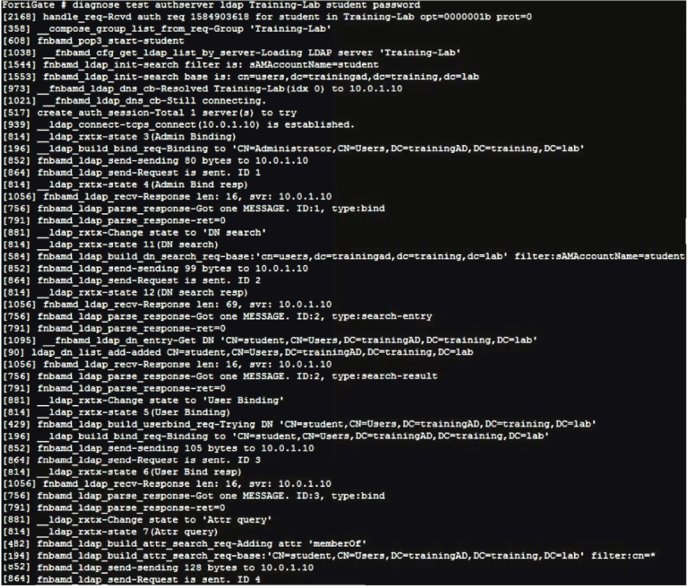
Refer to the exhibit showing certificate values.
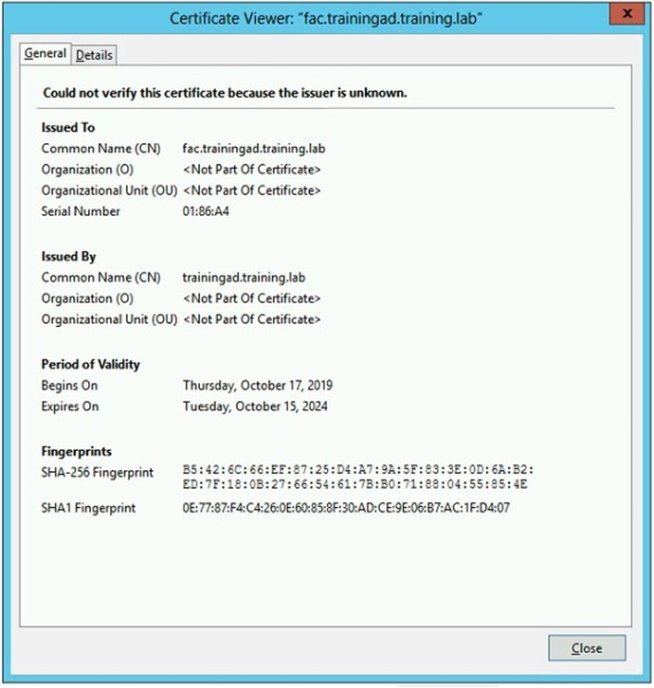
Wireless guest users are unable to authenticate because they are getting a certificate error while loading the captive portal login page. This URL string is the HTTPS POST URL guest wireless users see when attempting to access the network using the web browser:
https://fac.trainingad.training.com/guests/login/?login&post=https://auth.trainingad.training.1ab:1003/
fgtauth&magic=000a038293d1f411&usermac=b8:27:eb:d8:50:02&apmac=70:4c:a5:9d:0d:28&apip=10.10.100.2&userip=10.0.3.1&ssid=Guest03&apname=PS221ETF1
8000148&bssid=70:4c:a5:9d:0d:30
Which two settings are the likely causes of the issue? (Choose two.)
Select all that apply, then click Submit answer.
-
○
The external server FQDN is incorrect.
-
○
The FortiGate authentication interface address is using HTTPS.
-
○
The wireless user's browser is missing a CA certificate.
-
○
The user address is not in DDNS form.